Vibe ChessVibe ChessApp

Chess tournament live broadcast: every game on air from a phone camera

Alexey Mudry · updated October 26, 2026
Broadcasting a chess tournament used to mean electronic boards at the price of a good laptop each, cables and an operator. In the Vibe Chess app it takes two phones at each table: one runs the chess clock, the second records the moves with its camera. Every game of the tournament is visible straight away on live.playvibechess.com - on the screen in the hall and for any viewer wherever they are. Below - how it works, what the organiser needs, what starts by itself and who benefits from such a broadcast.

How a chess tournament broadcast works

The whole way from registration to the last move runs through one app. The organiser needs no arbiter's laptop, no pairing program and no separate broadcast system.
1

A tournament in the app

The organiser creates a tournament in the Vibe Chess app: system, time control, rounds, tables.
2

Pairings on their own

The app makes the pairings and assigns tables. Every player sees on their own phone who they play and at which table.
3

Two phones at the table

One phone is the chess clock, the second one on a stand looks at the board with its camera and records the moves.
4

Games on air

Every game of the tournament appears straight away on live.playvibechess.com: boards, players, moves, results.
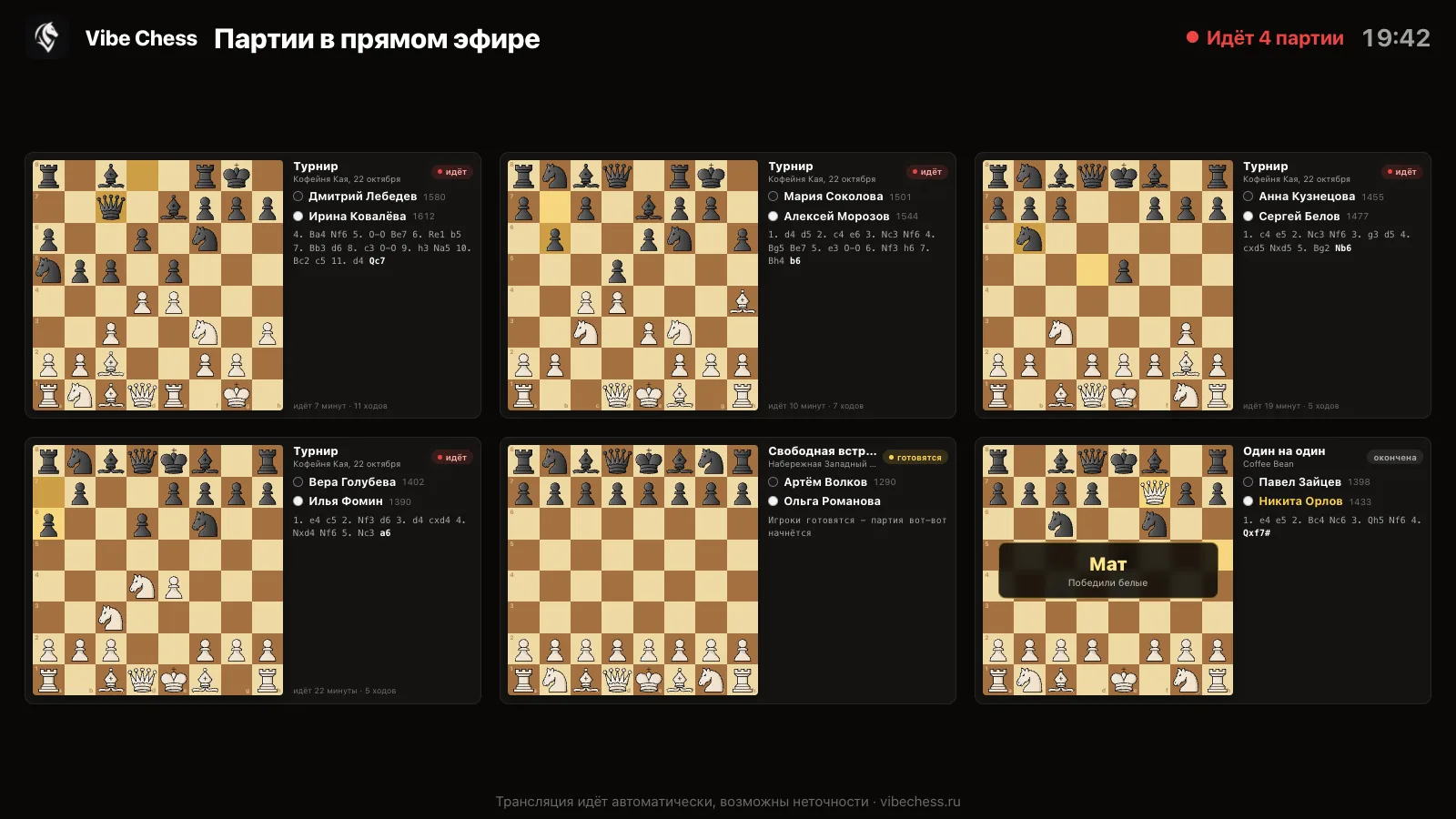
The broadcast page: six tournament boards, players with ratings, the latest moves, live and getting-ready labels and a checkmate result
This is what a tournament broadcast looks like: every game on one screen.

What viewers see on the broadcast page

live.playvibechess.com is made for a big screen: a projector, a TV, a monitor in the hall. The boards are laid out to fill the whole screen with no scrolling - one game takes the whole wall, six or twelve games of a tournament are laid out in a grid.

A guide for viewers and parents: how to watch a chess tournament broadcast.
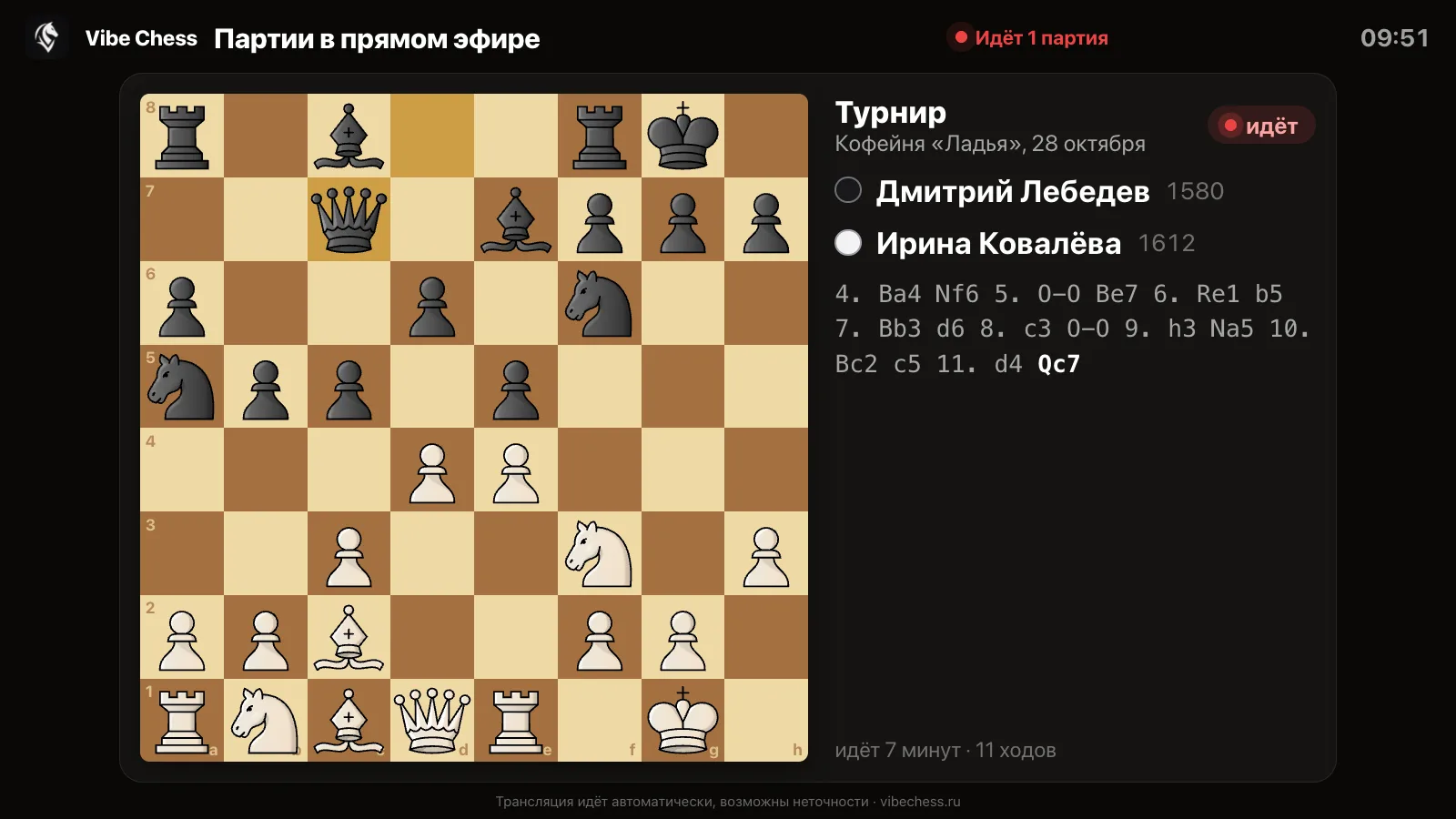
  • The board with the current position and the last move highlighted.
  • The players - who has White, who has Black, their rating.
  • The latest moves in notation and how long the game has been running.
  • Game status: "getting ready", "live", "finished".
  • The result large over the board: checkmate, stalemate, draw, time, no-show.
One game across the whole screen: board, players, move record and time in play
One game - full screen.

On a phone the page opens the same way - by link, without the app and without signing in. There is a light theme for a hall where the projector shines in daylight, and a Full screen button.
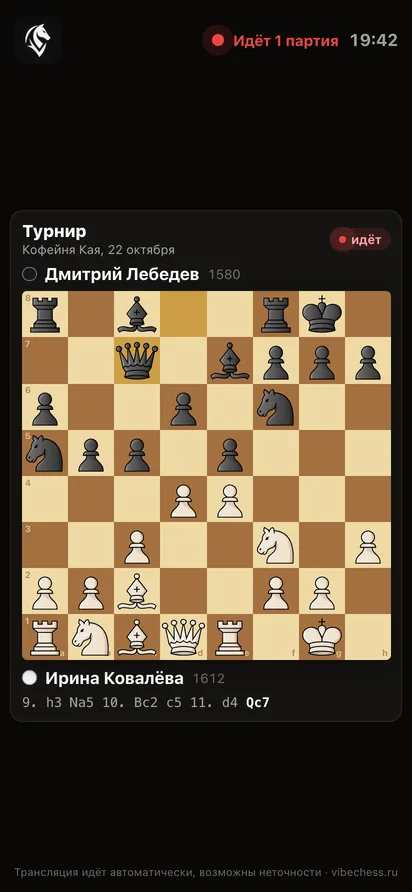
The broadcast on a phone: one board, the players, the latest moves
On a phone - the same game, by link.

Step 1. Create a tournament in the app

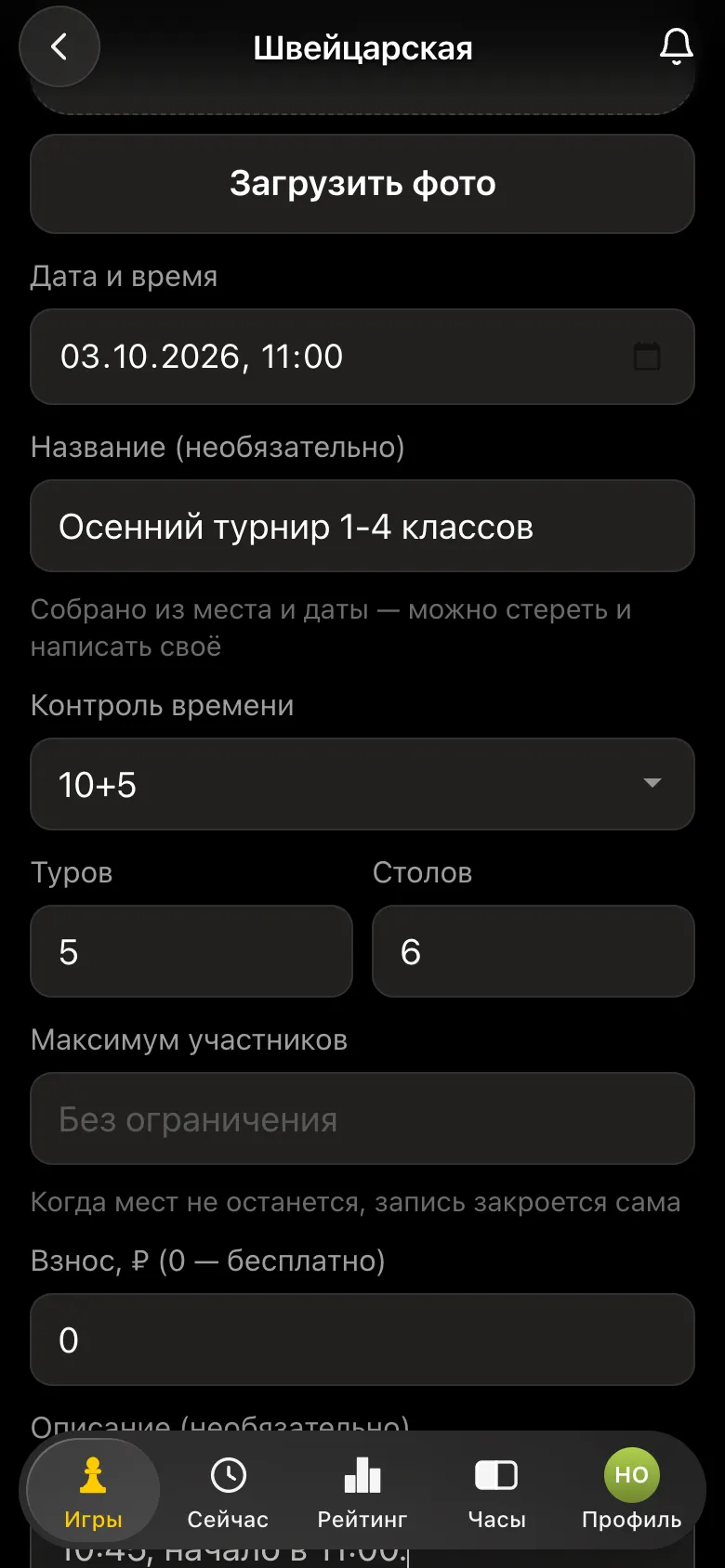
Open the Vibe Chess bot in Telegram and press the app button, or go to the web version on a computer. On the Games tab - Create your own game - choose the format: Swiss system, round robin, team tournament, arena. Set the venue, date, time control, number of rounds and number of tables.
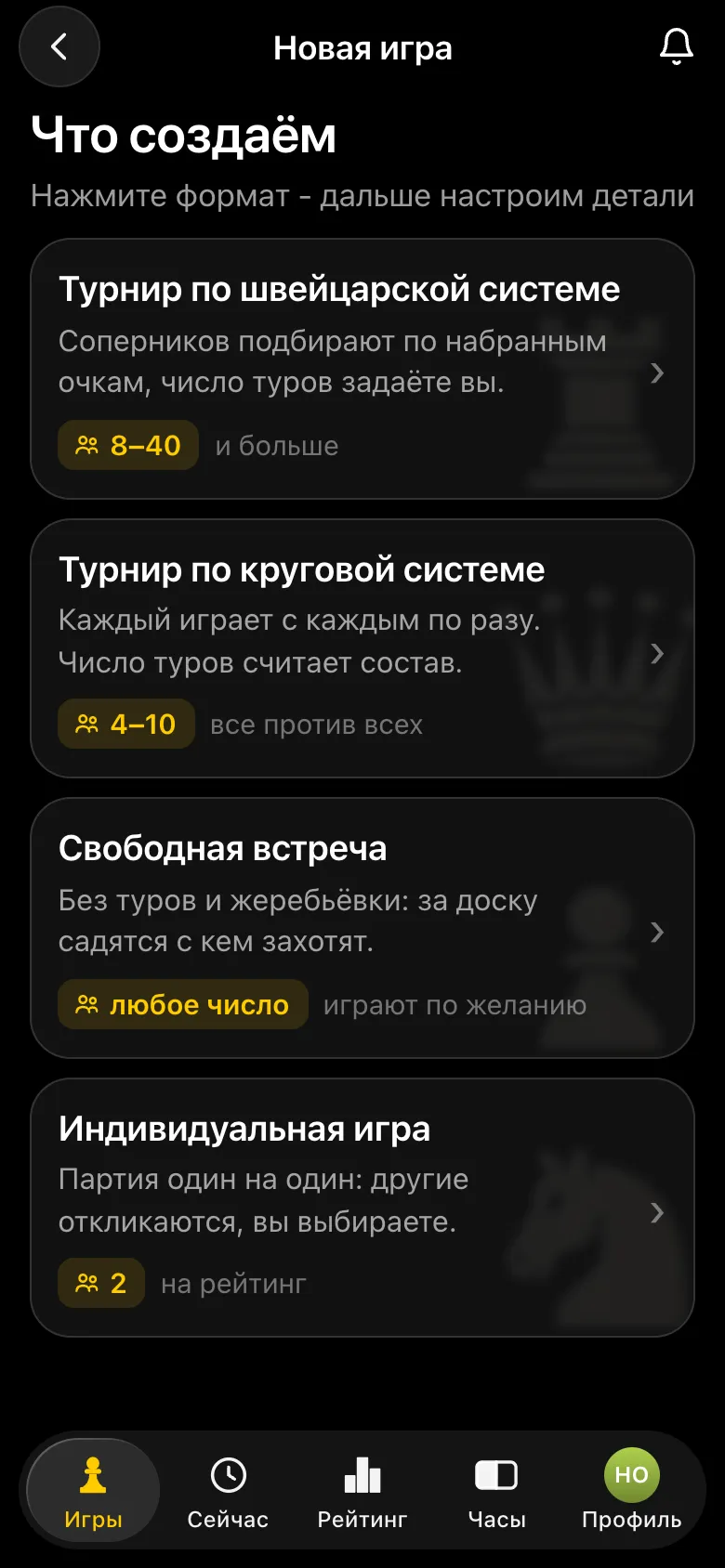
The What are we creating screen: Swiss, round robin, free meetup, individual game
Choosing the tournament format.
Tournament form: control 10+5, 5 rounds, 6 tables
Time control, rounds and tables.

Players sign up by the tournament link or QR code; children and guests without a phone are added by the organiser. In detail - how to organise a chess tournament.

Step 2. Pairings and tables - automatically

The organiser marks attendance and presses Start the tournament. The app makes the pairings by the rules of the chosen system and assigns colours and table numbers. No need to read pairings out loud or pin a sheet to the wall: every player sees on their phone who they play and at which table.
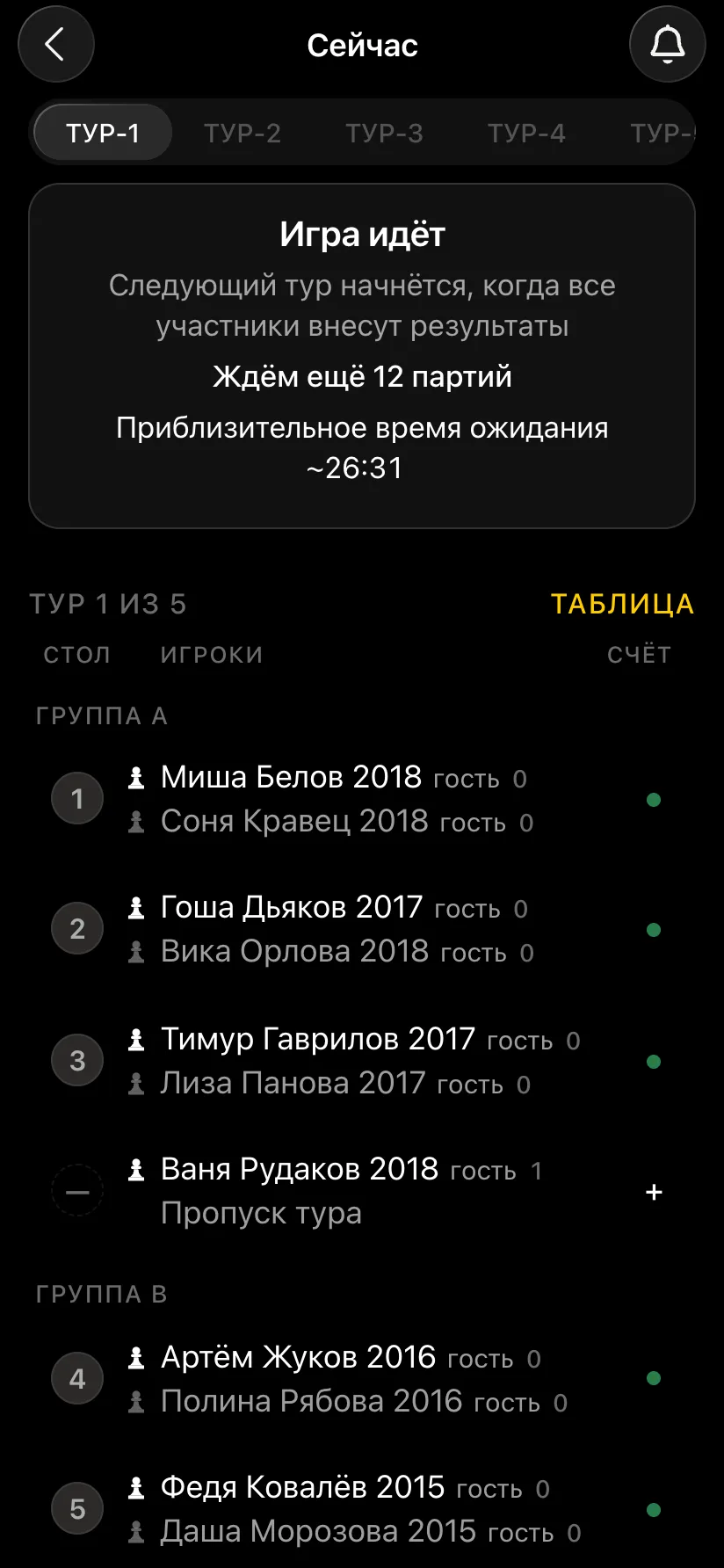
Round one in the app: pairs at tables 1-3, each pair with a table number, a bye
Round pairs and tables - on every phone.

The same round can go on a screen in the hall as a separate page - pairs, tables, points and standings. When every table has finished, the app pairs the next round by itself. How the pairing works - chess tournament pairing online.
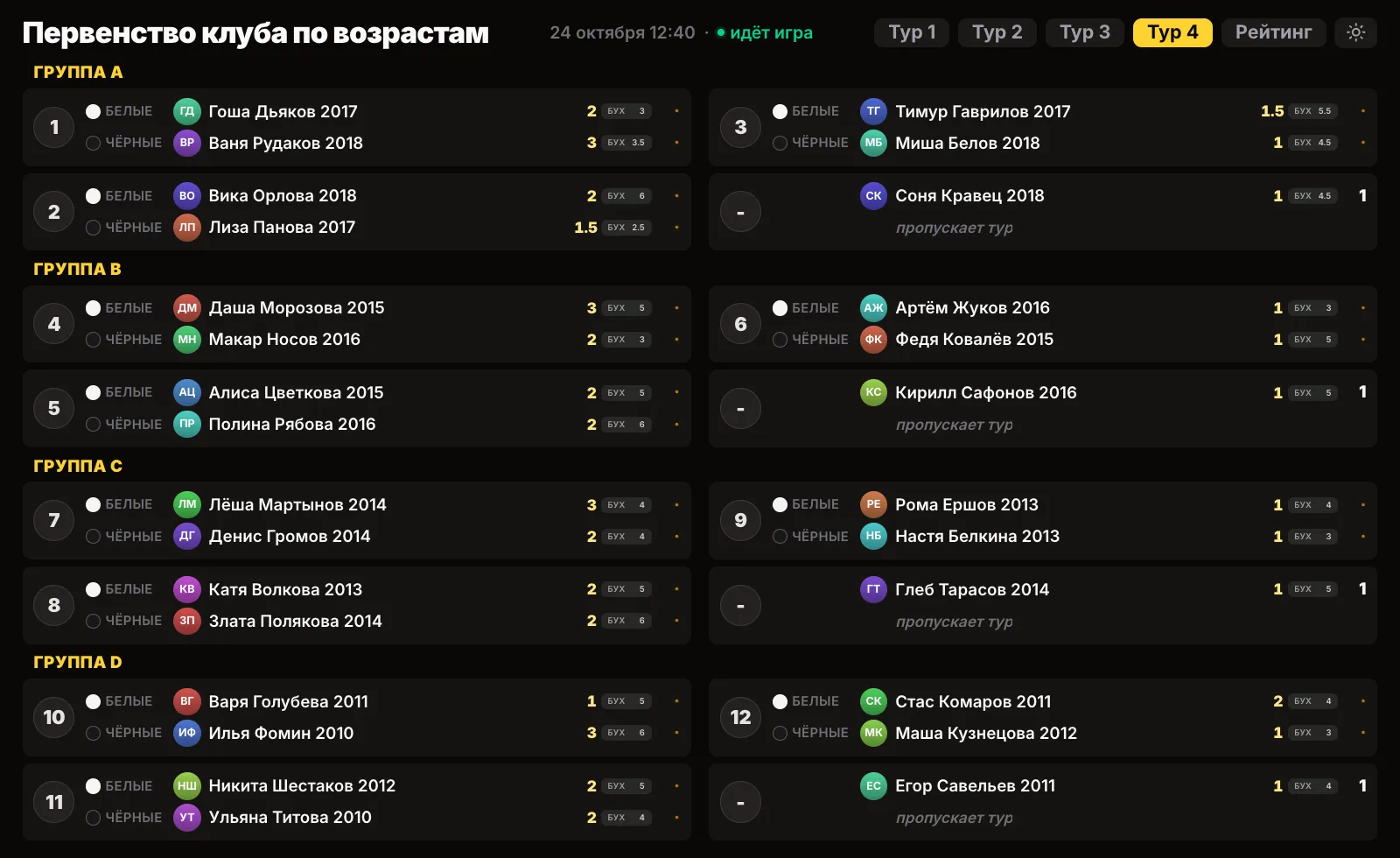
Screen for the hall: round four pairs by group, table numbers, points and Buchholz
Round pairs on the screen in the hall.

Step 3. Two phones at each table

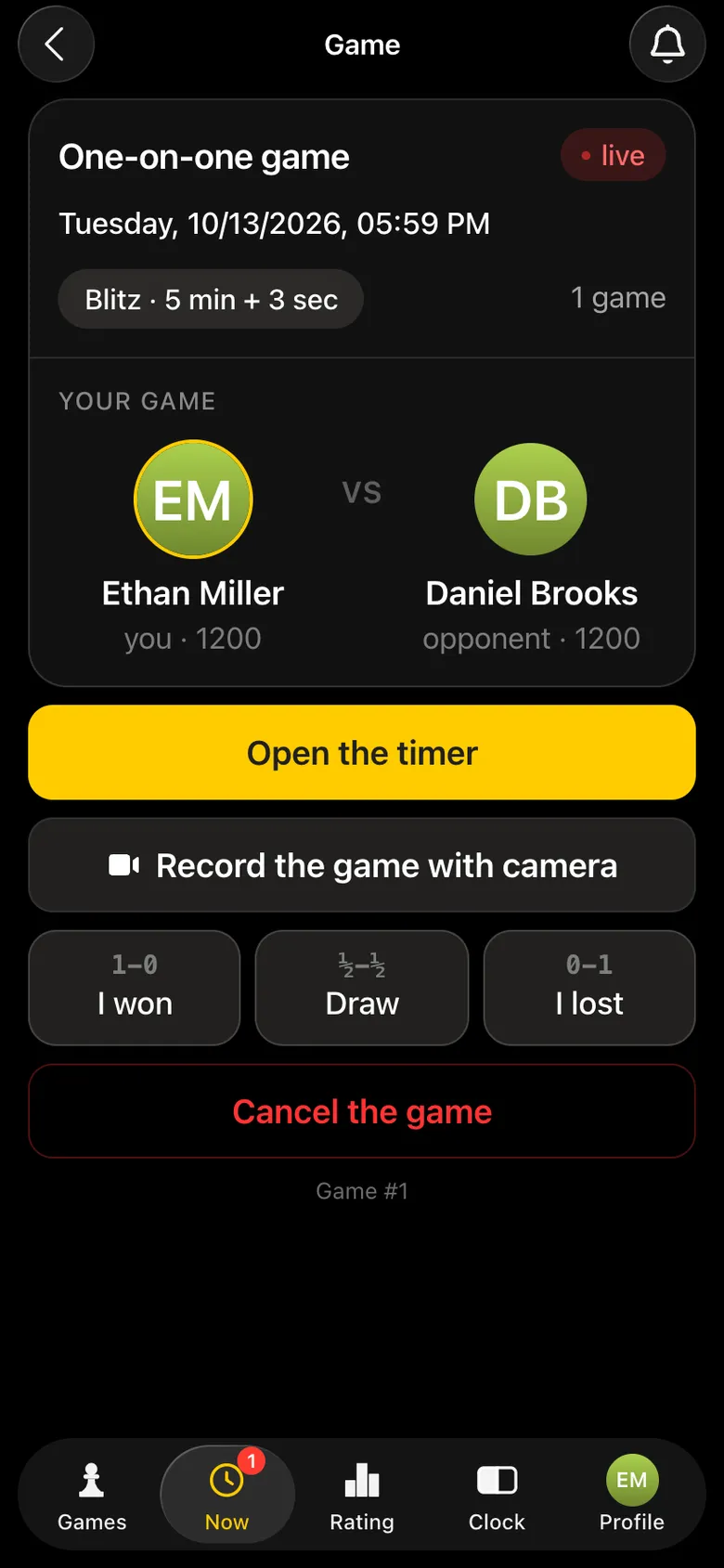
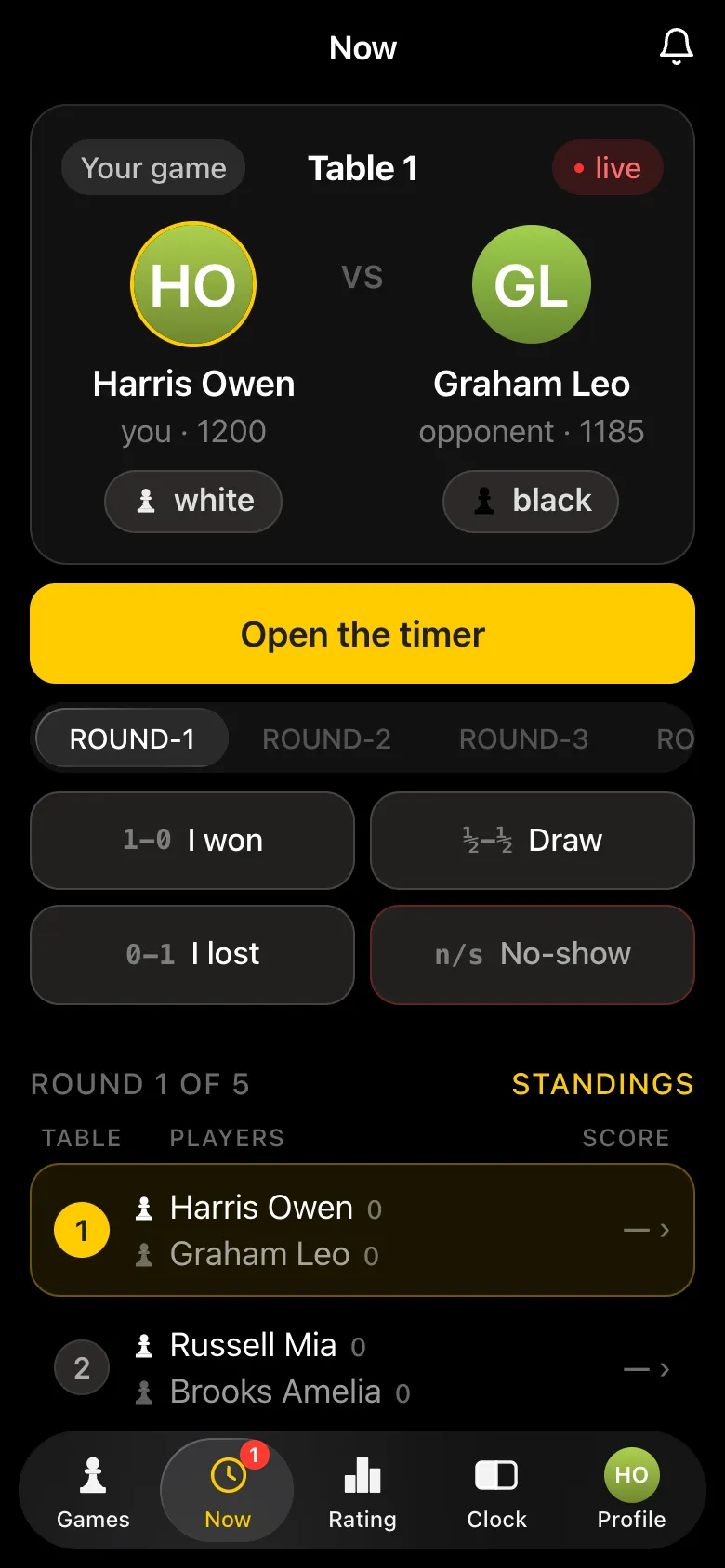
A broadcast needs two phones at the table. The easiest way: one player opens the chess clock on their phone, the other puts their phone on a stand with the camera on the board and opens game recording.
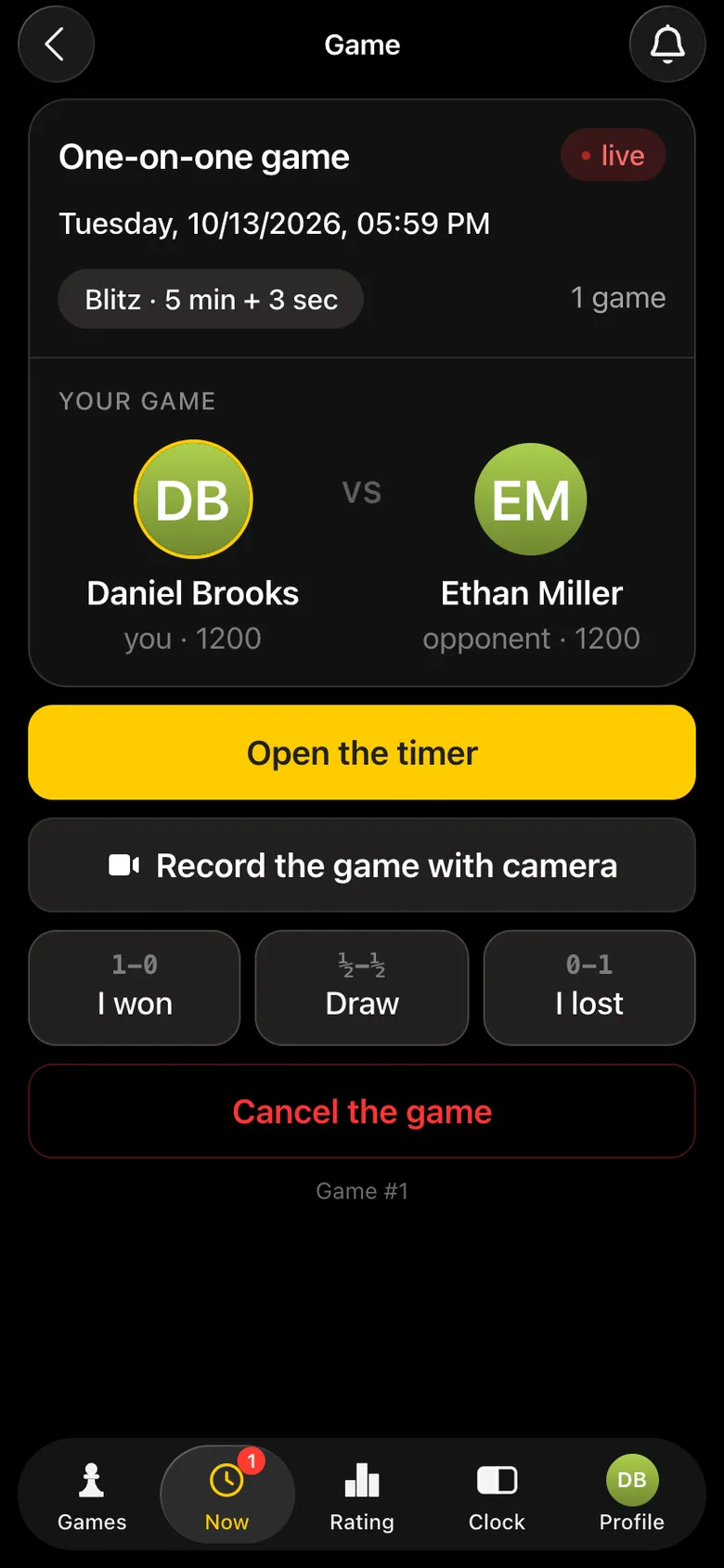
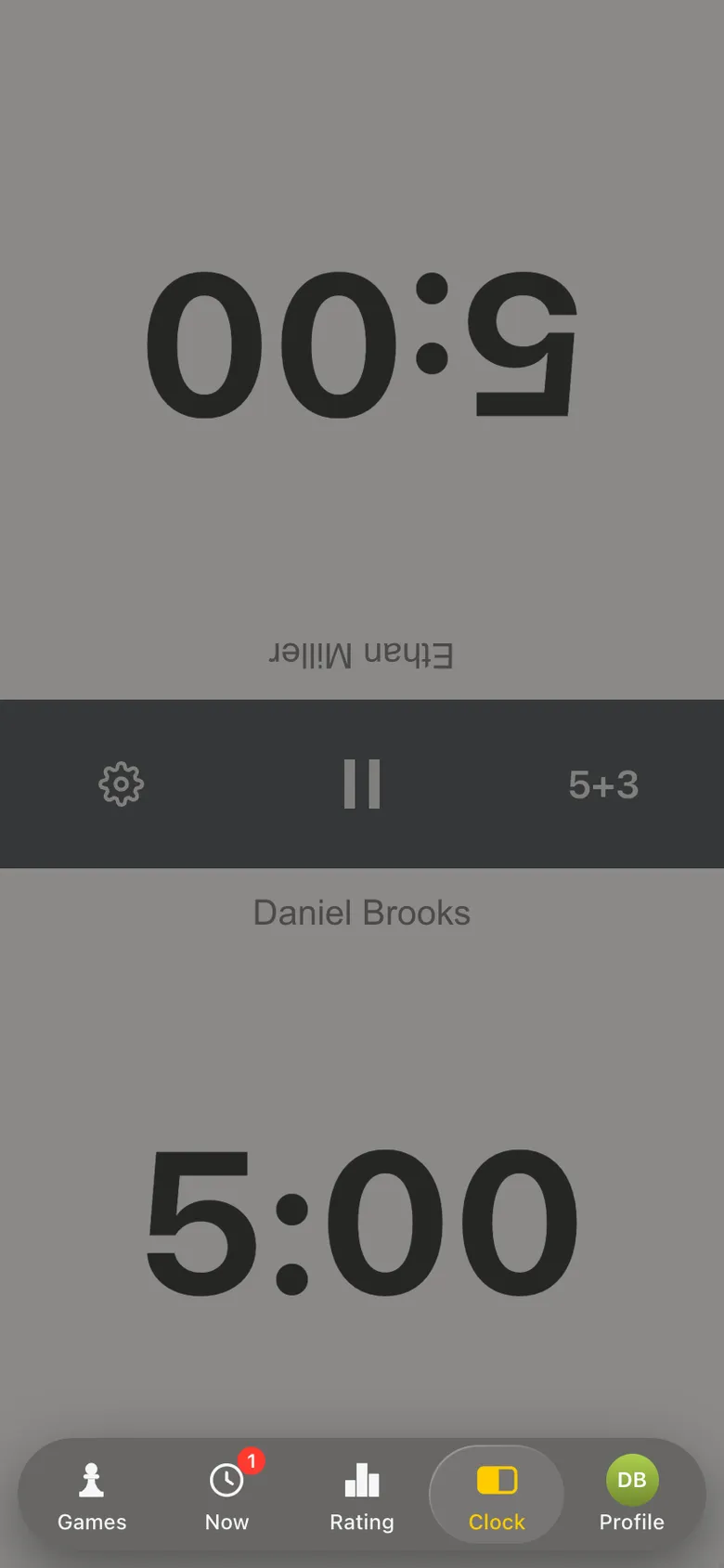
Game screen: the Open the timer button
Phone 1: open the timer.
The chess clock in the app: control 5+3
The clock lies by the board.
Game screen: the Record the game with camera button under the timer
Phone 2: Record the game with camera.

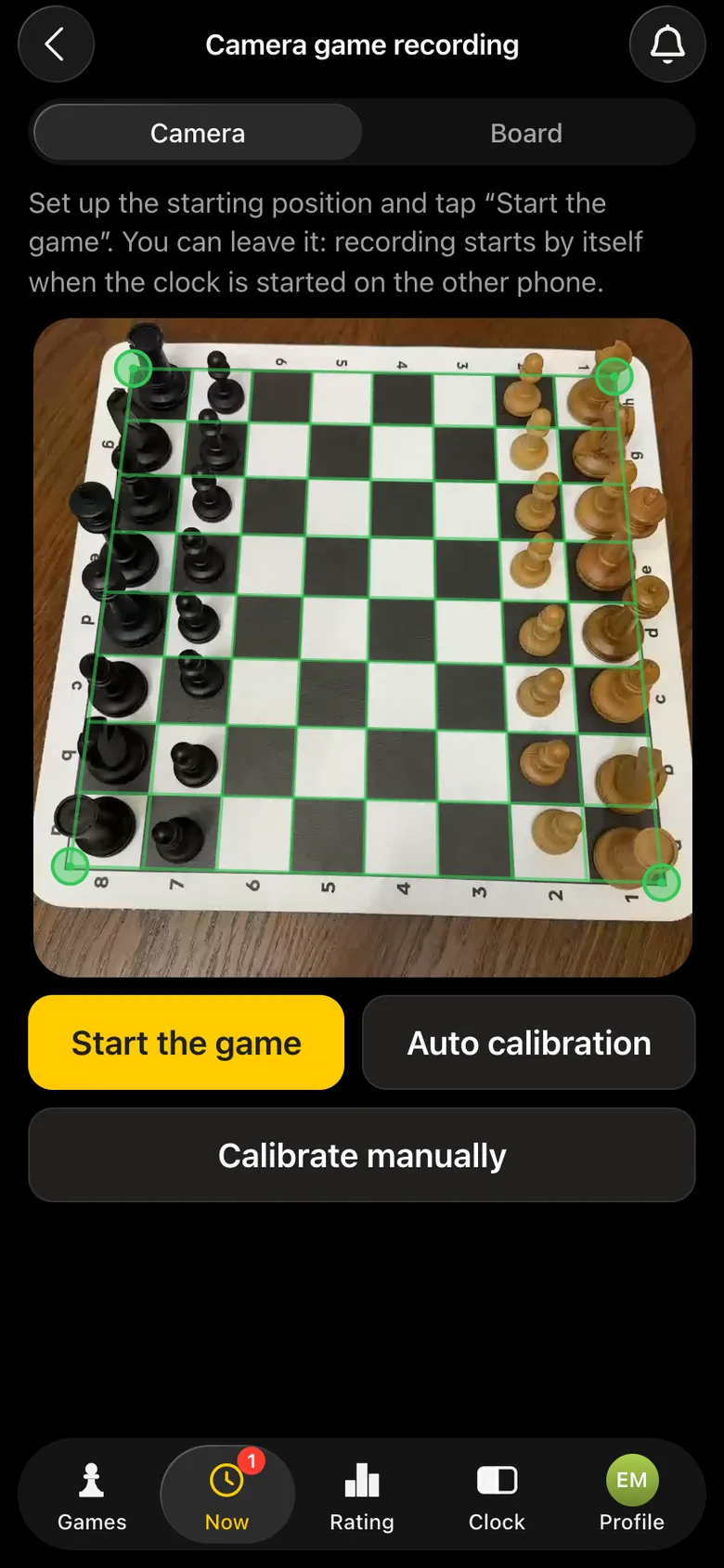
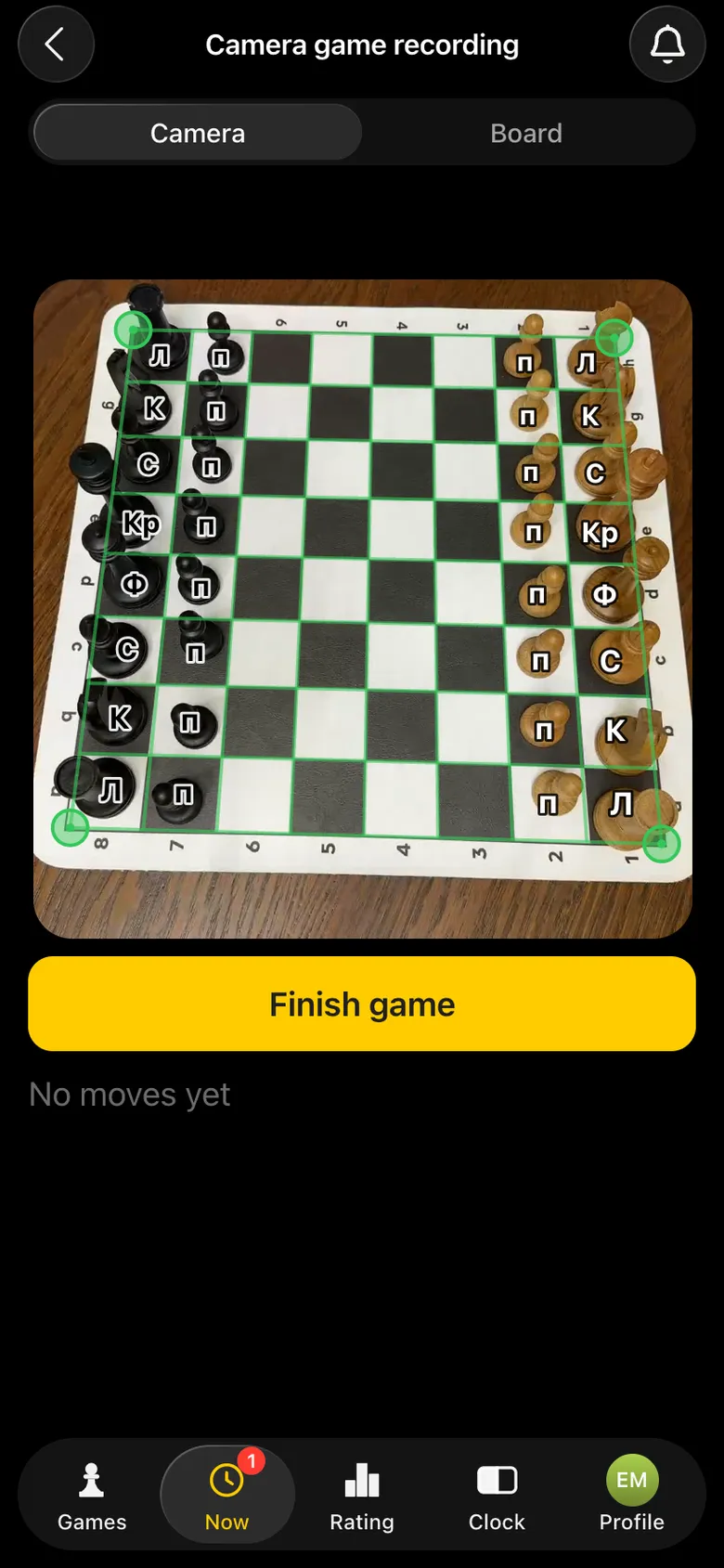
The app finds the board in the frame by itself - a green frame settles on its edges. The camera must see all 64 squares; any sensible angle works: from above, from the side at 45°, from White's or Black's side. After the start every piece is labelled on the phone screen, but nobody needs to look at it during play.
The camera has found the board: a green frame on the corners
Board found.
View from the camera: every piece labelled
Recording.
A checkmate - White wins label over the board
Checkmate - recording ended by itself.

More on camera recording - recording a chess game with a phone camera and chessboard recognition with a camera.

Step 4. The game is on - moves go online

A player starts the clock - and recording on the camera phone starts by itself. The app records every move and sends it straight over the internet to the Vibe Chess server, and live.playvibechess.com picks up new moves every few seconds. Viewers see a move almost the same second as the players at the board.

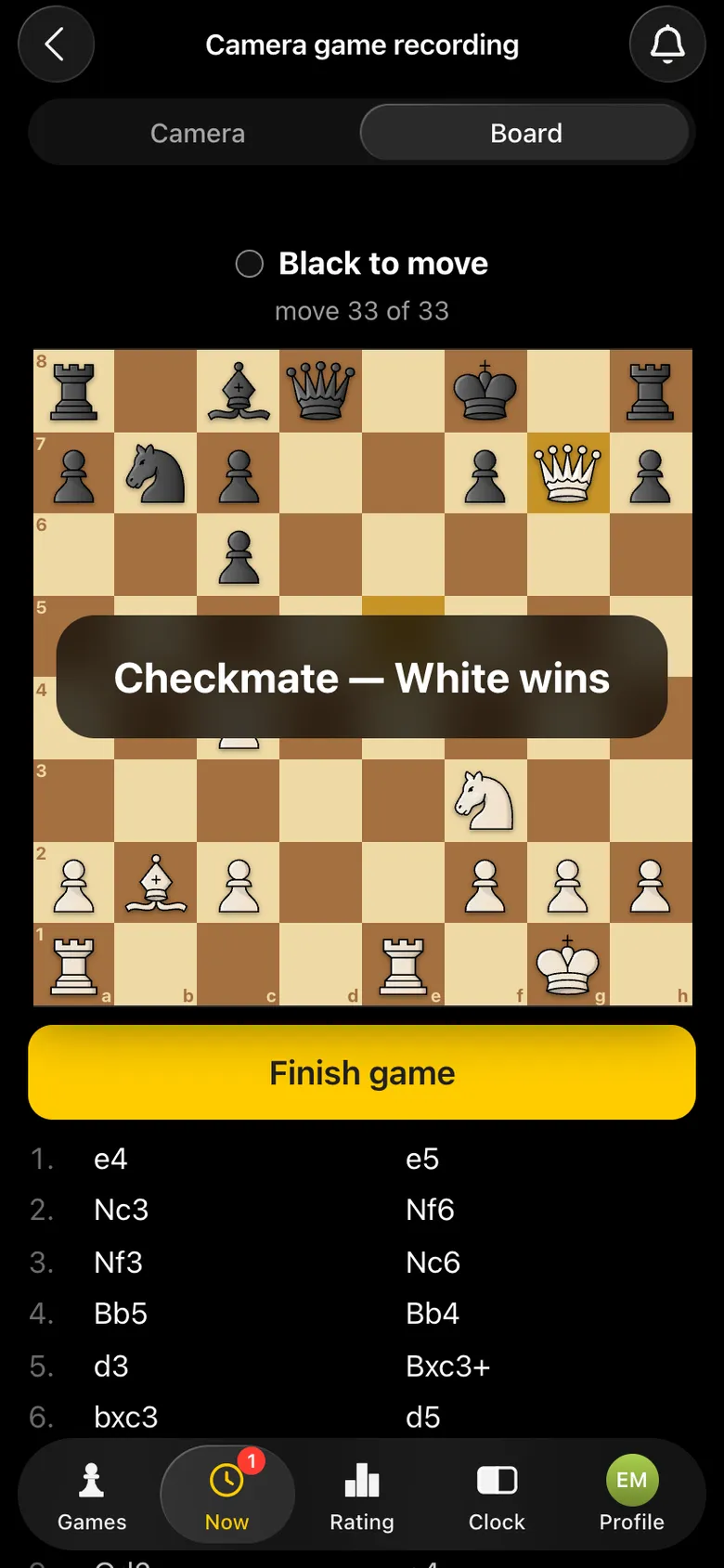
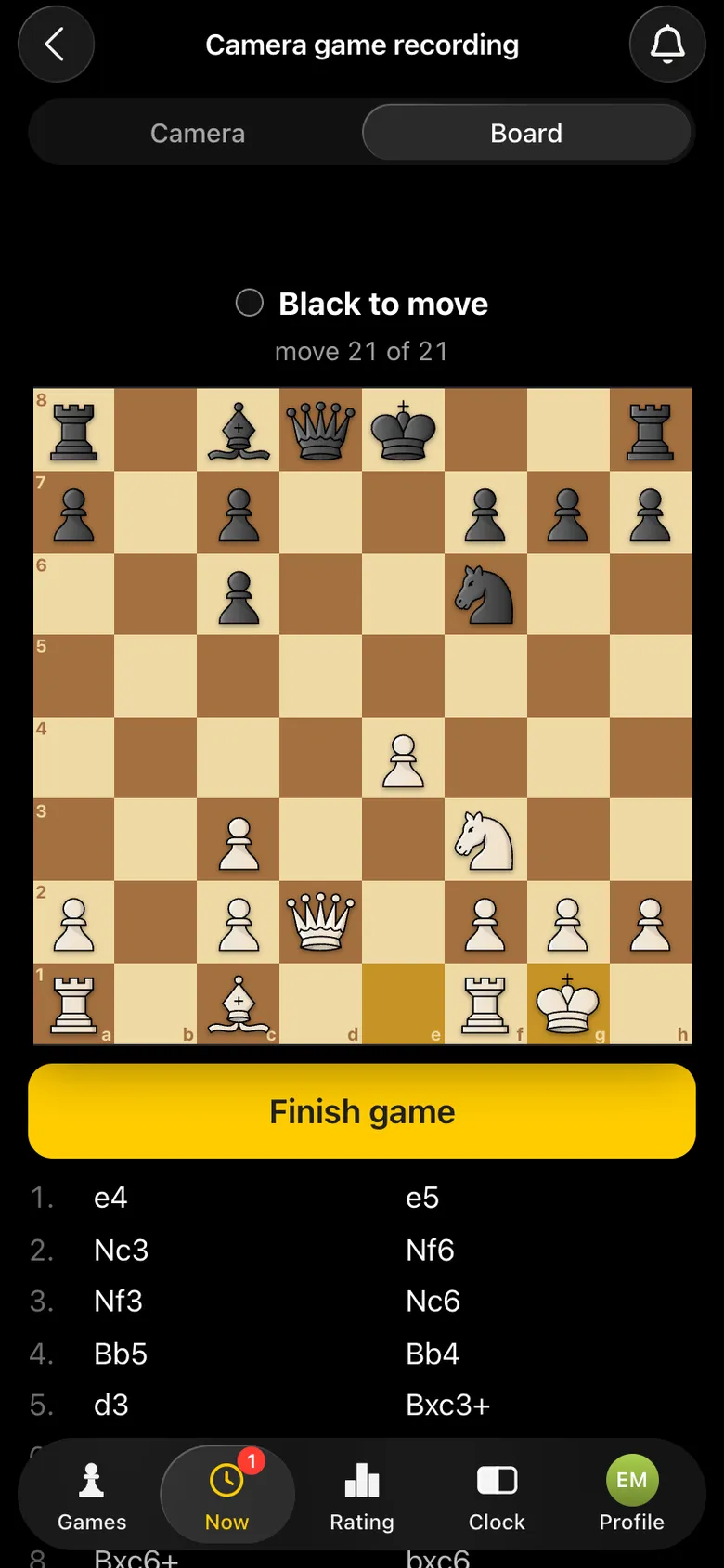
During the game the camera phone has a Board tab: the recorded position, whose move it is and the list of moves. The organiser can walk up to any table and check the record against the board - but players do not need to look at that screen.
The Board tab on the camera phone: the recorded position, whose move it is, the list of moves and the Finish game button
The Board tab: the position and the moves already on air.

On the broadcast page viewers see the board and the moves, not the camera picture.

Step 5. The game is over - record and analysis

Checkmate and stalemate are spotted automatically. Resignation, a draw or a flag fall are marked by the players on the clock - recording stops and the result appears large on the broadcast board. The result goes into the tournament table, and the app pairs the next round by itself.

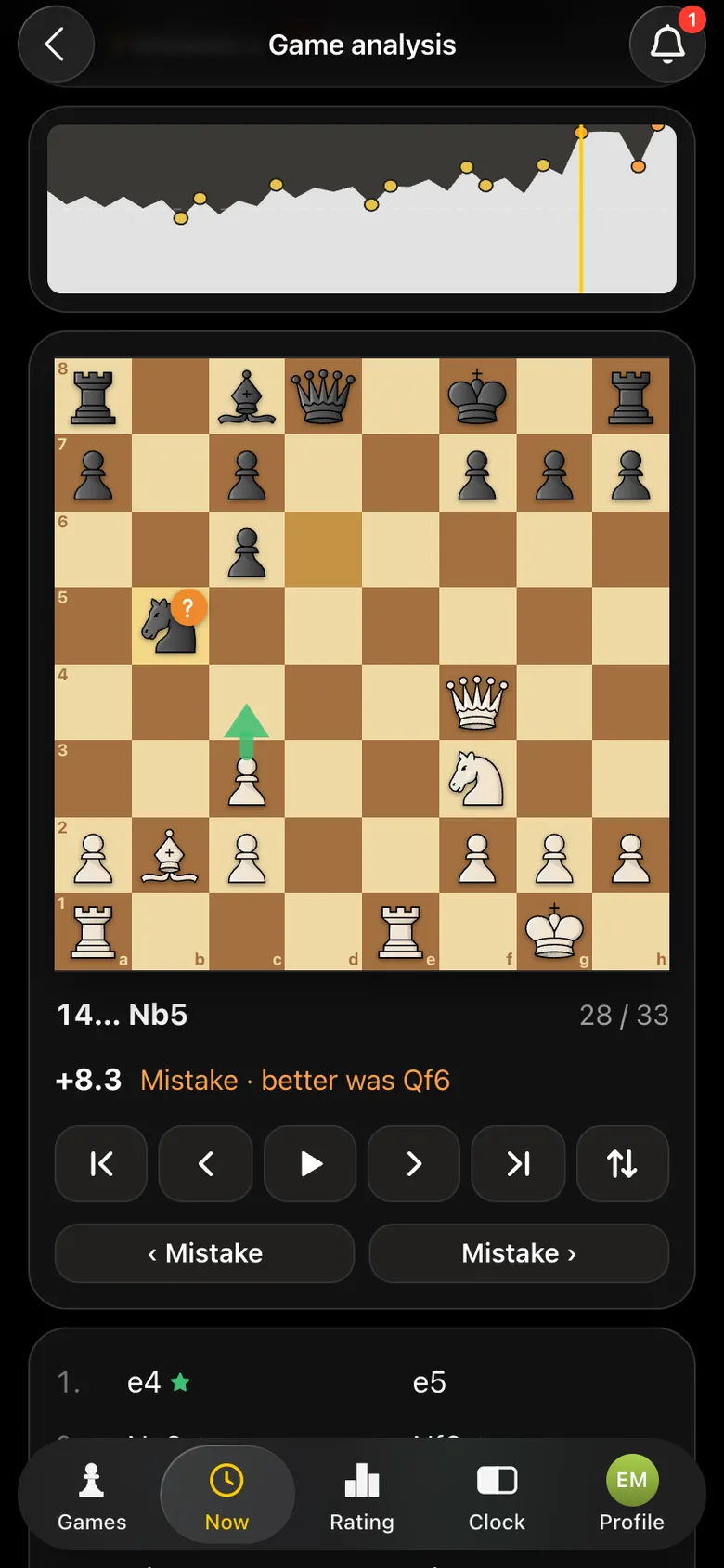
The recorded game stays with the players in the app: it can be stepped through move by move and analysed by an engine - an evaluation graph, mistakes and best moves.
Analysis of a recorded game: evaluation graph, board with the mistake highlighted and the best move hint
Engine analysis of a recorded game.

How a game gets onto live.playvibechess.com

1

Camera at the table

A phone on a stand looks at the board and records the moves. What it recognises and how is nothing the players need to know: they just play.
2

The app

Every move goes straight over the internet to the server. No connection - the moves are stored on the phone and sent when it comes back.
3

The Vibe Chess server

Collects the games from every table, the players, table numbers and results into one broadcast.
4

The broadcast page

live.playvibechess.com refreshes every few seconds and lays out all the boards to fit the screen - from a phone to a projector.

No step needs a person: no broadcast operator, no arbiter at a laptop, no volunteer copying moves. If there is a camera at the table, the game is on air.

What internet a broadcast needs

The broadcast runs over the internet, so the hall needs a stable connection at every table with a camera: venue Wi-Fi or a good mobile network, ideally with a backup channel. What matters is that the connection does not drop, and if every camera uses one venue network, test it under load in advance - with several phones at once. It is easier for players to install the app on their phone in advance: it then works directly, without Telegram or a VPN. In detail - internet for a chess tournament broadcast.

From scratch in 15 minutes: a cheat sheet

  1. Install the Vibe Chess app on the phones and sign in - through Telegram or VK ID.
  2. Games → Create your own game → tournament format, venue, date, time control, rounds, tables.
  3. Send the players the sign-up link or QR code.
  4. Put a phone stand at every table.
  5. On the day, mark attendance and press Start the tournament.
  6. Players sit at their tables: one has the clock, the other - Record the game with camera on the stand.
  7. Open live.playvibechess.com on the screen in the hall and send the link to viewers.
  8. Players start the clocks - the games go on air by themselves.
  9. After a game they mark the result - the next round is paired by itself.
  10. After the tournament - results as a PDF and the recorded games with analysis.

A detailed checklist with a fan zone and a commentator - how to prepare for a chess tournament broadcast.

What starts by itself

The arbiter and the players do not need to press "start broadcast", "start recording" or "stop recording". Everything follows the normal course of the tournament:

  1. 1The broadcast switches on. As soon as camera recording is opened at a table, the game appears on the broadcast page marked "getting ready" - even before the first move.
  2. 2Recording starts. A player starts the clock on their phone - and the camera on the second phone starts recording. Pressing "Start game" is not required.
  3. 3Moves go on air. Every move appears on the broadcast page as soon as it is made. The last move is highlighted, as in the app.
  4. 4The game ends. Checkmate and stalemate are spotted automatically. Resignation, a draw or a flag fall are marked by the players on the clock - recording stops, and the result appears large on the broadcast board.
  5. 5The next round. When every table has finished, the app pairs the next round by itself. Players move to new tables, the phones stay in place.

What equipment a broadcast needs

No electronic boards. All you need on top of a normal tournament set is phones and stands. The players usually have the phones already.

WhatHow manyWhich
Clock phone1 per tableAny smartphone with the Vibe Chess app. Usually one of the players' phones.
Camera phone1 per tableA modern smartphone - a recent iPhone or Android. Its main camera faces the board.
Stand or tripod1 per tableA flexible clip-on holder costs a few dollars; a desk tripod will do too.
Board and pieces1 set per tableAny ordinary ones: a vinyl board and plastic pieces, wooden ones, tournament sets.
Internetat the camera phoneMobile data or venue Wi-Fi: the moves go to the broadcast over the network.
ChargingoptionalA power bank or an extension lead at the table - for a long tournament with a camera.
Screen or projectoroptionalIf you want to show the broadcast in the hall: a laptop or a TV with a browser.
  • Stand. A flexible clip-on holder fixes to the edge of the table and holds the phone above the board. A desk tripod will also do: the main thing is that the phone stays still.
  • Camera - the main one, no zoom. If the phone switched to the telephoto lens by itself and the board does not fit, move it a little further away.
  • Light. Ordinary light in a hall or café is enough - daylight or evening light.
  • Internet. It must be stable, ideally with a backup, and it is easier for players to install the app in advance - then it needs neither Telegram nor a VPN. In detail - internet for a chess tournament broadcast.

Boards and pieces for events - chess sets for events.

Every move recorded: analysis and a virtual arbiter

A broadcast is also a full record of the tournament. Every game played with a camera is saved in the app with all its moves: after the round it can be opened, stepped through move by move and analysed by an engine. The app calculates each player's accuracy and shows mistakes and blunders.
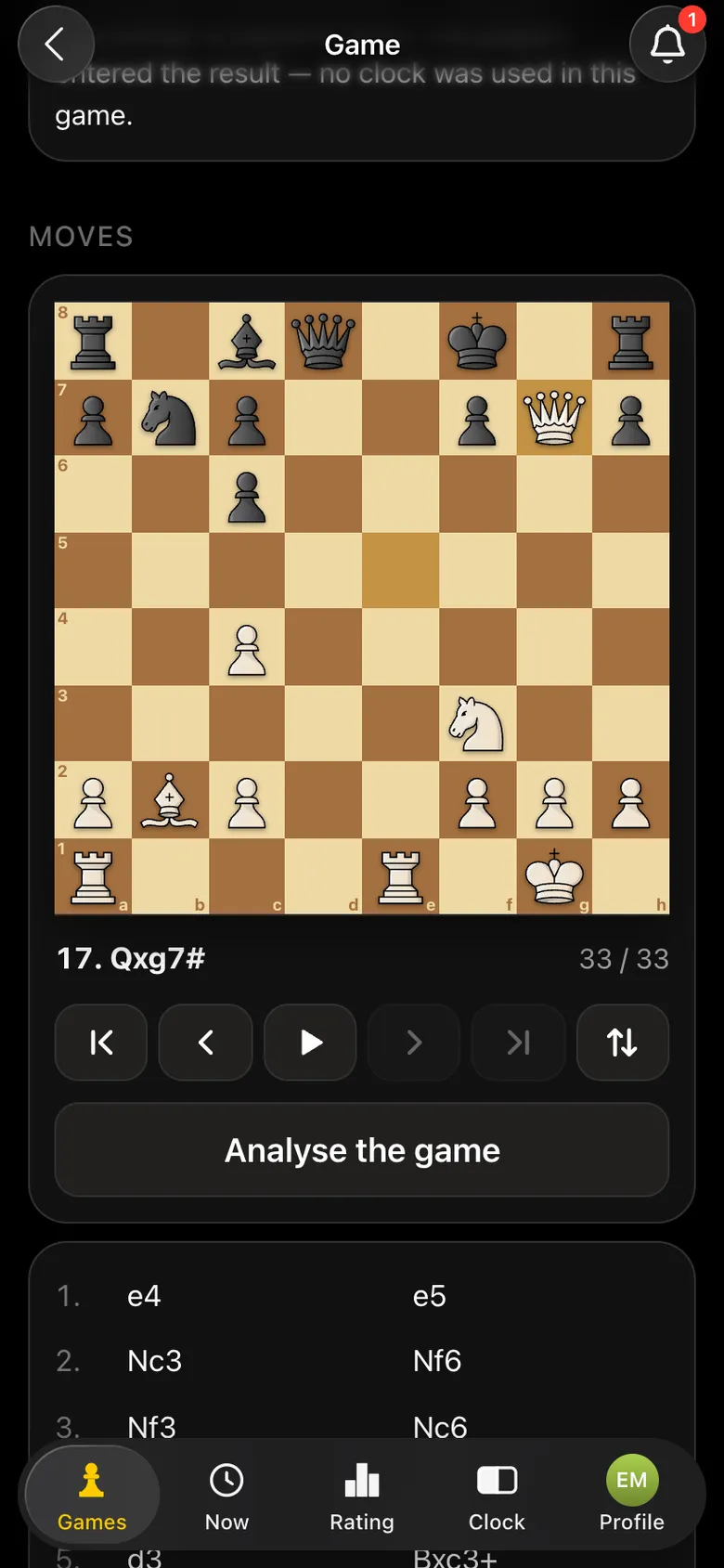
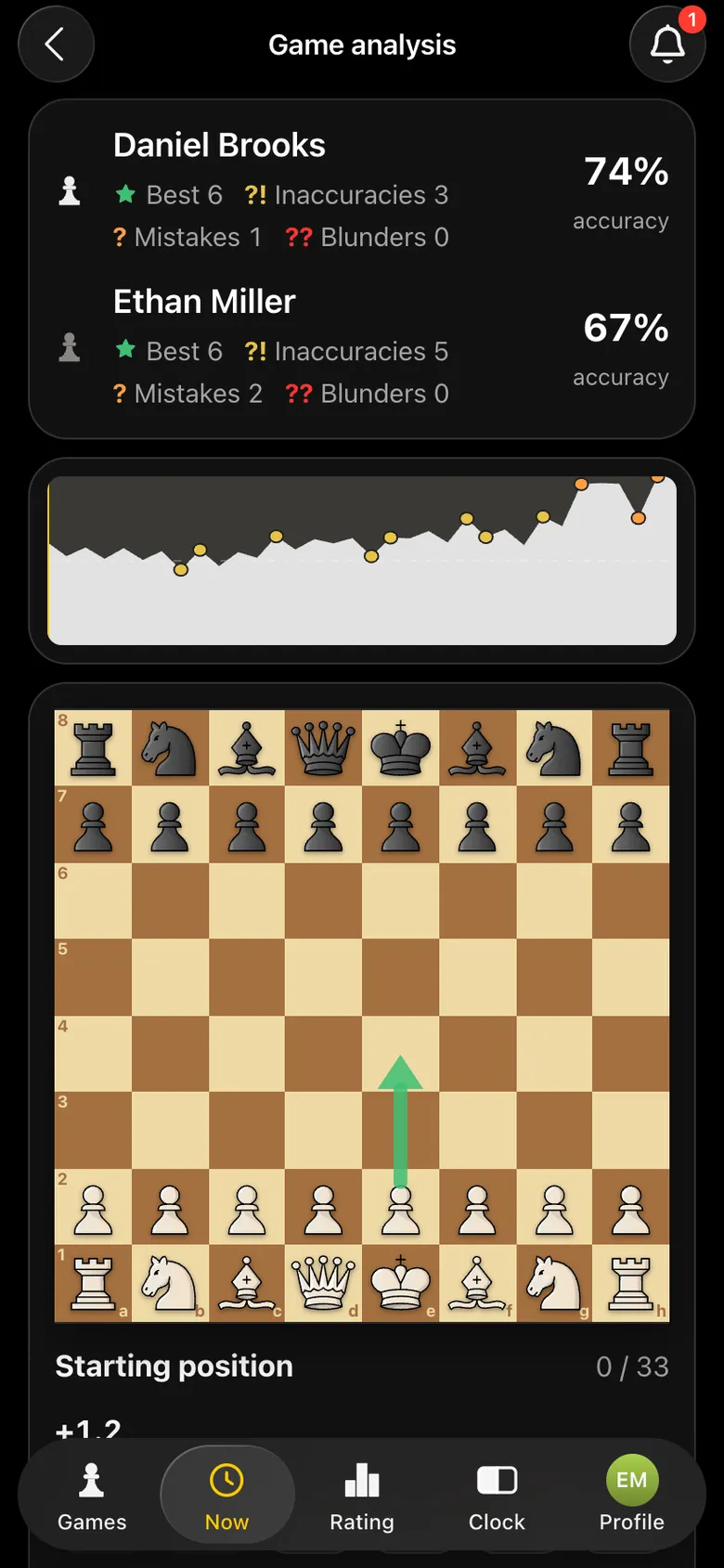
The game moves on a board with replay and the Game analysis button
Every move - with replay.
Game analysis: player accuracy, mistakes, game graph
Engine analysis.

For the arbiter the record works as a virtual arbiter. The moves are recorded together with the clock: you can see who made which move and in what order. If an illegal move is made on the board, the app notices it and stops recording at the last legal position - a dispute about "how the pieces stood" is settled by the record, not by the players' memory.

Analysing a recorded game - chess game analysis in the app. The arbiter's role at an amateur tournament - a host and an arbiter for a tournament.

Who a chess tournament broadcast helps

Chess federations

A broadcast of a regional or city stage with no budget for electronic boards: two phones per table, which the players already have. Plus a full record of every game for rating and the archive.

Chess clubs

A club tournament looks like a big event: every game runs on the screen in the hall, and players and guests see what is happening on the next tables. The broadcast link is easy to drop into the club chat.

Tournament organisers

A tournament people can watch is easier to sell - to a sponsor, a venue, the players. Pairings, standings and the broadcast are in one app, no arbiter's laptop needed.

Junior coaches and schools

Parents watch their child's game on a phone instead of crowding the hall. After the tournament the coach goes through every game from the record.

Company tournaments

An office championship on the big screen in the meeting room, and colleagues in other cities cheer by link. More - a company tournament in the app.

Bars, cafés, community spaces

A chess evening on the screen draws in people who only came to sit down. Guests see the games up close and stay longer.

How people use the broadcast: six scenarios

🌍

Your child plays, you are on the other side of the world

Your son or daughter is playing a junior tournament, and you are away on business or live in another country. Open live.playvibechess.com - and you see the board, every move and the result the same second as the hall.
📺

A screen in the tournament hall

A laptop on a projector or a TV with a browser: the broadcast page fits the boards to the screen, no scrolling. Players who have finished and spectators see what is happening on the next tables.
🎙️

A commentator and a stream

A coach or a strong player comments on the leaders' games while watching the broadcast - on site or on their own stream. The moves arrive by themselves, nobody has to copy them.
👥

Fans and colleagues

Friends, family and colleagues who could not come cheer by link from a phone. There is one link for the whole tournament - send it to the chat in advance.
🧑‍🏫

A coach at several tournaments

Students play in different halls - the coach sees their games in one window and knows what to go through before the round is over.
📚

Archive and analysis

Every game is recorded: after the tournament each one opens in the app with move-by-move replay and engine analysis.

Which tournaments can be broadcast

The broadcast works in every format of the app: every game with a camera goes on air, whatever system paired it.
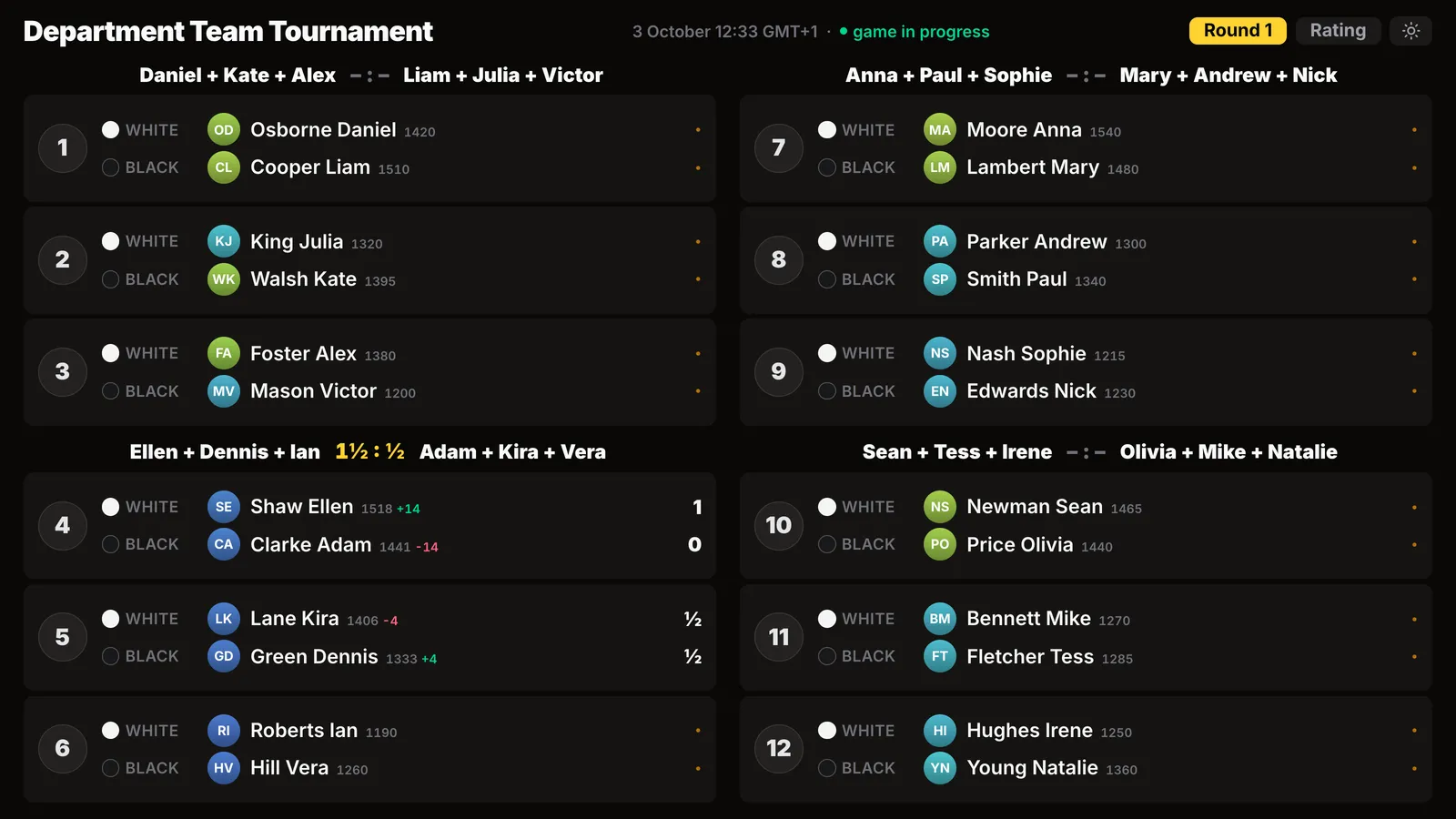
Swiss system

The most common open-tournament format: each round pairs players with similar scores. Pairings are made by an engine to FIDE rules - the Swiss system in the app.

Round robin

Everyone plays everyone - for a small field, by Berger tables. The round schedule is known in advance - the round-robin system.

Team tournament

Teams of two to four play matches on several boards, team pairings by the Swiss system. Team and individual standings - a team Swiss.

Leagues

Your own circle of players with its own rating, divisions and season: league tournaments add up to one table.

Arena

A timed tournament without rounds: finish a game and the app immediately gives you the next free opponent. Points 2/1/0, winning streaks and berserk; whoever scores most in the time wins.

Free play and one-on-one games

An evening without pairings, where people play as much as they like, and a game with a friend - the camera and the broadcast work here too.
Screen for the room, round one of a team tournament: team matches by board
A team tournament on the hall screen.
Round one of a round-robin tournament in the app
A round robin: a round by Berger tables.
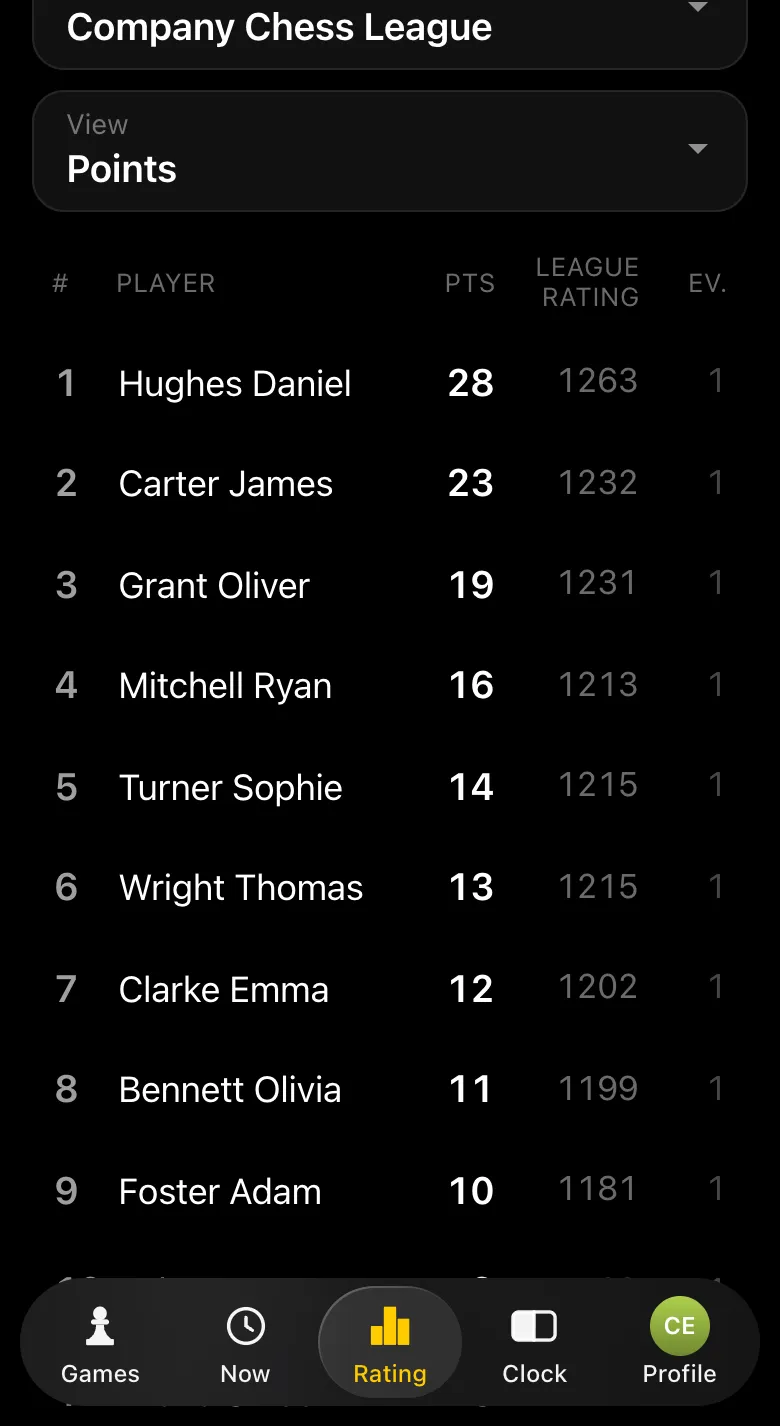
League season table: players, points, league rating
A league: its own season table.

Why it beats broadcasting from electronic boards

Electronic boardsVibe Chess phone camera
Cost per tablehundreds of dollarsa stand for a few dollars
Board and piecesonly its own setany ordinary ones
Connectioncables, a laptop, a programa phone and internet
Pairings and standingsa separate programin the same app
Broadcast pageset up separatelylive.playvibechess.com - straight away
Game analysisexport and a programa button in the app

Need your own broadcast? Write to the developers

We build the app ourselves and are open to working together. If your tournament needs something beyond what is described above, write to us and we will adapt the broadcast for you.

  • • a broadcast delay of a few moves or minutes - so hints from the hall do not reach the board;
  • • your own page look: the federation or sponsor logo, colours, board order;
  • • a separate page for your tournament only, or only the top boards;
  • • game exports for the federation and your own table format;
  • • any other mode you specifically need.
Write to the developers on Telegram

Run a tournament with a broadcast

Open @vibechessbot in Telegram, create a tournament and set up phones at the tables - the games appear straight away on live.playvibechess.com. Questions and requests - write to us on Telegram.

Frequently asked questions about broadcasting a chess tournament

How do I broadcast a chess tournament?

Create a tournament in the Vibe Chess app and start it - the app makes the pairings by itself. At each table put a phone with the chess clock and a second phone on a stand with its camera on the board and game recording open. Every game of the tournament appears straight away on live.playvibechess.com.

Do I need electronic chess boards?

No. Any ordinary boards and pieces will do. The moves are recorded by a phone camera.

How much does a broadcast cost?

The app and the broadcast page are free. The only cost is a phone stand for each table, a few dollars, and your own phones if the players do not have enough.

Which phones do I need?

Two per table: one runs the chess clock, the other is the camera. For the camera a modern smartphone works - a recent iPhone or Android; the clock runs on any phone.

Do I need to start the broadcast by hand?

No. A game appears in the broadcast as soon as camera recording is opened at the table. Recording starts when the clock is started on the second phone and ends on checkmate or when the players mark the result.

Where do I watch the broadcast?

On live.playvibechess.com - in a browser on a computer, a TV or a phone, without the app and without signing in. It can go on a projector in the hall.

Can I watch my child's game from another city?

Yes. Open live.playvibechess.com by link - the game is visible move by move the same second as in the hall.

Which tournament formats are supported?

Swiss and round-robin systems, team tournaments, leagues, the arena, as well as free play and one-on-one games.

Are games saved after the tournament?

Yes. Every game recorded with a camera is saved with all its moves: it can be stepped through and analysed by an engine in the app.

Can I have a broadcast delay or my own page design?

Yes, write to us on Telegram. We build the app ourselves and adapt the broadcast to your tournament: a delay, a logo, a separate page, game exports.

Free

Anyone can be the organizer

There are no club or arbiter roles in the app: the create button is available to everyone. You can announce a tournament today and run it this weekend.

  1. 1Create the event, open sign-up, share the link
  2. 2Start the tournament - the app announces the pairing
  3. 3Record results as the evening goes
  4. 4Show the final standings and export the TRF report
  • Swiss. when there are more than ten players and nobody should be knocked out
  • Round robin. when the field is small and fairness matters most
  • Free meetup. when you simply want to get together and play

More than a bot: the app, FIDE rules and a TRF report

  • The app. Besides the bot there is an app - inside Telegram and simply at playvibechess.com/app: what is on in your city, the player list, a live table, the current round, your profile and game history - everything that is awkward to read as chat messages.
  • Pairings by FIDE rules. Pairings are computed by bbpPairings, an open-source engine implementing the Dutch system: score groups, floats on an odd field, colour alternation, no rematches, and no player gets a bye twice.
  • A TRF report. A finished tournament exports as a single file in the FIDE data exchange format - the one arbiter software and federations accept. Your profile stores the FIDE ID, national federation code, title, sex and date of birth for it.
  • Free. All of the above, with no subscriptions, paid plans or limits on the number of tournaments and players.

Full overview

Missing a feature? Message the developers

The bot is constantly improved based on real tournaments. If you need a feature that isn't there yet, message the developers right inside the bot with the /support command. Many features appeared exactly because organizers asked for them, and useful ideas get added quickly.

What to read next

A turnkey broadcast with your own design and a delay - order a chess tournament broadcast. The platform the broadcast runs on - a platform for broadcasting chess games. A step-by-step checklist before the tournament - how to prepare for a chess tournament broadcast. Recording a single game - recording a chess game with a phone camera. What recognition can do - chessboard recognition with a camera. Analysing recorded games - chess game analysis. Every way of showing a game to spectators, from a plywood board to a projector - demo boards and broadcasting.

Alexey Mudry
Alexey Mudry · hosted 37 events for Vibe Chess · 157 reviews · rating 5.0

At the board since childhood: hazy about his rating, precise about every rook he has blundered. Counts an evening as a good one if the opponent stayed to talk afterwards instead of rushing off to check with an engine. Message →