Vibe ChessVibe ChessApp

A platform for broadcasting chess games in real time

Alexey Mudry · updated October 26, 2026
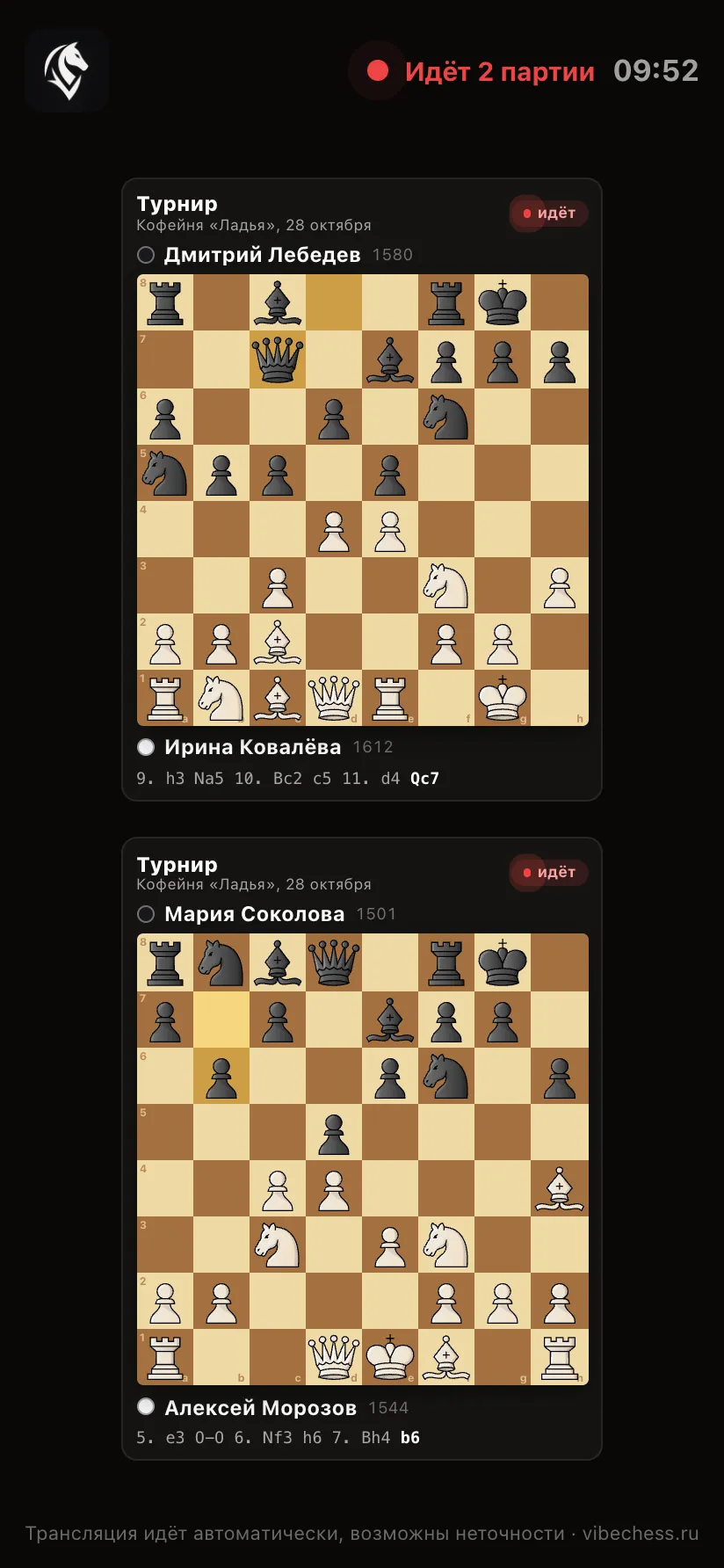
live.playvibechess.com is a separate platform for broadcasting chess games in real time. It shows every game currently being recorded with a camera in the Vibe Chess app: the boards, the players, the moves and the results. Moves are recorded by the camera of an ordinary phone, so a broadcast needs no electronic boards, no cables and no person copying moves. Below - what the platform does, how it differs from other ways of showing chess to an audience, how many boards it handles and how to connect your tournament.

What live.playvibechess.com is

It is a live page that shows, in real time, every chess game being recorded with a camera in the Vibe Chess app. The organiser sets nothing up: a game appears on the platform by itself as soon as recording is opened at the table, and leaves a minute after the result.
⚡

Real time

A move made at the board appears on every viewer's screen a few seconds later.
📷

A camera instead of an electronic board

Moves are recorded by the camera of an ordinary phone on a stand. Any board and pieces will do.
🤖

No operator

A game goes live on its own as soon as recording is opened at the table. Nobody copies moves by hand.
♾️

Any number of boards

One game fills the whole wall, dozens are laid out in a grid with no scrolling.
🌐

A link instead of an install

Viewers open the page in a browser - on a computer, a TV or a phone, without signing in.
$0

Free

No subscription, licences or per-board fees. All you need is phones and internet.
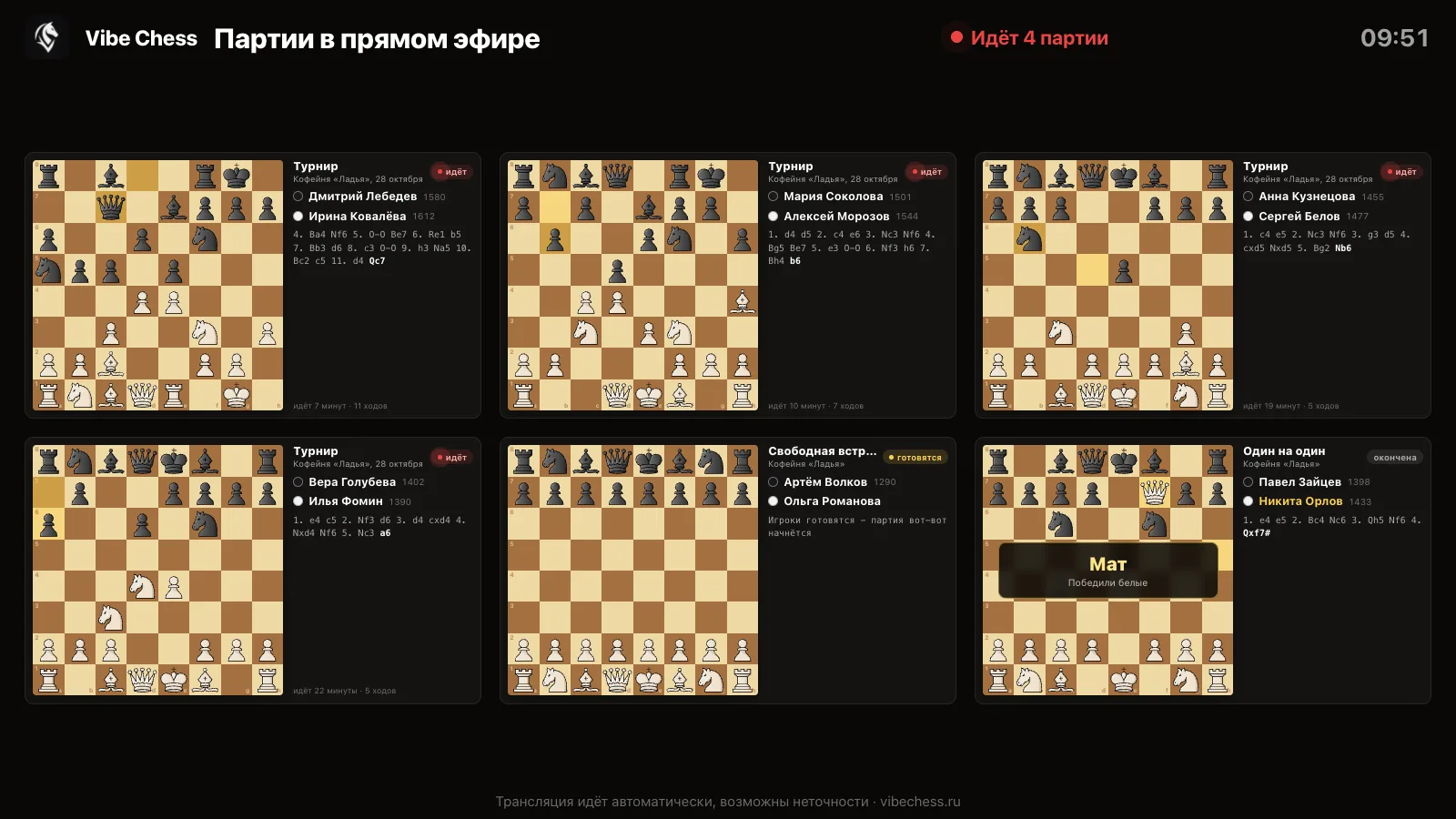
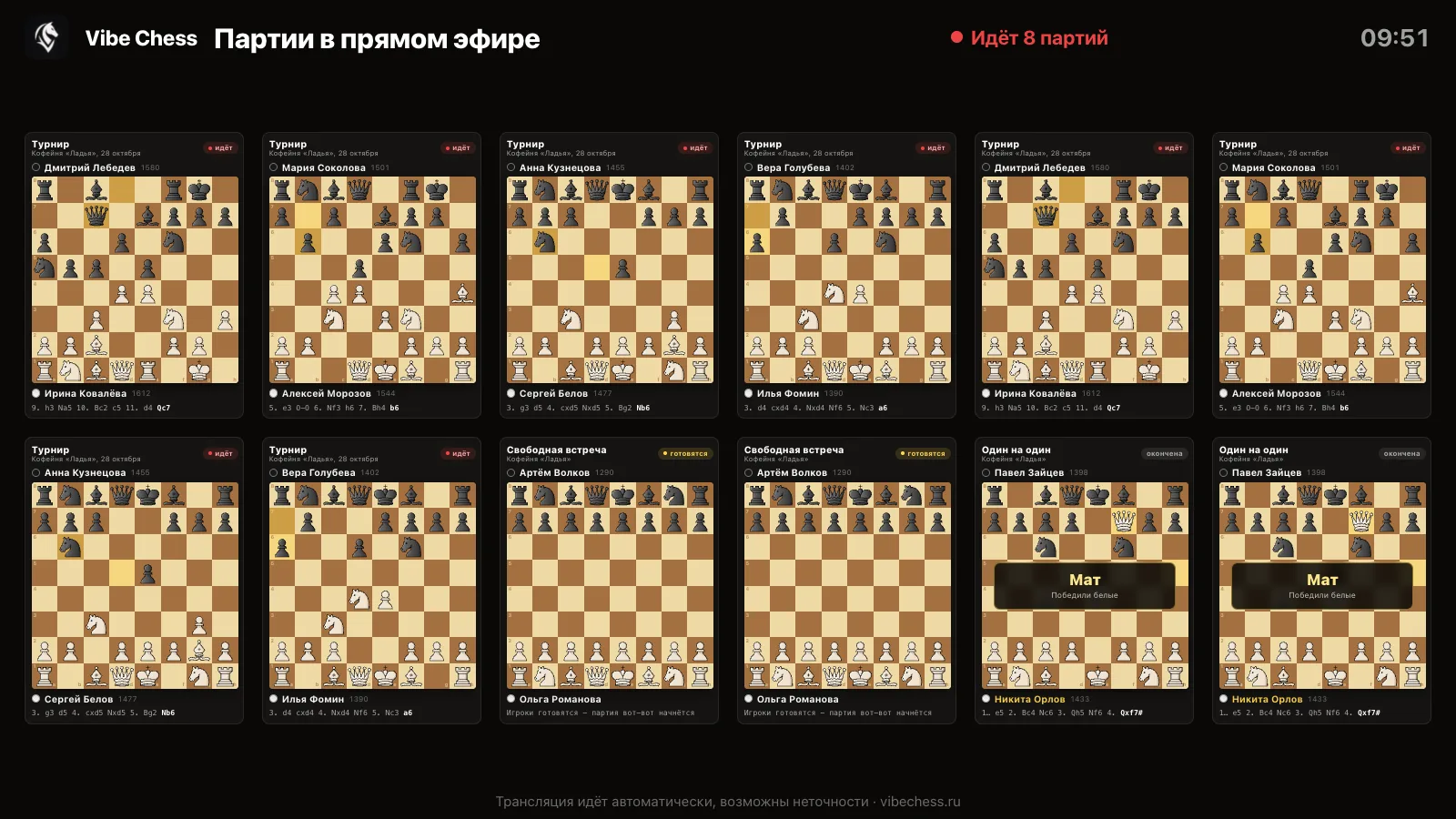
The broadcast platform: six boards - a tournament, a free meetup and a one-on-one game, players with ratings, moves and a checkmate result
The platform on air: every game in play on one screen.

What viewers see

Board with the current position

The last move is highlighted, so the eye finds what changed straight away.

Players and rating

Who has White, who has Black, and each player's rating.

Move record

The latest moves of the game in chess notation, the newest one highlighted.

Game status

"Getting ready" - recording is open, no moves yet; "live" - how many minutes and moves; "finished".

Result over the board

Checkmate, stalemate, draw, time, no-show - large on the board, so the hall sees it at once.

Event type

A tournament, a free meetup or a one-on-one game - with its name and venue.

Dark and light theme

Dark for a dim hall, light when the projector shines in daylight.

Full screen

One button (or the F key) hides everything else - a screen for the projector.
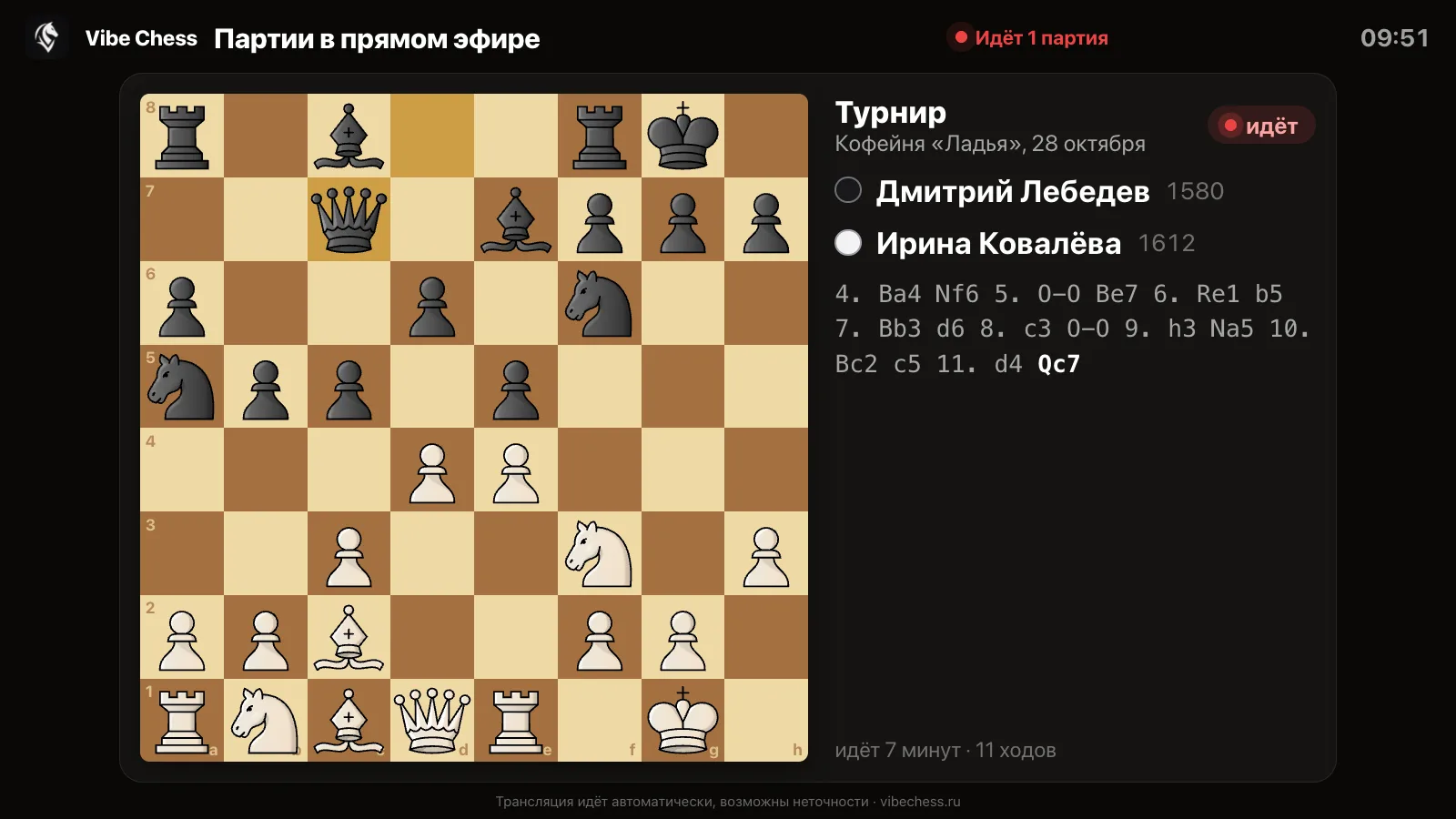
One game across the whole screen: a board with the last move highlighted, players with ratings, the move record and the time in play
One game - across the whole wall.

How many boards the platform handles

The platform does not limit the number of games: everything being recorded with a camera goes on air. The page picks the layout itself, so that every board comes out as large as possible and there is never any scrolling. Two games sit side by side, six in two rows, twelve in a full-screen grid.
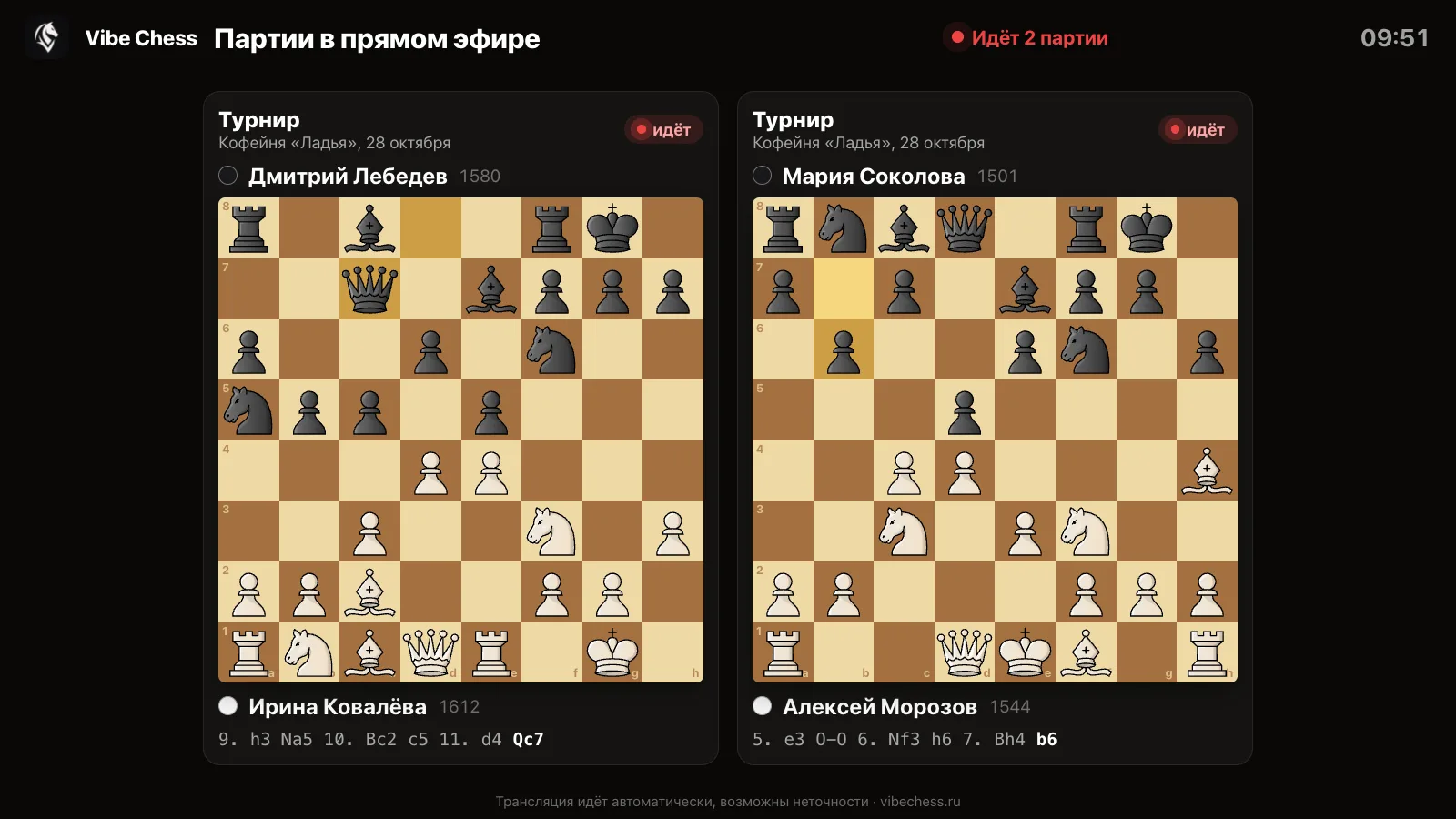
Two games side by side on the broadcast platform
Two games - large, side by side.
Twelve boards in a grid on one platform screen
Twelve games - in a grid, no scrolling.

A tournament in the app holds up to 100 tables - that is up to 200 players at the boards at once, with no limit on the number of entrants. If you need more, or several halls at once, write to us in advance.

How a game gets onto the platform

1

An event in the app

A tournament, meetup or one-on-one game is created in the Vibe Chess app.
2

A camera at the table

A phone on a stand with game recording open looks at the board.
3

Moves to the server

Every move goes straight over the internet to the Vibe Chess server.
4

The platform

live.playvibechess.com picks up new moves every few seconds and shows them to every viewer.

Recording starts by itself when the players start the clock. Checkmate and stalemate are spotted automatically; resignation, a draw and a flag fall are marked by the players on the clock - and the result appears on the platform board. If the connection at the table drops, the moves are stored on the phone and sent when it comes back: viewers see a pause, but the game is not lost.
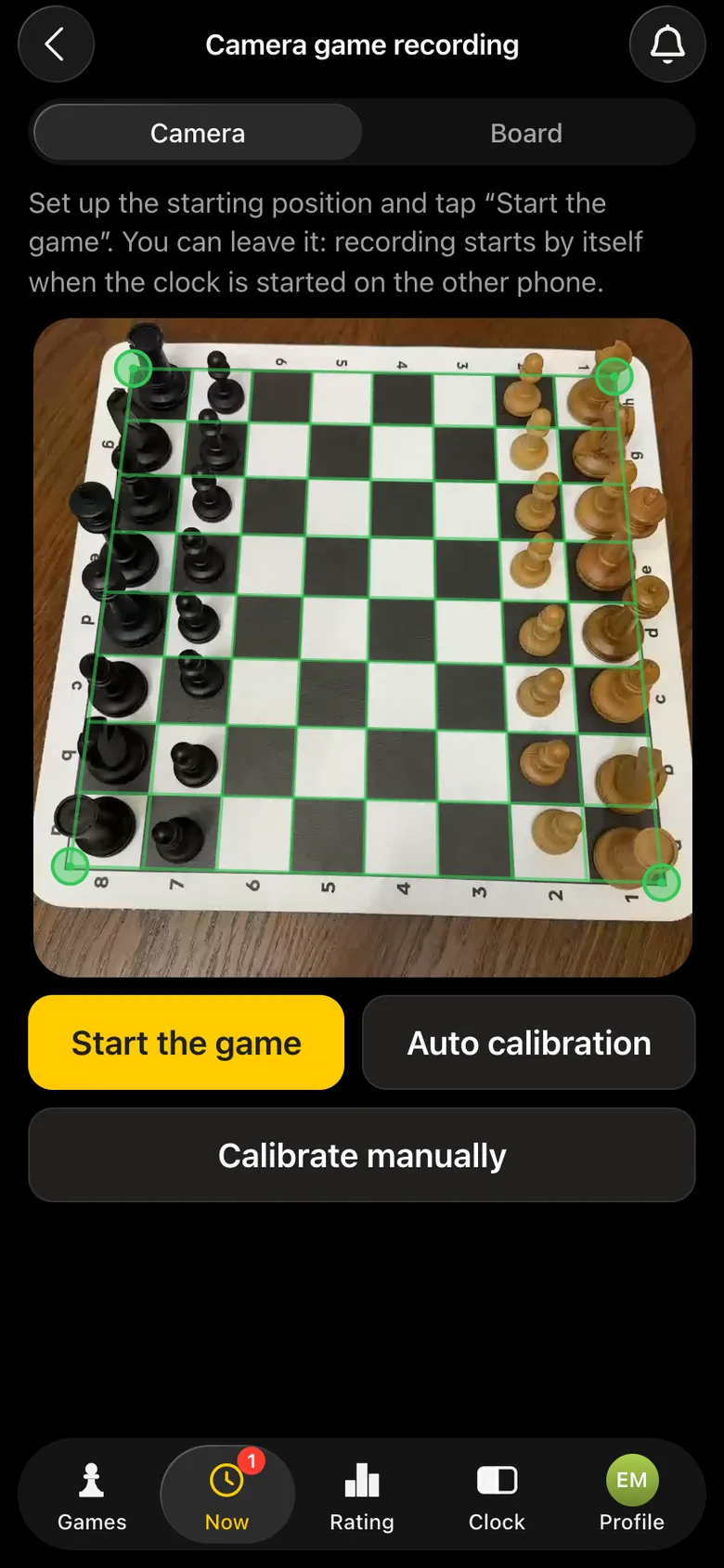
A phone camera has found the chessboard: a green frame on the corners
The camera has found the board - the game is on air.
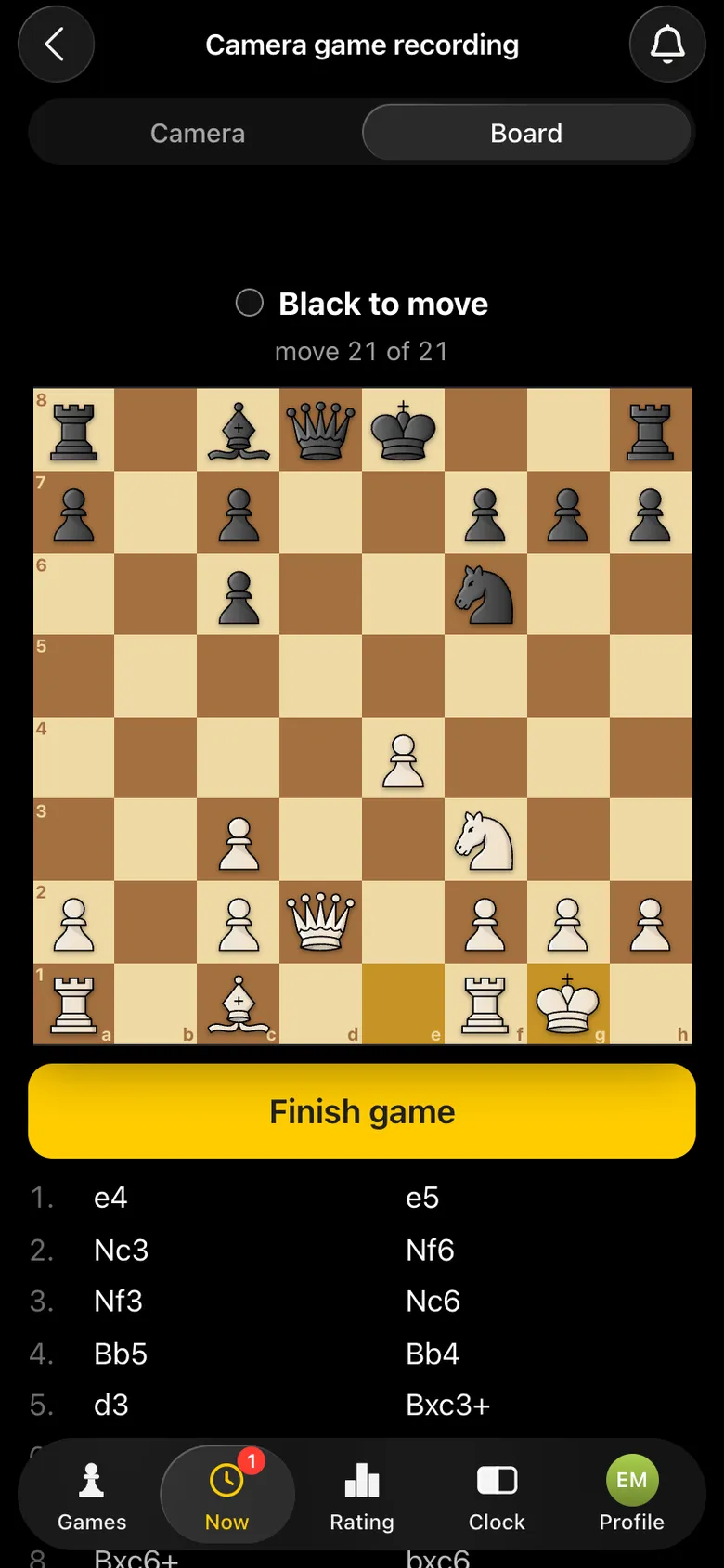
The Board tab on the camera phone: the recorded position and the moves of the game
What is recorded is what goes on air.

How recording works - recording a chess game with a phone camera.

A screen for the hall and a screen for online viewers

The same platform plays two roles. In the hall it is opened on a projector or a TV - in full-screen mode and in a suitable theme. Online viewers open the same link on their own devices: on a phone the boards stack one under another.
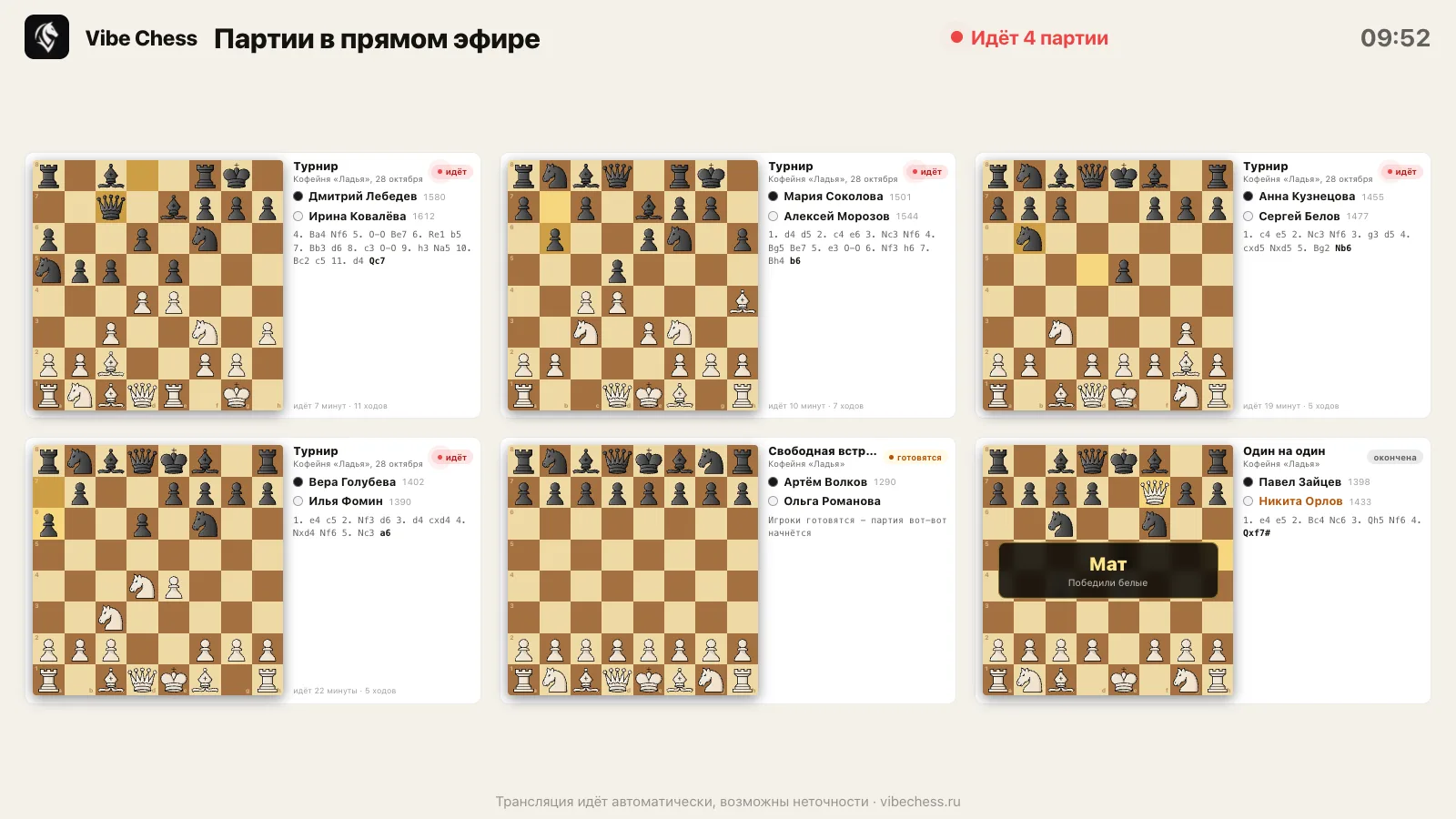
The broadcast platform in the light theme: six boards on a light background for a projector in daylight
Light theme - for a hall in daylight.
The broadcast platform on a phone screen: two games one under another
On a viewer's phone - by link, no sign-in.
Next to the platform in the hall, put a second screen with the pairings and standings - "Show the tournament on screen" in the app. That way viewers see both the games and the places. How to set up a fan zone - a fan zone at a chess tournament.

How the platform differs from other ways of broadcasting

Electronic boardsEntering moves by handlive.playvibechess.com
What each table needsan electronic board and a cable to a computera person entering the movesa phone on a stand
Boards and piecesonly its own setanyany
Cost per tablehundreds of dollarsa volunteer's time at every boarda stand for a few dollars
Move delaysecondsas fast as the person typesseconds
Pairings and standingsa separate programa separate programin the same app
Page for viewersset up separatelyset up separatelylive.playvibechess.com straight away

Which events can be broadcast

Any game recorded with a camera in the app goes onto the platform, whatever format it was paired in:

  • • a Swiss or round-robin tournament, a team Swiss;
  • • an over-the-board arena - timed games without rounds;
  • • a free meetup - an evening where people sit down with whoever they like;
  • • a one-on-one game - even at home with a friend.

How to run a tournament in the app - the organiser's guide.
Who needs a broadcast platform

Federations and arbiters

City and regional events on air with no budget for electronic boards. Every game is recorded - for the archive and for checks.

Chess clubs

A club evening on the hall screen and a link in the club chat - people who did not come can watch.

Tournament organisers

A tournament people can watch is easier to show to a sponsor and a venue. The broadcast is part of the same app as the pairings.

Junior schools and parents

Parents follow their child's game on a phone, from another city or country.

Companies

A company championship on the meeting-room screen, colleagues from other offices cheer by link.

Commentators and streamers

The moves arrive on their own - you can stream any board without copying the game down.

How to connect your tournament from scratch

  1. Install the Vibe Chess app on the phones and sign in - through Telegram or VK ID.
  2. "Games" → "Create your own game" → format, venue, date, time control, rounds and tables.
  3. Send the entrants the sign-up link, mark attendance on the day and press "Start the tournament".
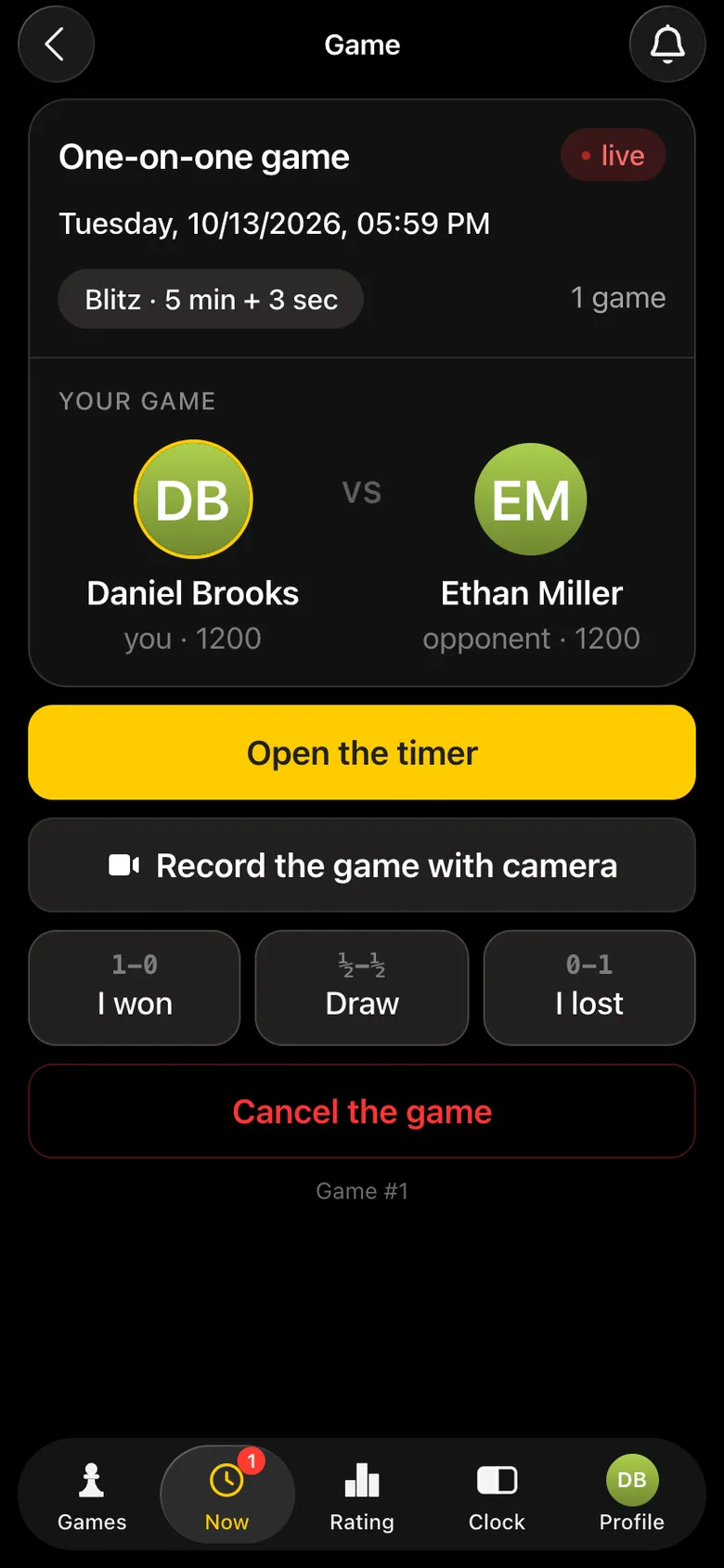
  4. At each table: the weaker phone runs the chess clock, the stronger one goes on a stand with its camera on the board - "Record the game with camera".
  5. Open live.playvibechess.com on the screen in the hall and send the link to viewers.
  6. Players start the clocks - the games appear on the platform by themselves.
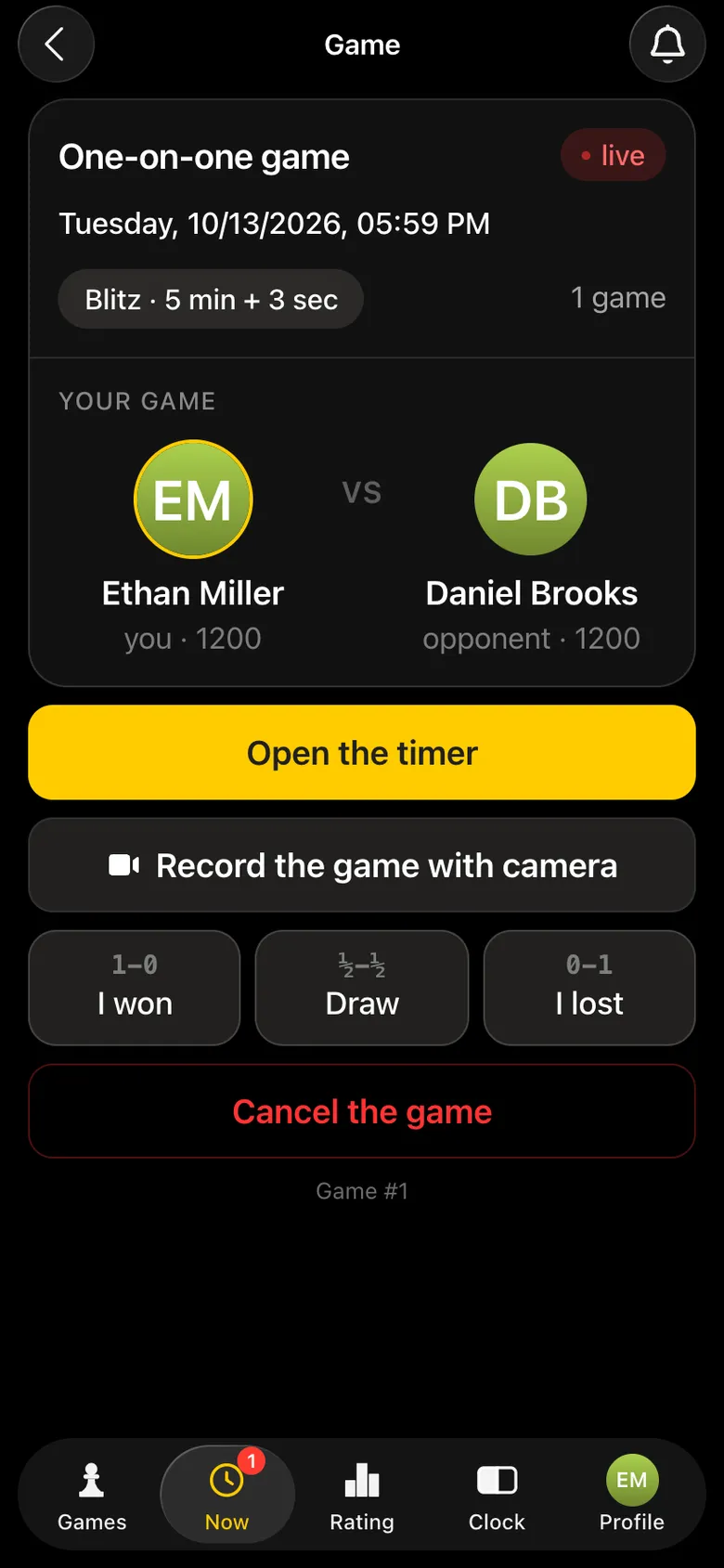
Game card: Open the timer - the phone for the clock
Phone 1: the clock.
Game card: Record the game with camera - the phone on a stand
Phone 2: the camera.

Step by step with examples - how to broadcast a chess tournament. Which phone to choose - which smartphone suits Vibe Chess.

What a stable broadcast needs

  • • Internet at every table with a camera: venue Wi-Fi or mobile data, ideally with a backup - what internet a tournament needs.
  • • A modern phone on the camera - its power decides how fast moves reach the broadcast.
  • • A stand - the phone stays still, the whole board in the frame.
  • • Charge - a power bank or an extension lead at the tables for a long tournament.
  • • Boards and pieces - any ordinary ones - chess sets for events.

Games stay after the broadcast

The broadcast does not vanish without a trace: every recorded game is saved in the app for its players. It can be stepped through move by move and analysed by an engine - an evaluation graph, mistakes and best moves. The organiser keeps the final standings, the results sheet as a PDF and a TRF export for the federation.
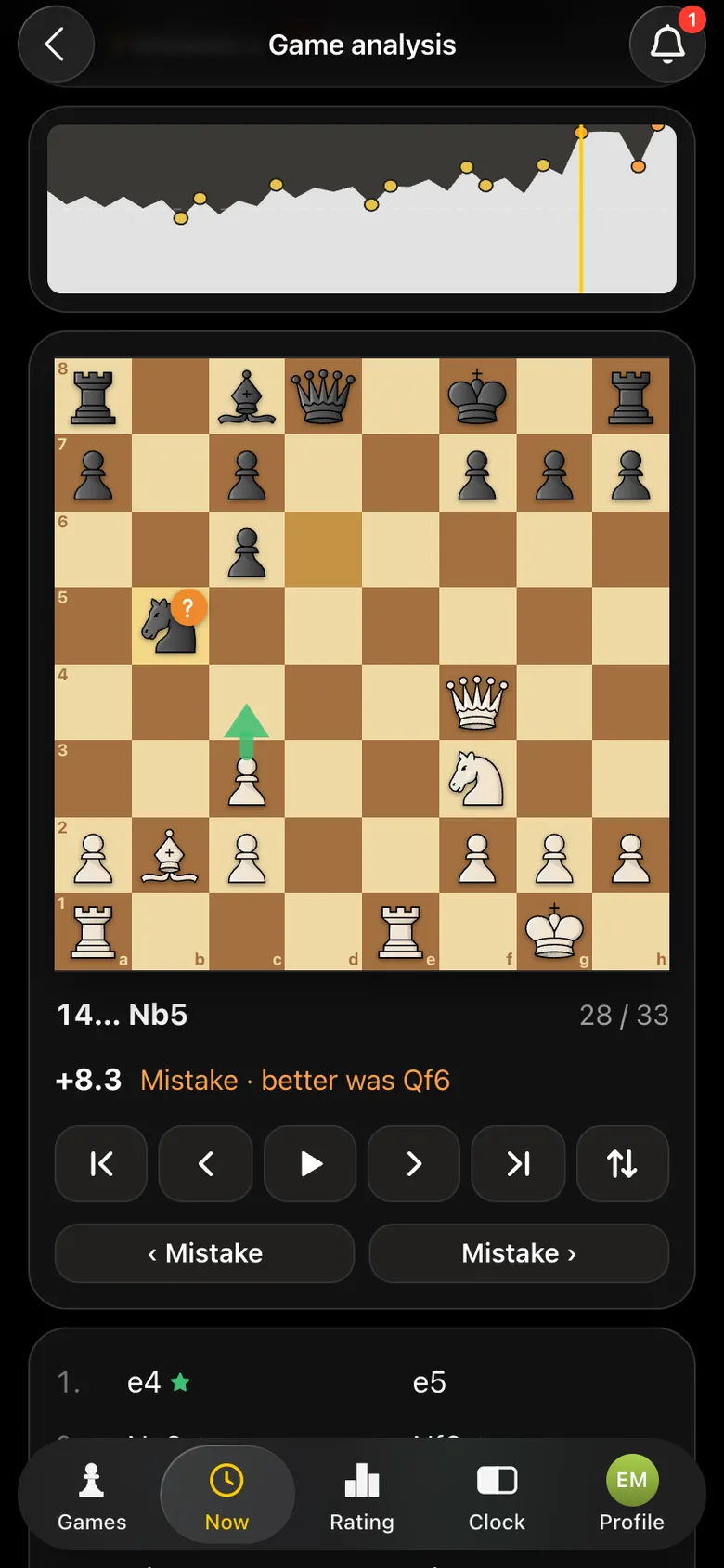
Analysis of a recorded game: the evaluation graph and the best move hint
After the broadcast - engine analysis of the game.

In detail - chess game analysis.

A broadcast tailored to your event

We build the platform ourselves and are open to working with federations, clubs and organisers. Write to us if you need:

  • • a separate broadcast page for your tournament only, or only the top boards;
  • • a broadcast delay, so hints from the audience do not reach the board;
  • • your own look: the federation or sponsor logo, colours, board order;
  • • a tournament with more than a hundred tables, or several halls at once;
  • • game exports in the format you need.
Write to the developers on Telegram

Put your tournament on air

Open @vibechessbot, create a tournament and set up phones at the tables - the games will appear on live.playvibechess.com. Questions and requests - write to the developers.

Frequently asked questions about the broadcast platform

What is live.playvibechess.com?

A free platform for broadcasting chess games in real time. It shows every game being recorded with a camera in the Vibe Chess app: the boards, the players, the moves and the results.

Do I need electronic boards?

No. Moves are recorded by the camera of an ordinary phone on a stand. Any board and pieces will do.

How many games can be broadcast at once?

The platform does not limit the number of games and lays them out to fit the screen. A tournament in the app holds up to 100 tables, with no limit on entrants.

How long is the delay before moves appear?

A few seconds: a move goes to the server at once, and the platform picks up new moves every few seconds. If you need a deliberate broadcast delay, write to the developers.

How do I watch the broadcast?

Open live.playvibechess.com in a browser on a computer, a TV or a phone. No app and no sign-in needed.

How much does the broadcast cost?

The platform and the app are free. The only cost is a phone stand for each table, a few dollars.

What internet does a broadcast need?

A stable one: venue Wi-Fi or mobile data at each table with a camera, ideally with a backup. Viewers see the board and the moves on the platform, not the camera picture.

Can we have a separate broadcast page for our tournament?

Yes, write to the developers on Telegram: a separate page, your logo, a delay and the board order are set up for the event.

Anyone can be the organizer

There are no club or arbiter roles in the app: the create button is available to everyone. You can announce a tournament today and run it this weekend.

  • Swiss
    when there are more than ten players and nobody should be knocked out
  • Round robin
    when the field is small and fairness matters most
  • Free meetup
    when you simply want to get together and play

More than a bot: the app, FIDE rules and a TRF report

  • The app. Besides the bot there is an app - inside Telegram and simply at playvibechess.com/app: what is on in your city, the player list, a live table, the current round, your profile and game history - everything that is awkward to read as chat messages.
  • Pairings by FIDE rules. Pairings are computed by bbpPairings, an open-source engine implementing the Dutch system: score groups, floats on an odd field, colour alternation, no rematches, and no player gets a bye twice.
  • A TRF report. A finished tournament exports as a single file in the FIDE data exchange format - the one arbiter software and federations accept. Your profile stores the FIDE ID, national federation code, title, sex and date of birth for it.
  • Free. All of the above, with no subscriptions, paid plans or limits on the number of tournaments and players.

Full overview

Missing a feature? Message the developers

The bot is constantly improved based on real tournaments. If you need a feature that isn't there yet, message the developers right inside the bot with the /support command. Many features appeared exactly because organizers asked for them, and useful ideas get added quickly.

What to read next

Order a branded broadcast of your tournament - live online chess tournament broadcasts. Run a tournament with a broadcast - chess tournament live broadcast, how to prepare for a chess tournament broadcast. Recognition - chessboard recognition with a camera. All ways of showing a game - demo boards and broadcasting.

Alexey Mudry
Alexey Mudry · hosted 37 events for Vibe Chess · 157 reviews · rating 5.0

At the board since childhood: hazy about his rating, precise about every rook he has blundered. Counts an evening as a good one if the opponent stayed to talk afterwards instead of rushing off to check with an engine. Message →