
Put a chess tournament together in an evening - with no spreadsheets and no stress
You add the players, press a button, and the first-round pairings are in your hands. After that you enter the results and the table updates itself. No Excel, nothing to download, right in the browser or on your phone.
How to run a Swiss-system tournament online
Five steps from an empty screen to the final table. It all works in the browser, with nothing to download and nothing to install.
Create a tournament
Give the name of the tournament, the number of rounds and the time control. Creating it takes a minute.
Add the players
Enter the players by hand or as a single list. For a large event you can open registration by link.
Generate the pairing
Get the first-round pairs at a single click. The pairs for later rounds are formed automatically once the results are entered.
Enter the results of the games
Give the winner, the draw or a result by default. The points and places are recalculated instantly.
Watch the tournament table
Get up-to-date points, places and the final result the moment the last round ends. The table can be saved or shared by link.
Who the service suits
The service is particularly useful for small and medium competitions that need quick pairing, a table that makes sense and a minimum of manual work.
Chess clubs
Regular club blitz events and rated series - with no paper, no Excel and no copying results out by hand.
School tournaments
A class or year-group championship. The teacher adds the pupils, runs 5-6 rounds and gives the parents a link to the table.
Coaches and sections
Internal competitions between groups and qualifiers before the district championships. The history of events is kept in one place.
Organisers of amateur competitions
Open tournaments in a bar, a coworking space or a park. Registration by link and mobile control from the arbiter's phone.
Online communities
A series of meetups for the members of a chat or a channel. The pairings and the table are published right in Telegram.
Go and draughts tournaments
The Swiss system works in more than chess. The service suits go, draughts, renju and other games with rounds and sides to allocate.
A tournament with no Excel and no recalculating by hand
In Excel it is easy to slip: repeat a pairing, allocate the colours wrongly, forget a player who missed a round or have to recalculate the table by hand after every result. Swiss-system pairing online automates all of that and saves the organiser time.
It suits chess, go, draughts and other games
Although the service is built around chess, it can be used for other games too, where players compete in rounds, score points and are paired by their current standing in the table.
Chess
The main use: a Swiss for club, school and amateur tournaments, with the colours taken into account.
Go
Go competitions on the same principles: rounds, points, sides allocated and repeat pairs excluded.
Draughts
The Swiss system works excellently for Russian and international draughts.
Renju
Games with a round system and points fit into a standard Swiss.
Board games
Competitions in board games where there are pairs of players and a results table.
Club tournaments
Any format with regular rounds, points and sides to allocate.
The features of online pairing
The full list of features, covering the whole cycle of an event from registration to the final table.
More detail on particular parts of the product: on chess tournament pairing online, and on the chess tournament table online and on the Buchholz score.
Online pairing helps you run a Swiss-system chess tournament quickly, with no manual tables and no complicated software. The organiser adds the players, starts the pairing, enters the results of the games and gets an up-to-date table after every round. This format suits chess clubs, school and amateur competitions, and go, draughts and other games where players score points across rounds.
The same tournament, but in every player's phone
In the Vibe Chess app the players sign up themselves from a link, see their table and their opponent in the current round, and the table updates for everyone at once. Creating a tournament is free, with no limit on the number of tournaments or players.
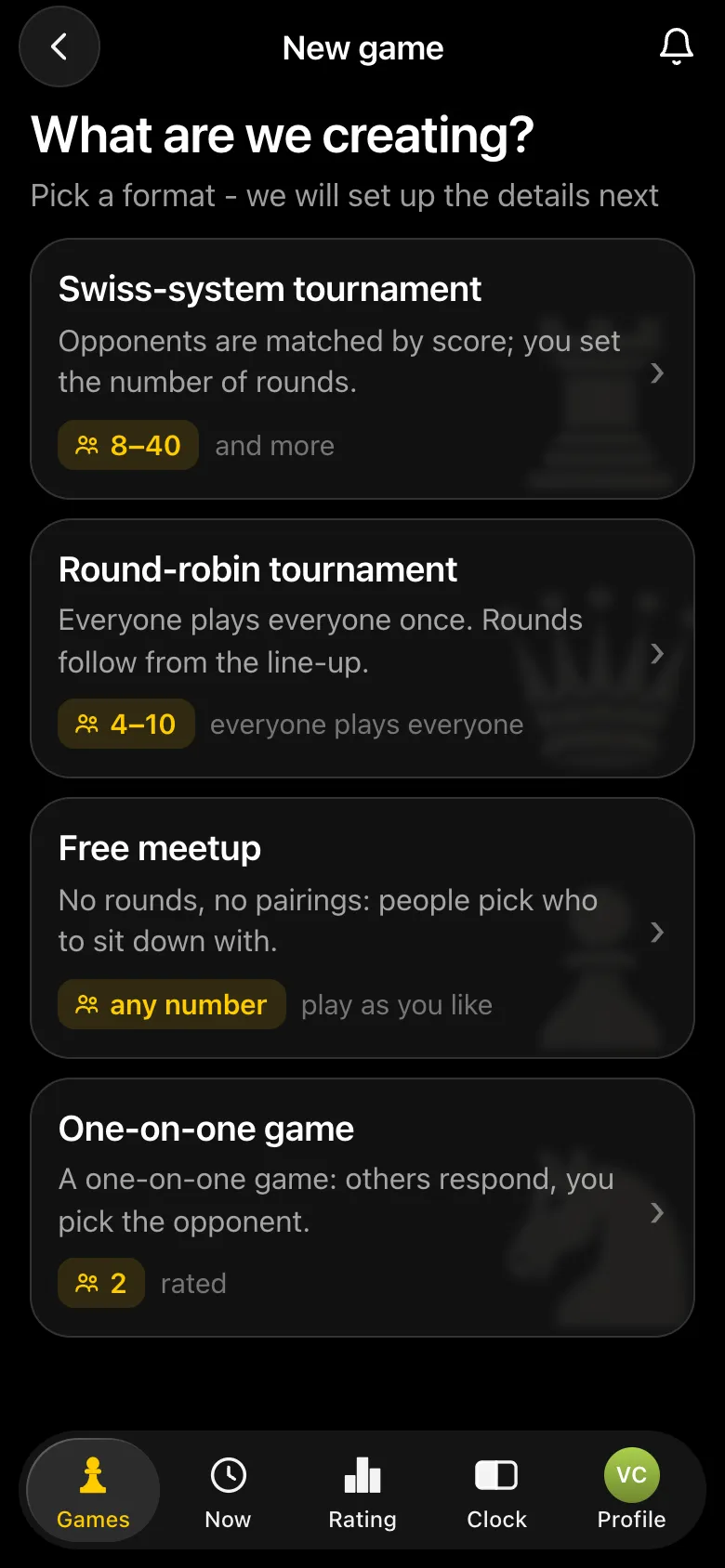
- The Swiss system - everything this page is about: the number of rounds is up to you, the pairs go by points, and the colours and byes are handled correctly.
- Round-robin system - when there are few players and you want everyone to play everyone; the app works out the number of rounds itself.
- A free meetup - when you do not need a tournament bracket at all: people turn up and choose for themselves who to sit down with.
Creating an event takes a minute: the name, the date and time, the venue, the time control and the number of rounds. After that you only have to open registration, hand out the link and press “Start tournament”.
How to run a Swiss-system tournament in the Vibe Chess app
The app lets you fill a tournament in two ways, and they mix freely. Players with their own account sign up themselves, see their table and opponent on their phone and report their own results - all the organiser does is tap Start the tournament. Guests without a phone are added by name, and the organiser enters their games. Below is the whole path through an eight-player club blitz: four players with the app, four guests, three rounds. Every screen is from the real app, and the event was played in it from start to finish.
Step 1. Create a Swiss-system tournament
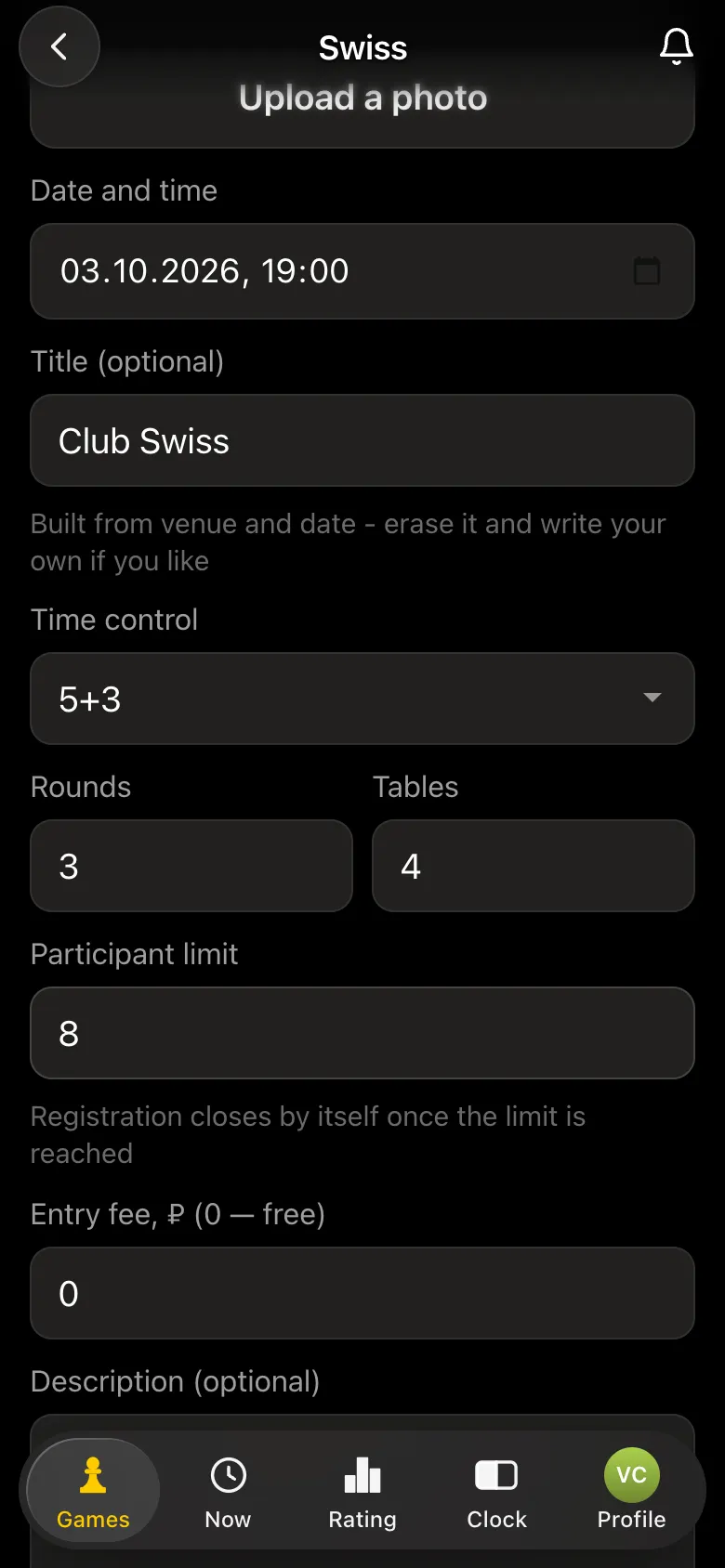
Games → Create your own game → Swiss-system tournament. The form takes the venue and date, a title, the time control, the number of rounds (1 to 20, your choice), the number of tables, a player cap and an entry fee. Once the places run out, registration closes on its own; leave the cap empty and there is no limit. How many rounds suit your field is in the table on how many rounds in a Swiss system.
Step 2. Invite players: a link or a QR code
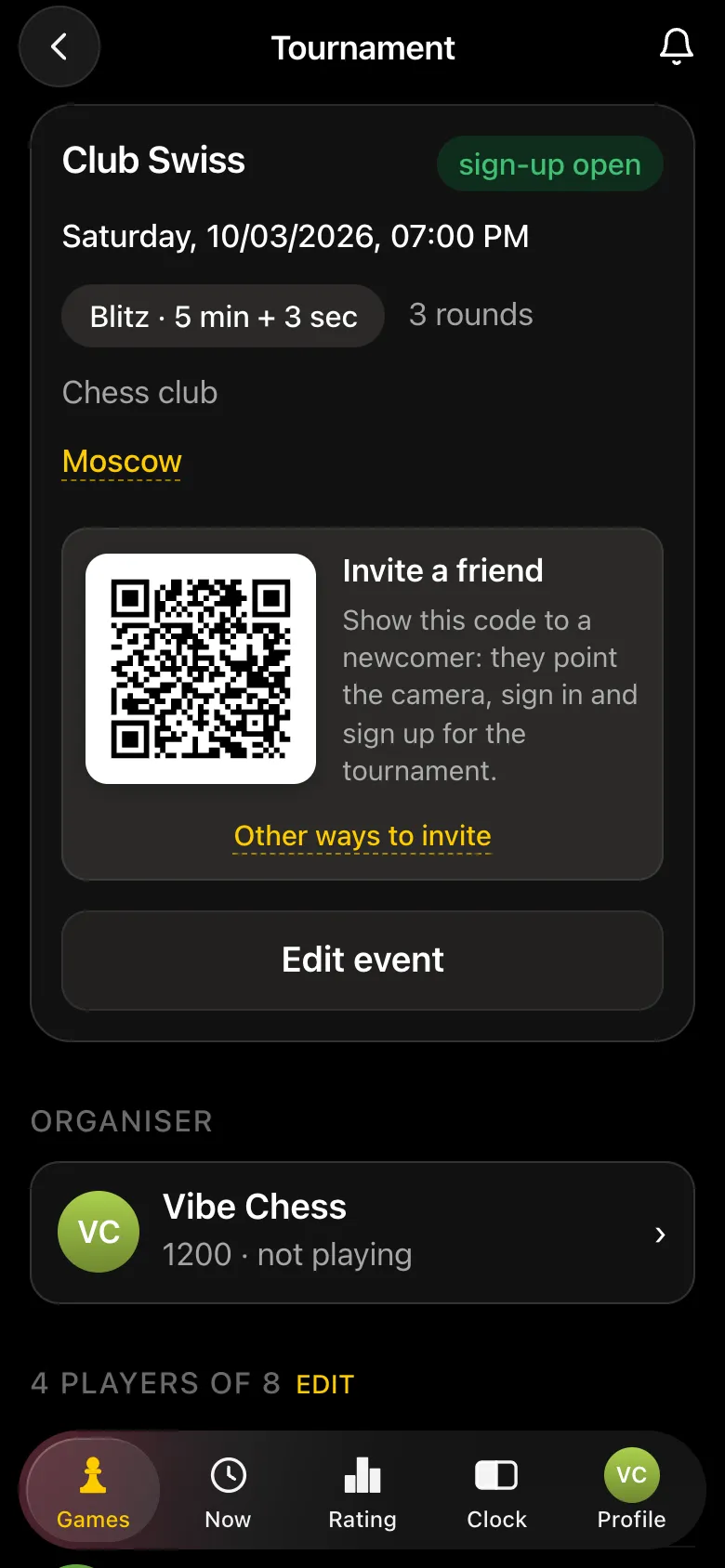
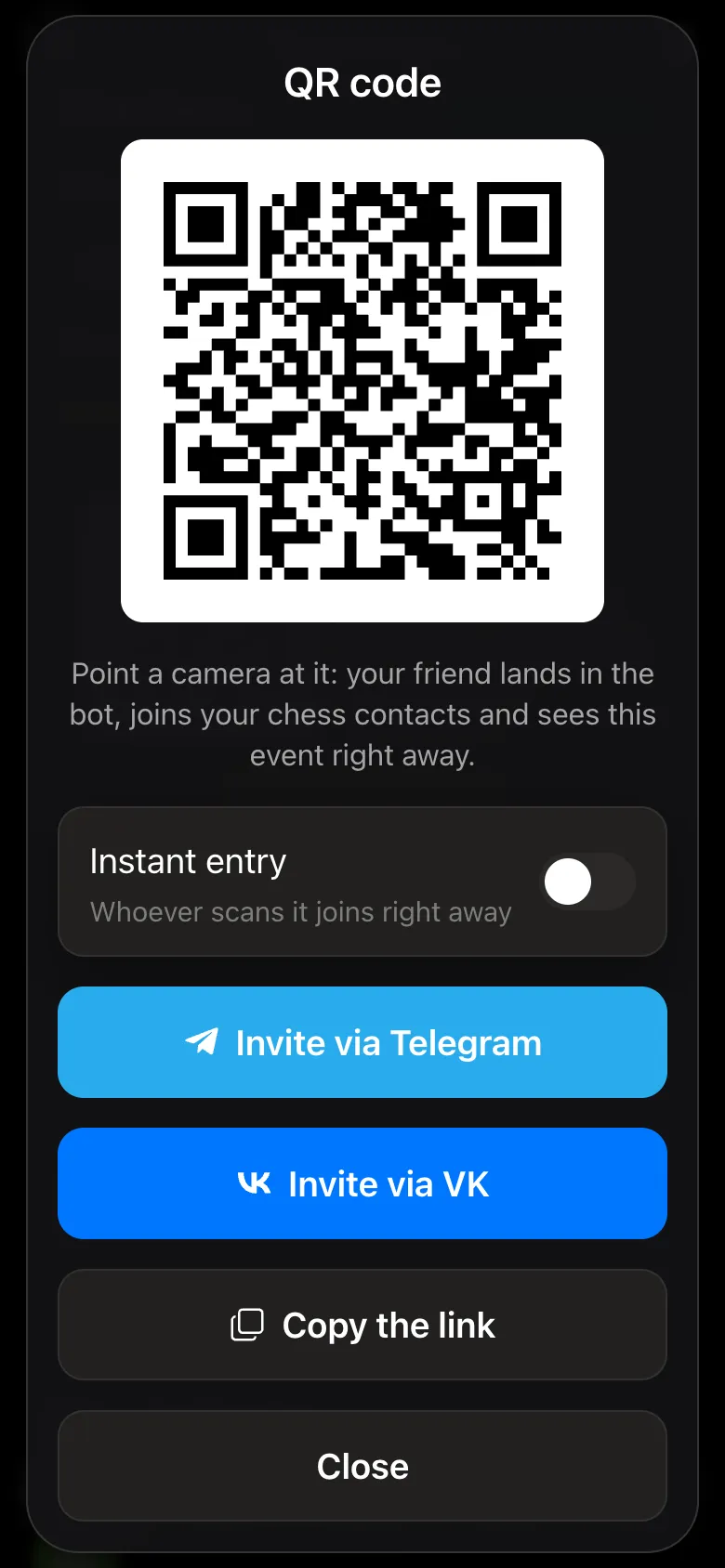
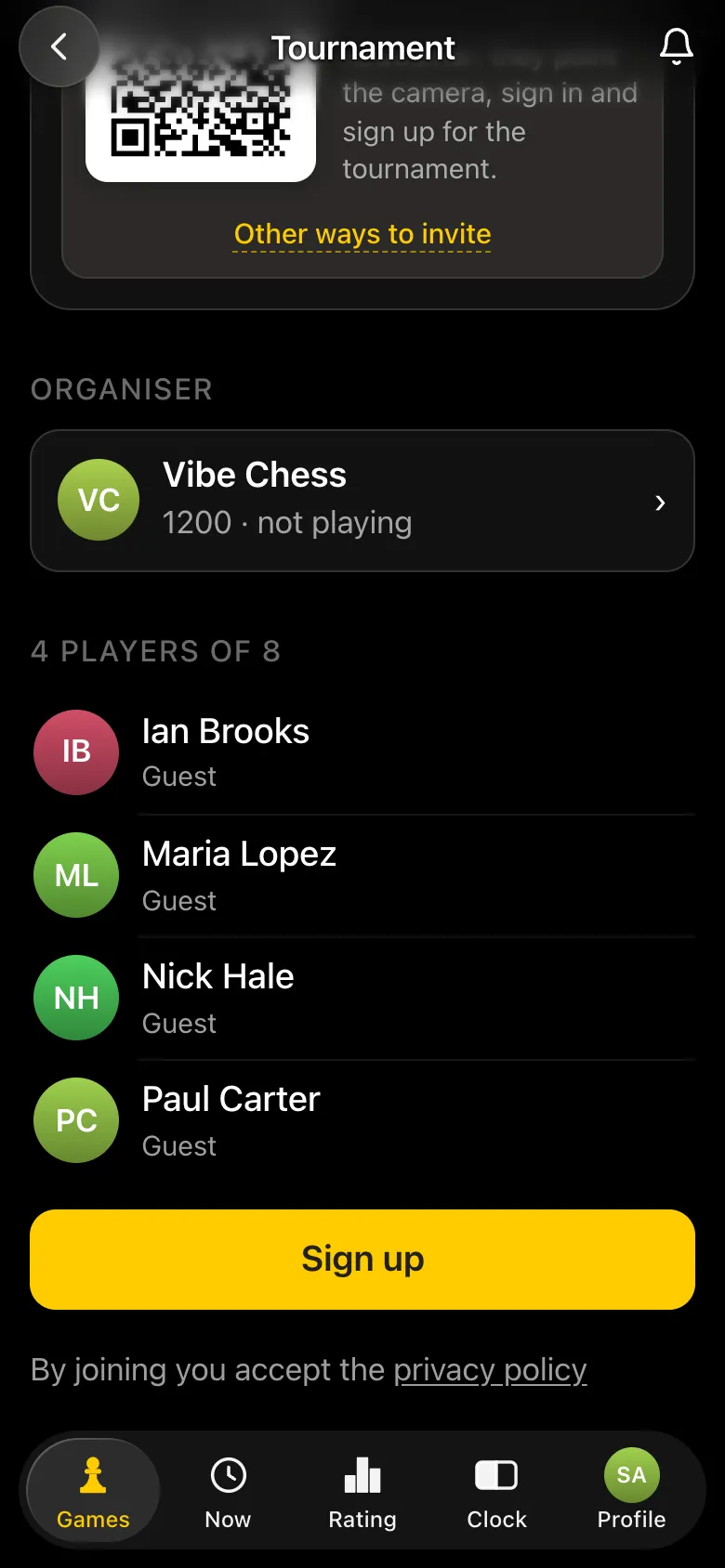
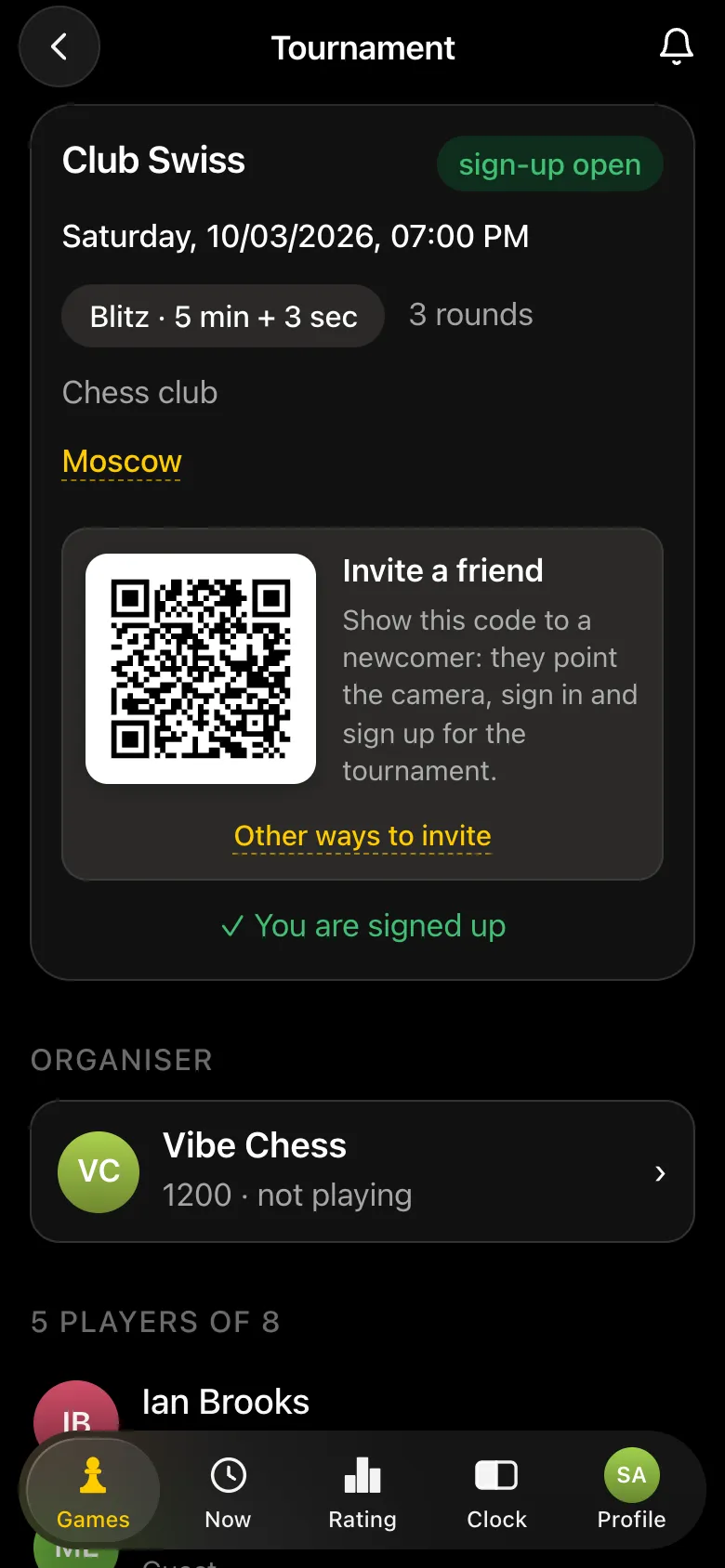
The tournament card immediately shows an Invite a friend QR code: a person points their camera, opens the app and signs up. Other ways to invite gives you Invite via Telegram, Invite via VK and Copy the link for the group chat. The Instant entry switch puts whoever scans the code straight into the field.
Step 3. Players sign up themselves
Following the link, a player sees the same card and taps Sign up, logging in with Telegram or VK ID. Nothing more is needed from the organiser: the player appears in the field and gets their pairing on their phone every round.
Step 4. Add guests without a phone by name
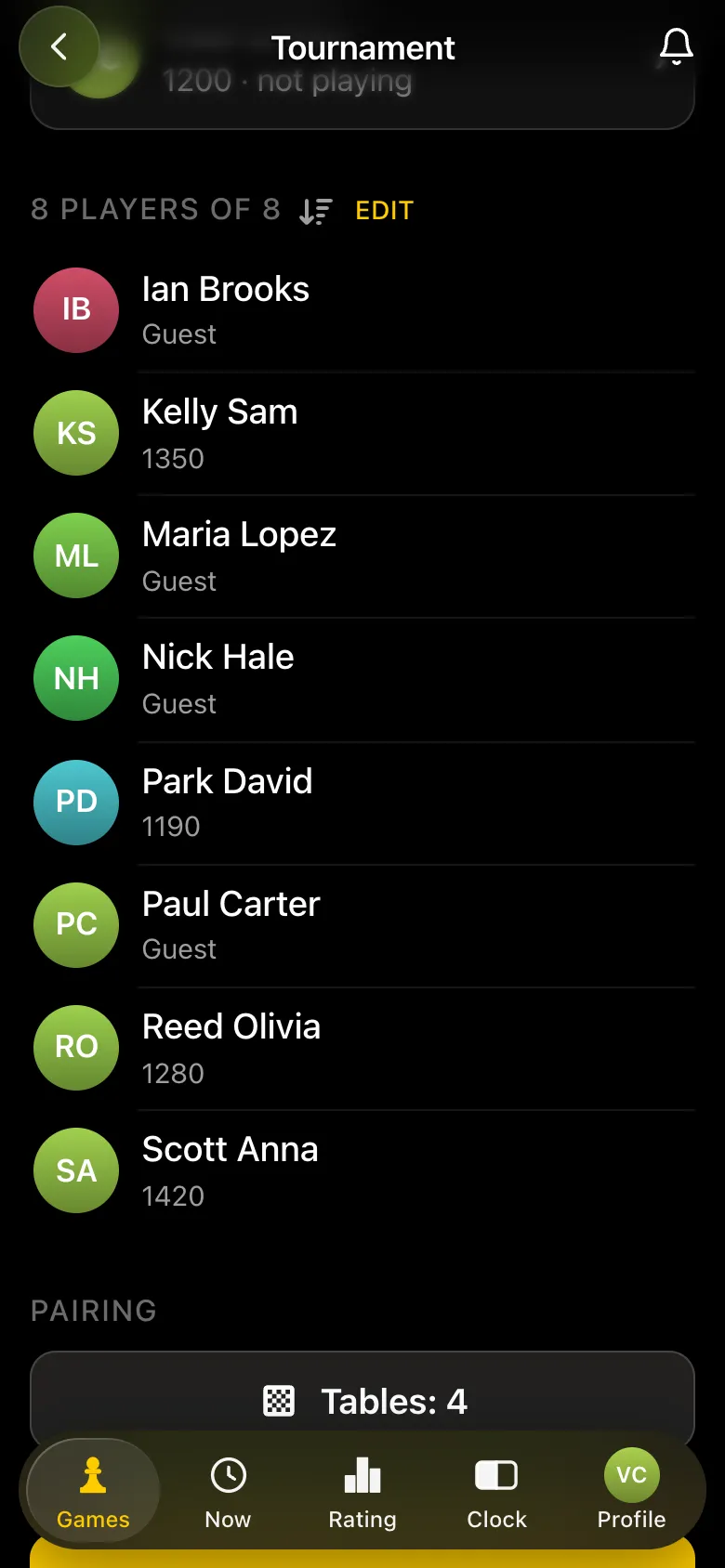
Some people do not need the app or have no phone to hand - the organiser adds them as guests: a name and the Add button, as shown in the round-robin walkthrough. Players and guests play in the same event: players show their rating in the field, guests are marked Guest. The organiser can play too, or just run the event by switching their own row off.
Step 5. Pairing by score: pairs, colours and tables
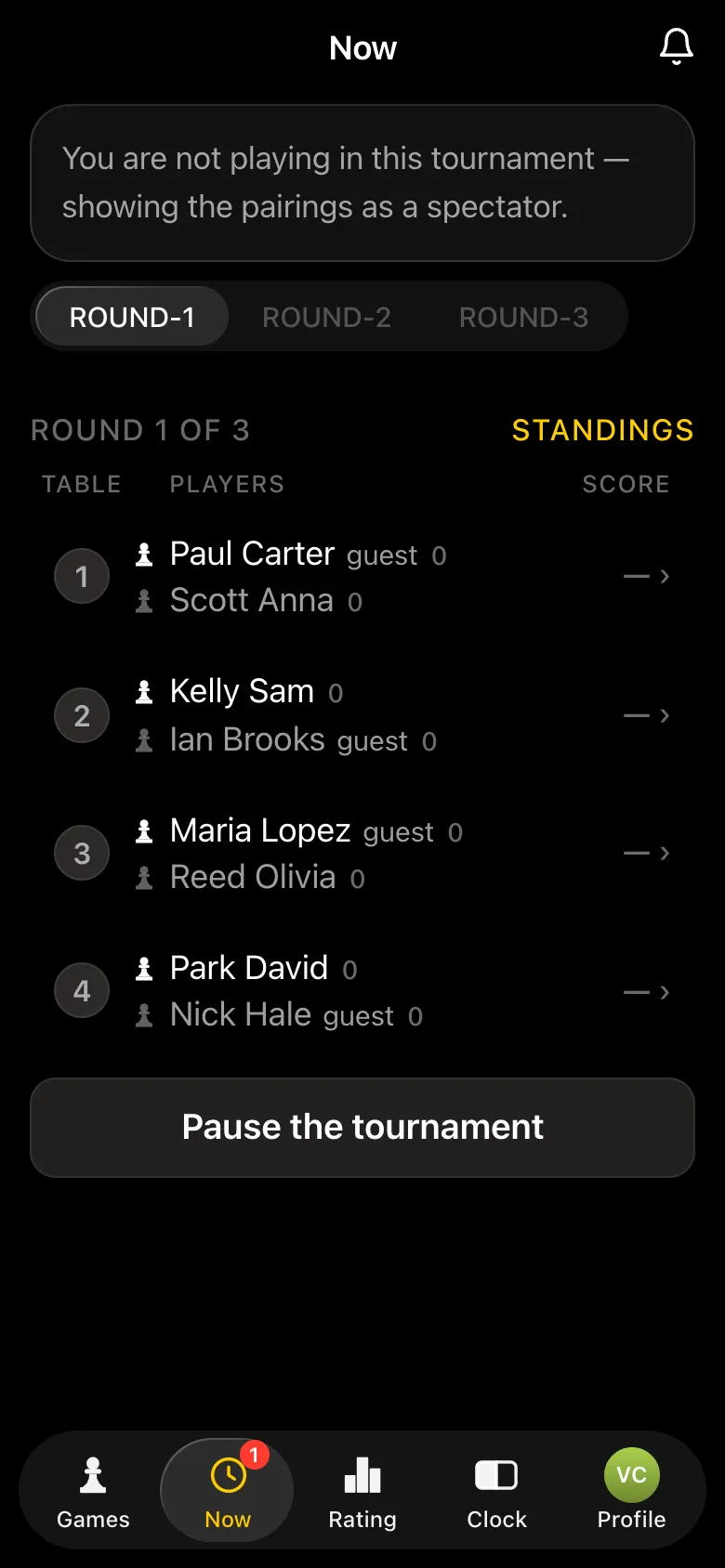
Tap Start the tournament and the app builds round one itself: FIDE Dutch-system pairing on the bbpPairings engine. Pairs are matched by score and rating, nobody meets twice, colours alternate, and with an odd field one player gets a bye worth a point. Each next round appears on its own as soon as every result of the current one is in, and Pause the tournament holds it if you need a break.
Step 6. On the player's phone: their table, colour and opponent
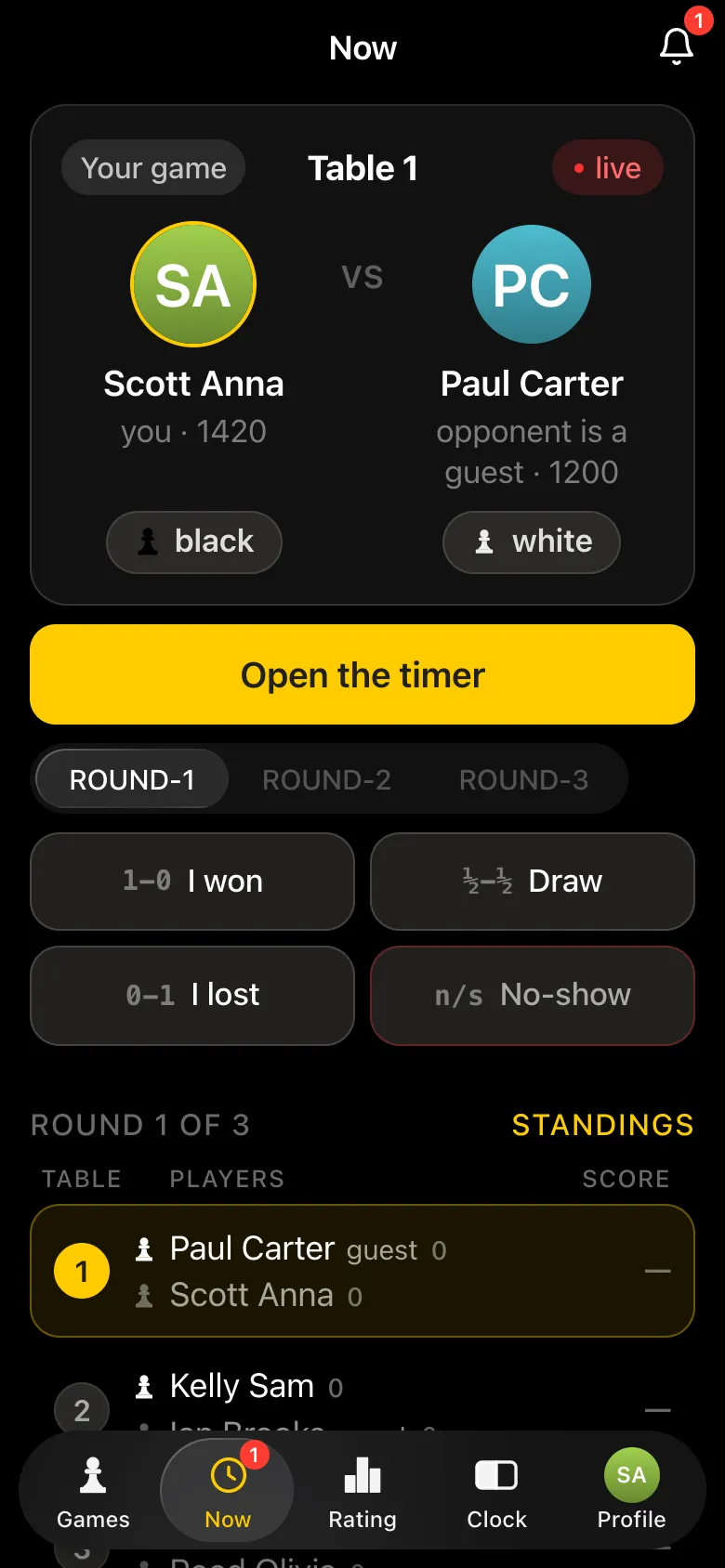
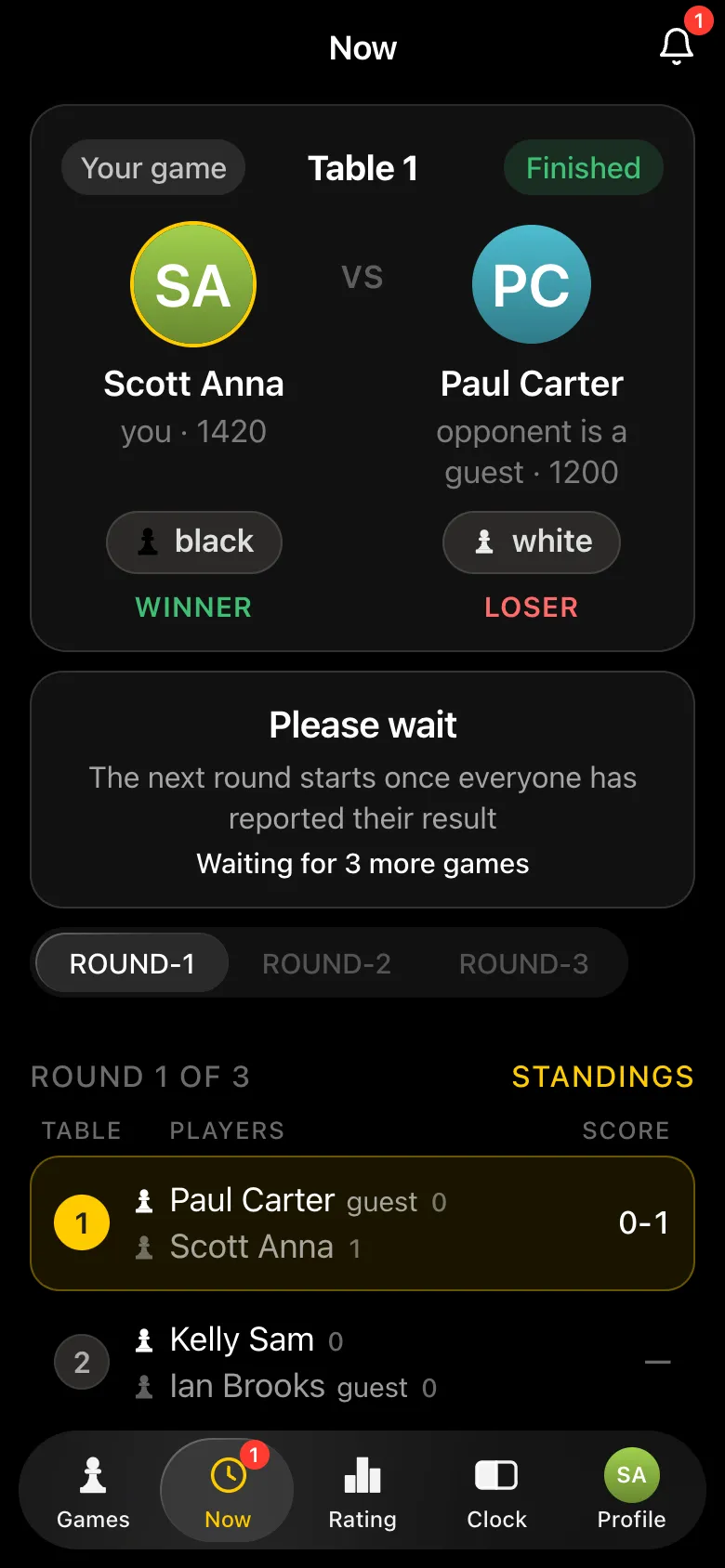
A player with the app sees their own game: table number, colour, the opponent with their rating and an Open the timer button - the chess clock is right there. After the game they report the result themselves: I won, Draw, I lost or No-show. Then the screen shows how many games in the round are still going.
Step 7. The opponent confirms the result
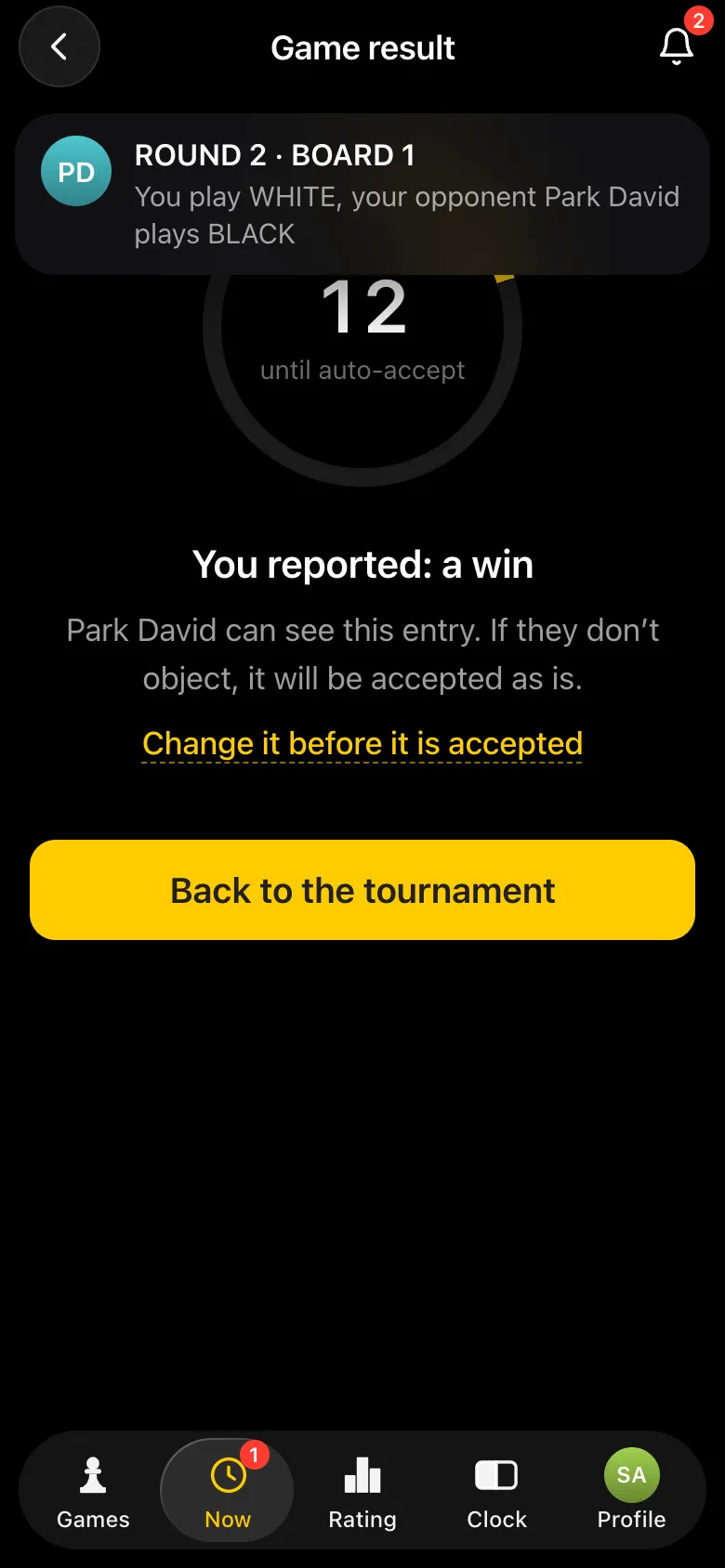
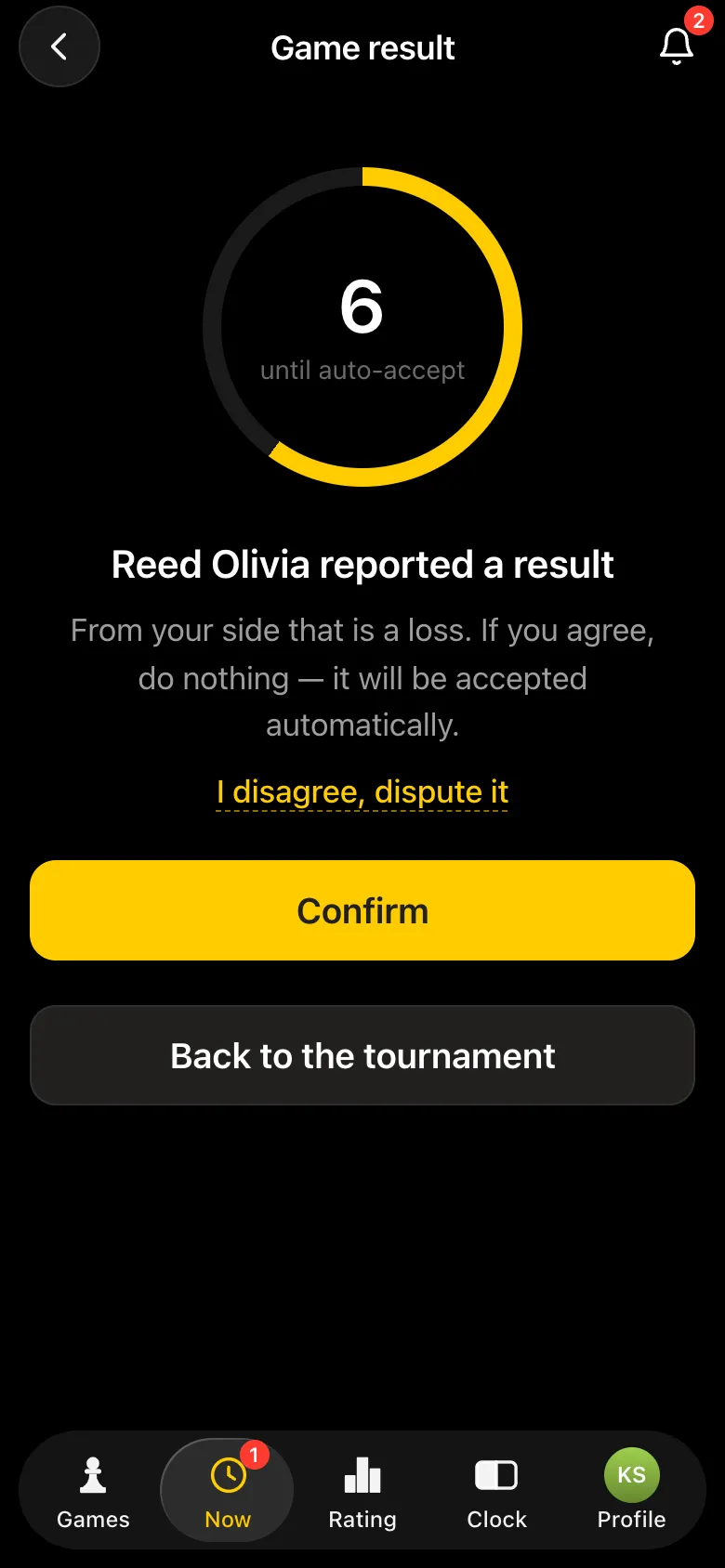
If both players use the app, one player's report is shown to the other at once: Reed Olivia reported a result, from your side that is a loss. They can tap Confirm or I disagree, dispute it - then the players sort it out at the board and report again. If nobody objects, the result is accepted automatically after 15 seconds. Against a guest it is accepted straight away.
Step 8. The organiser enters guests' games
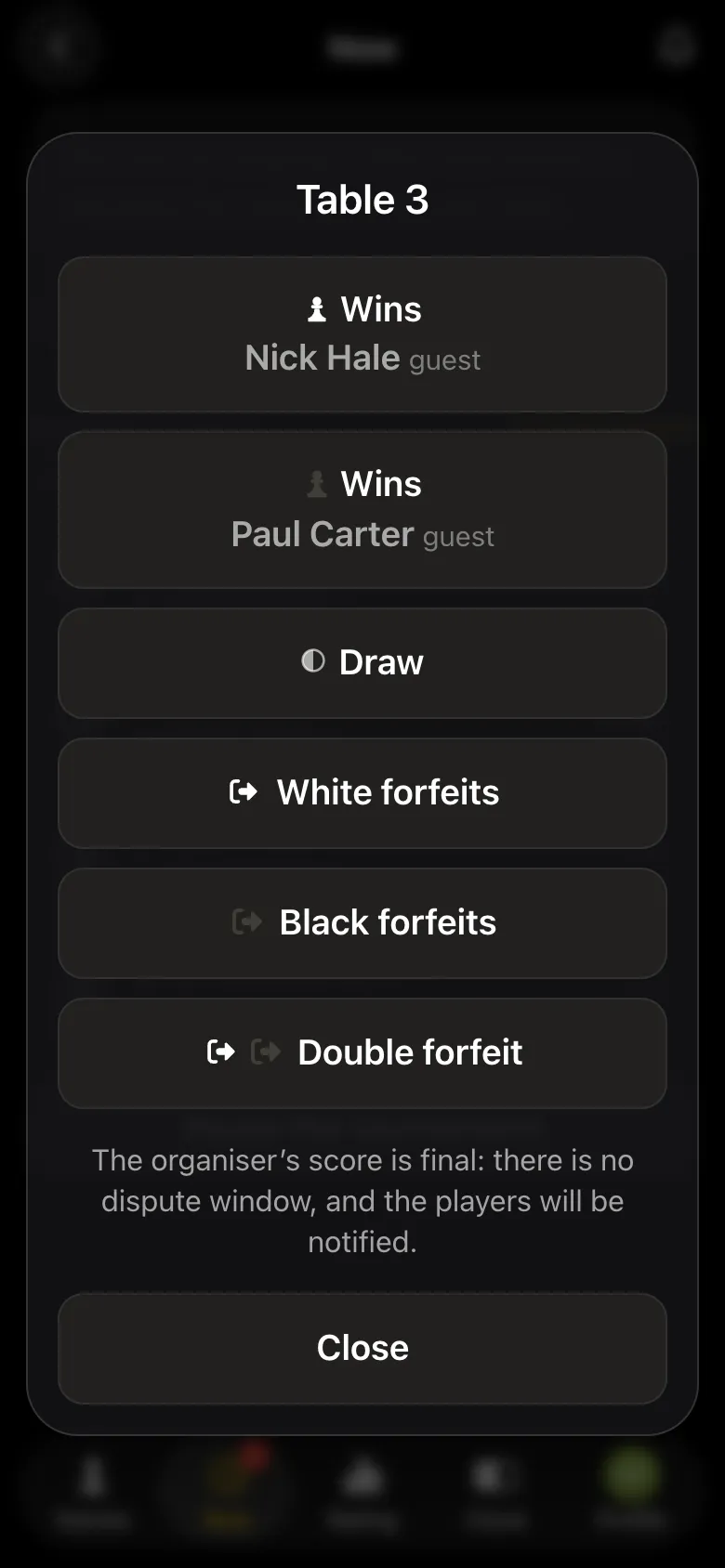
For pairs without a player on the app, the organiser enters the result: tap the pair and choose White wins, Black wins, draw, a forfeit by either side or a double forfeit. The organiser's score is final.
Step 9. Standings with Buchholz after every round
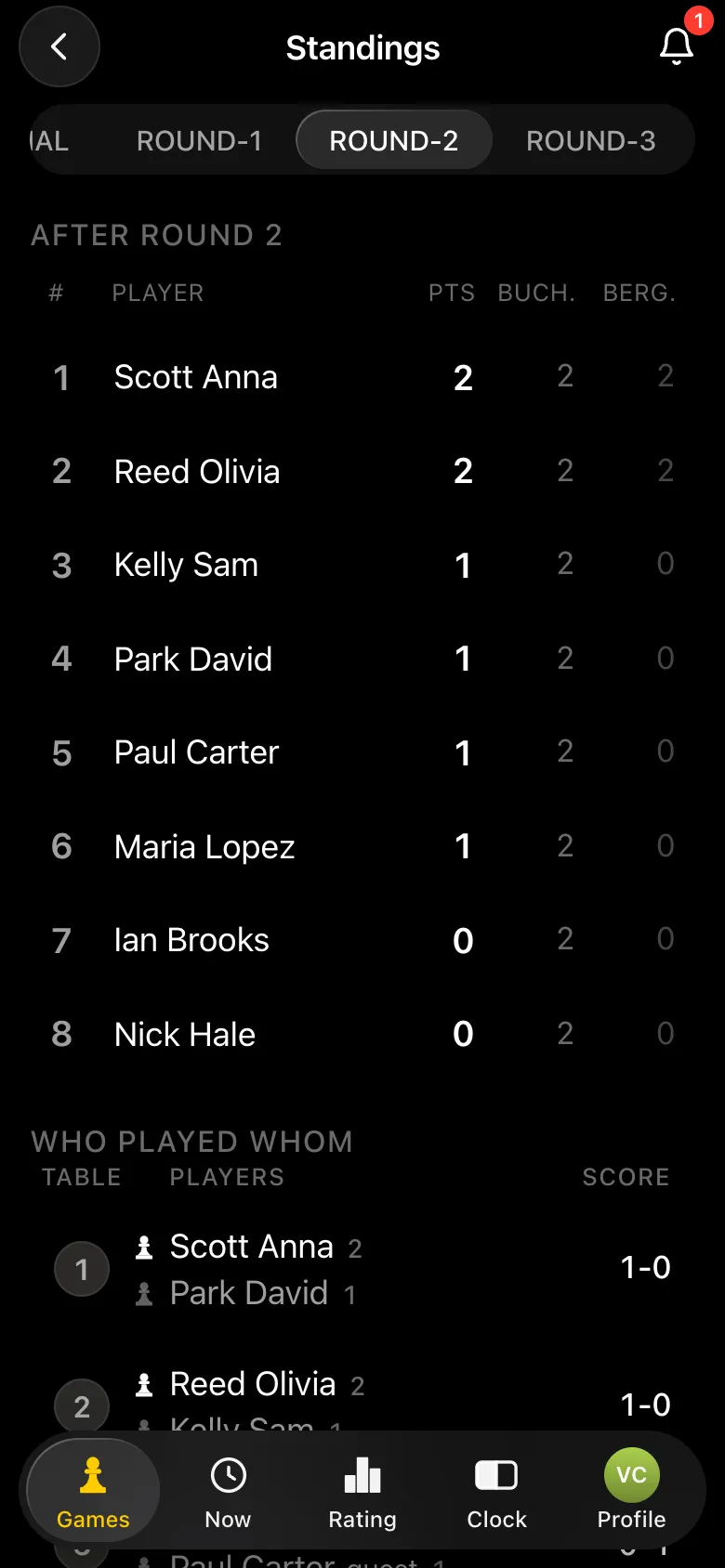
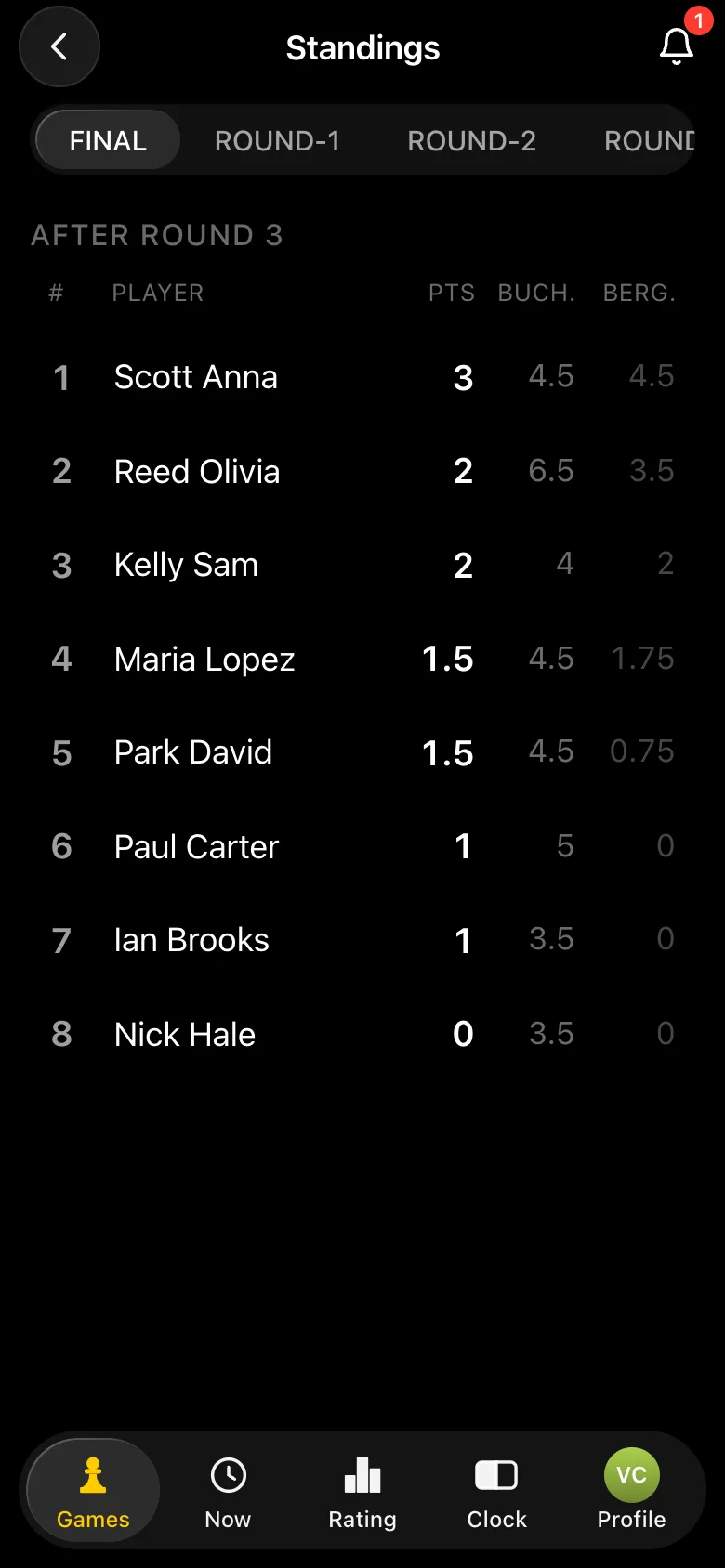
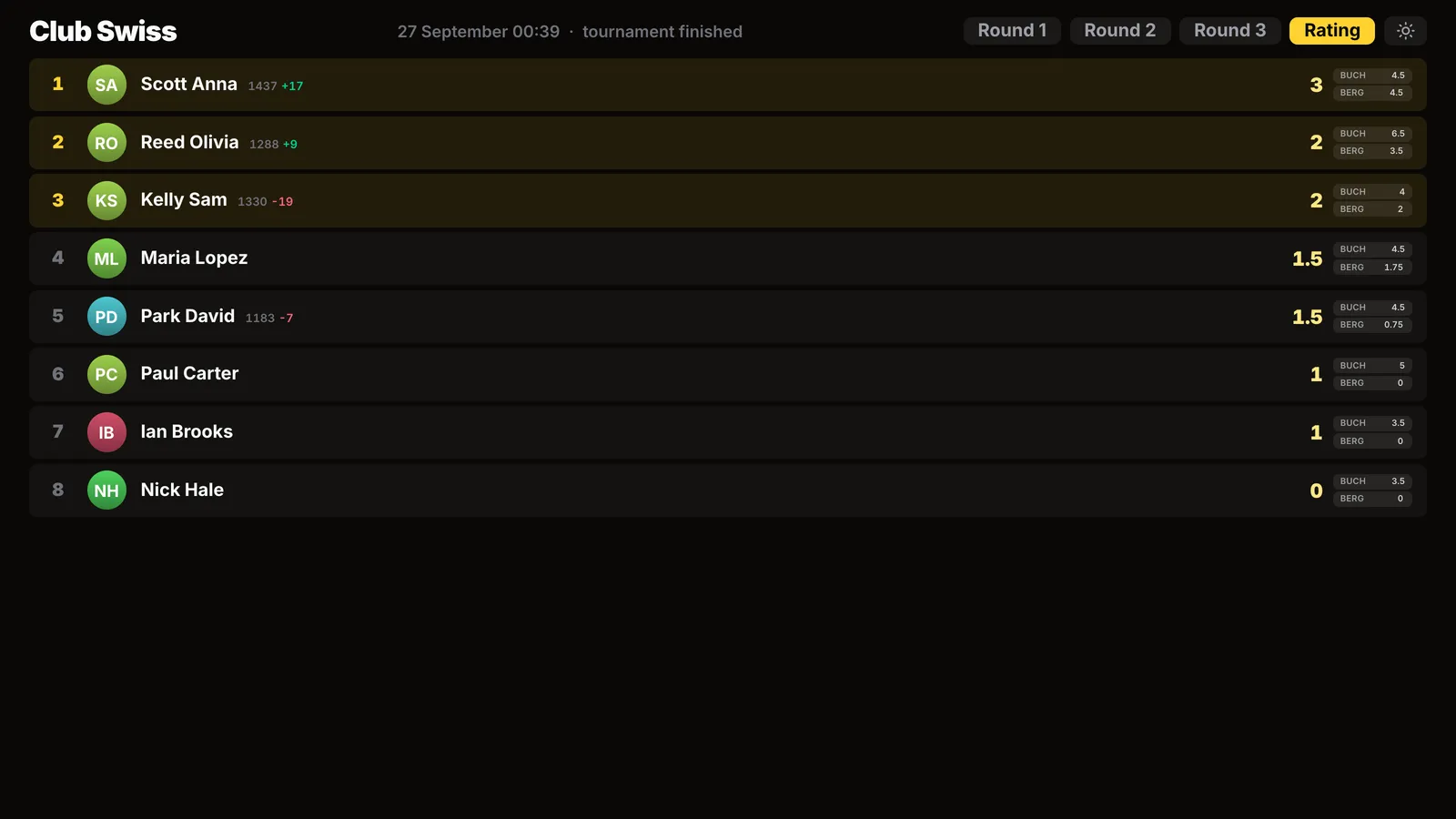
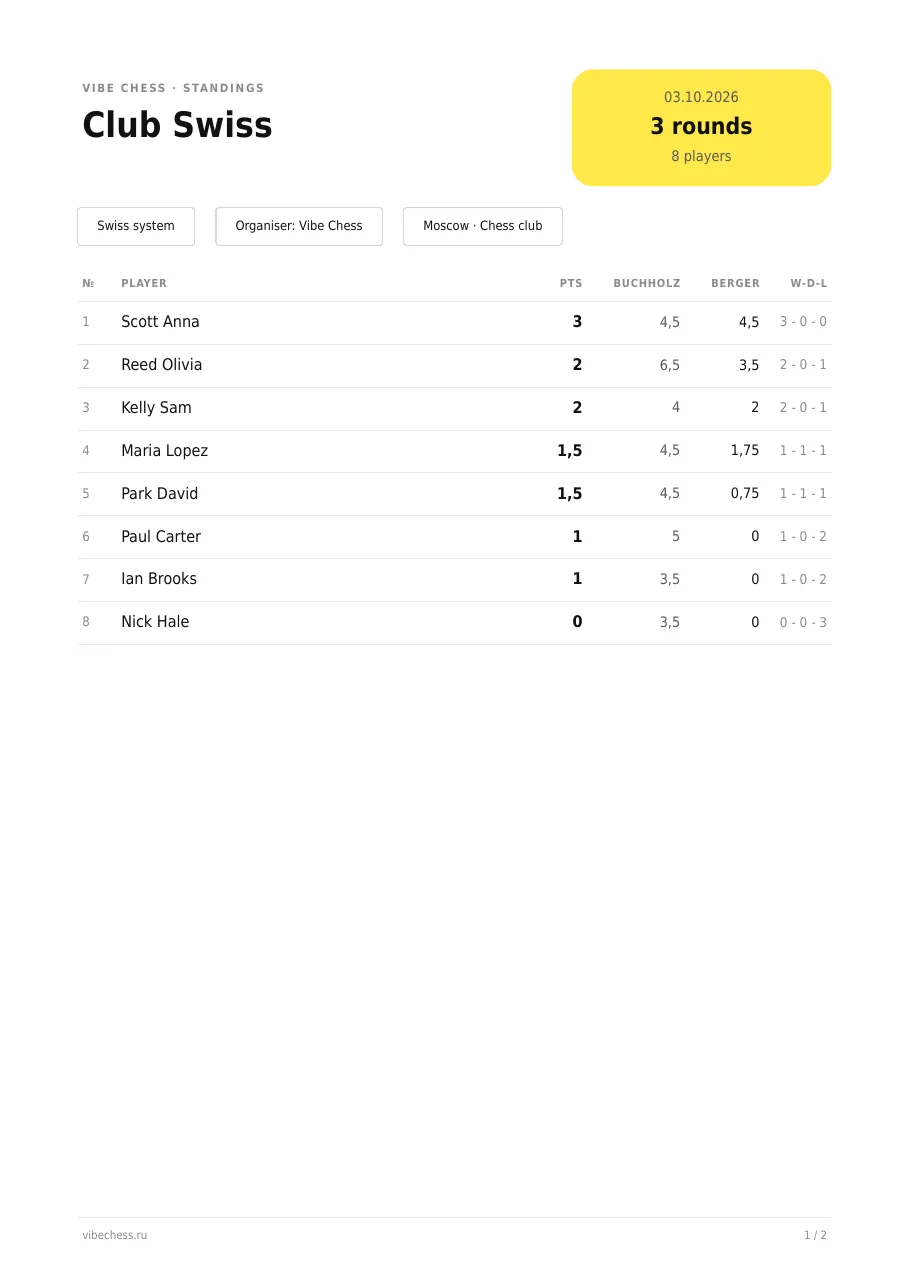
The table is recalculated after every round: points, the Buchholz score and Sonneborn-Berger, and the round tab adds who played whom. When points are level in a Swiss, Buchholz decides first: Olivia and Sam both scored 2, Olivia is second (6.5 against 4). If points and Buchholz are both level, Sonneborn-Berger decides: Maria and David have 1.5 and 4.5 each, Maria is higher (1.75 against 0.75). Players with an account see their rating change after the event; guests have no rating.
Step 10. Results: projector, PDF and TRF report
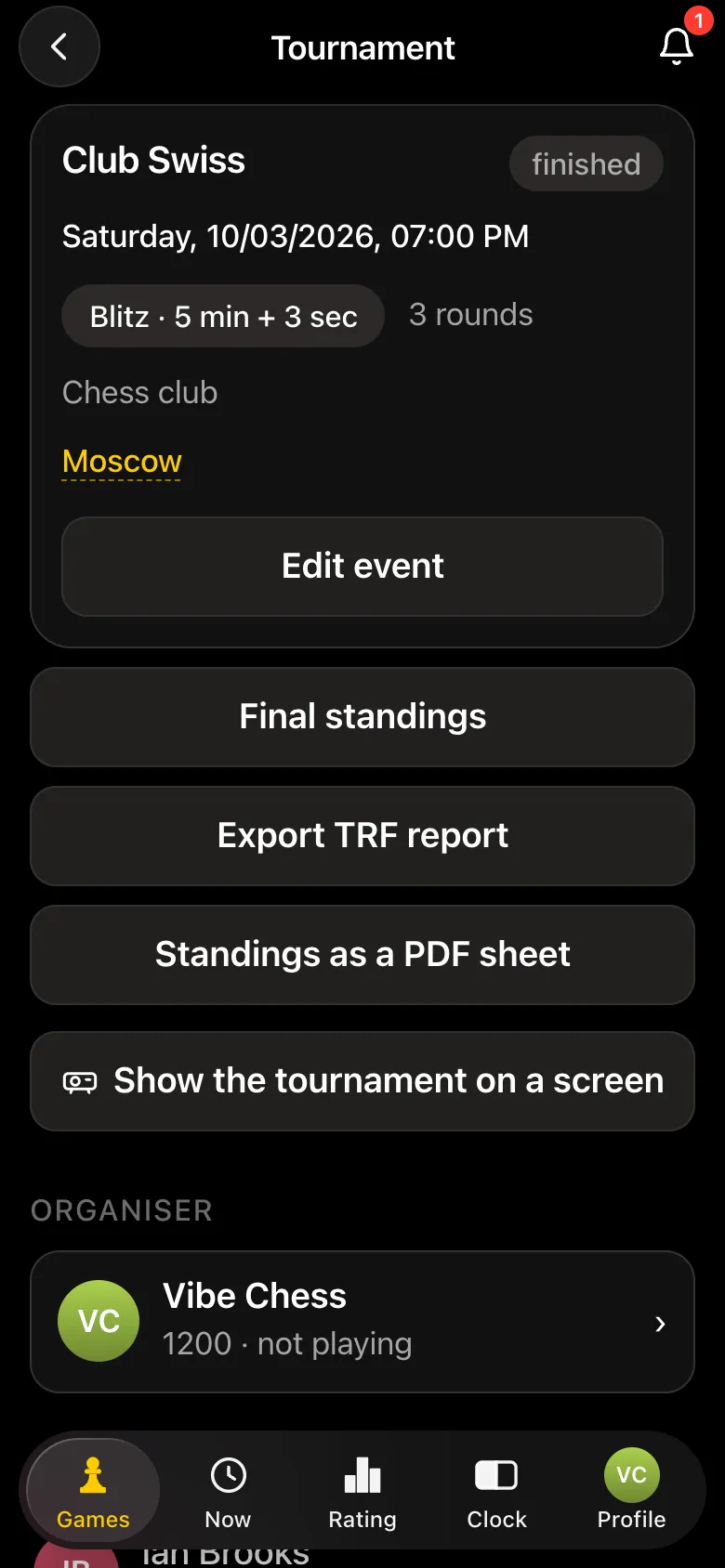
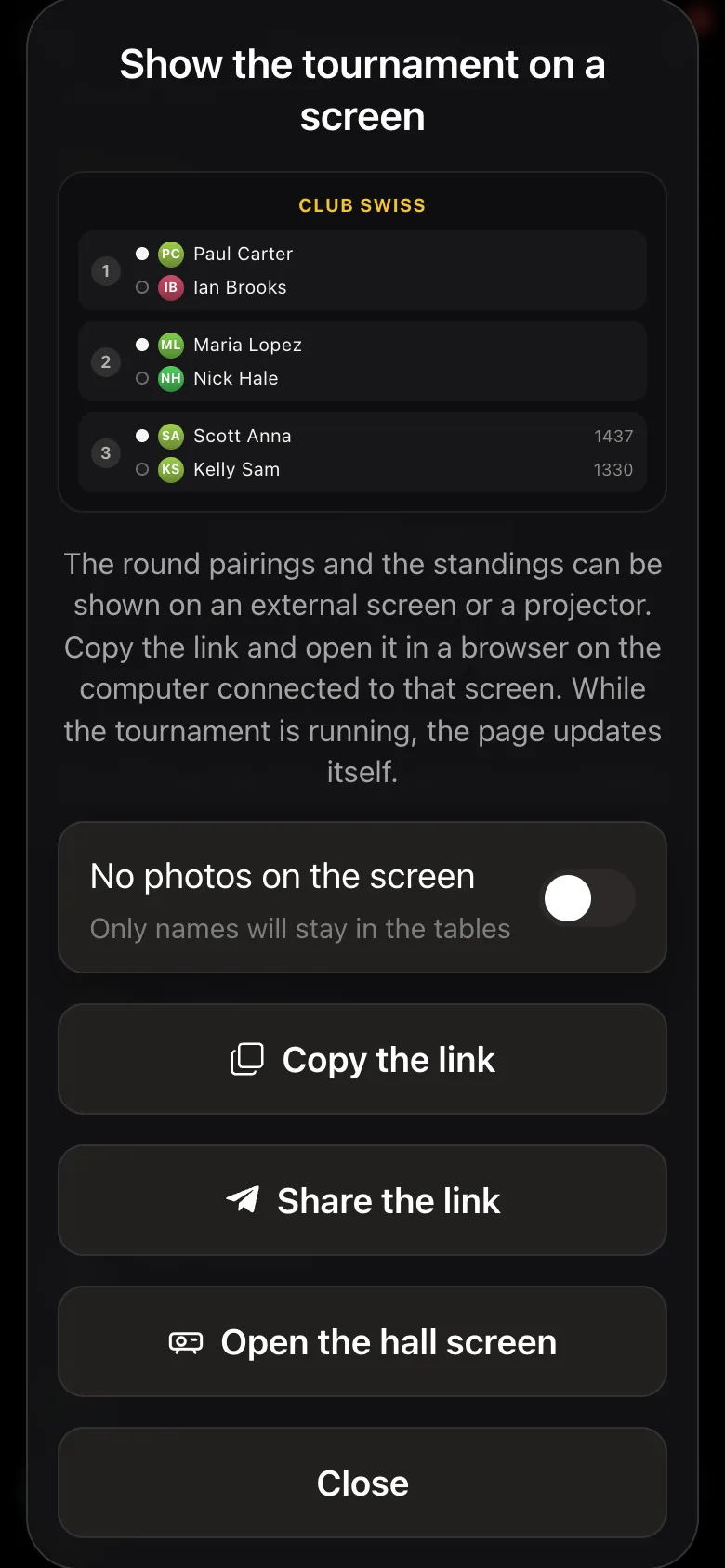
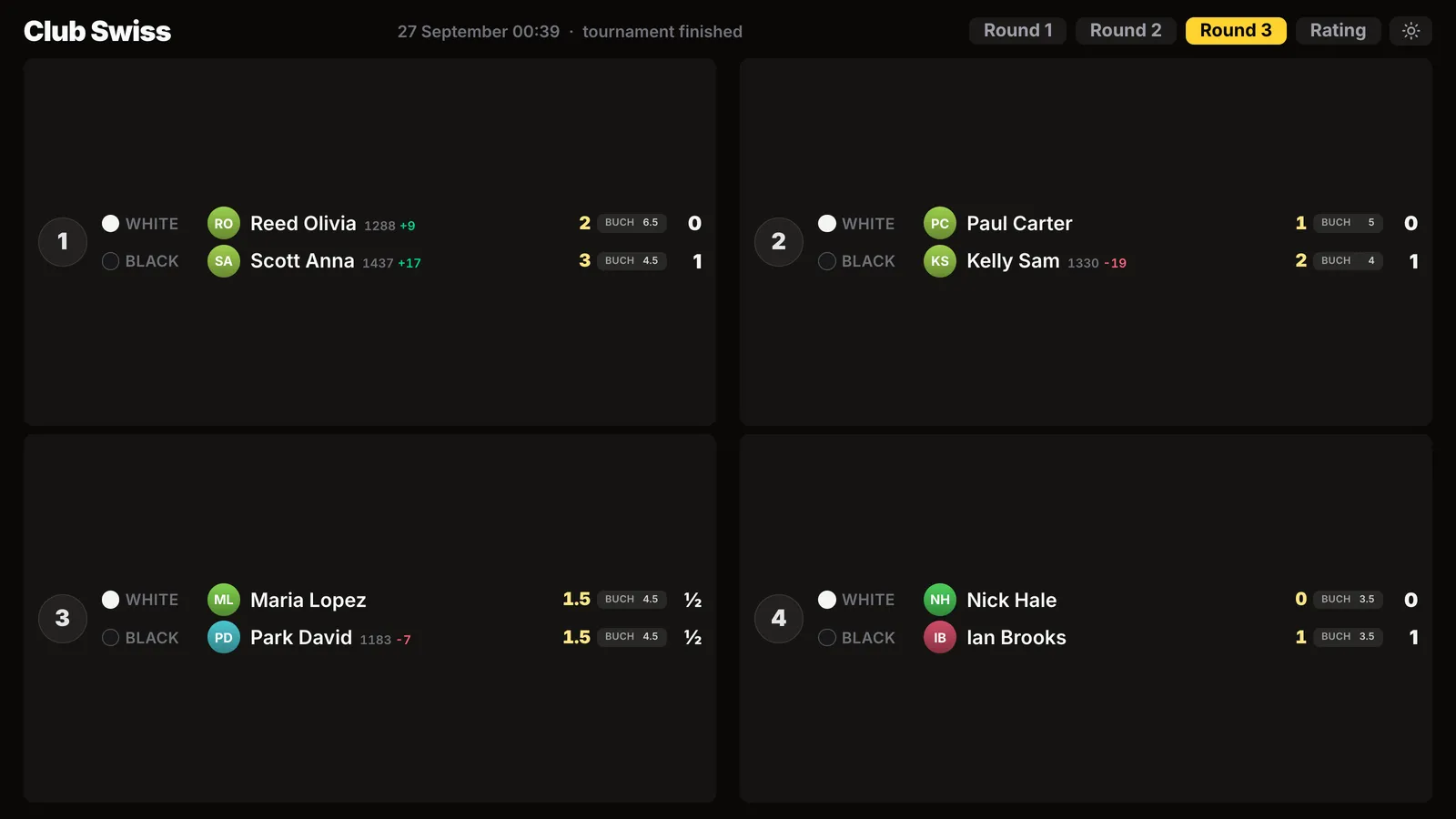
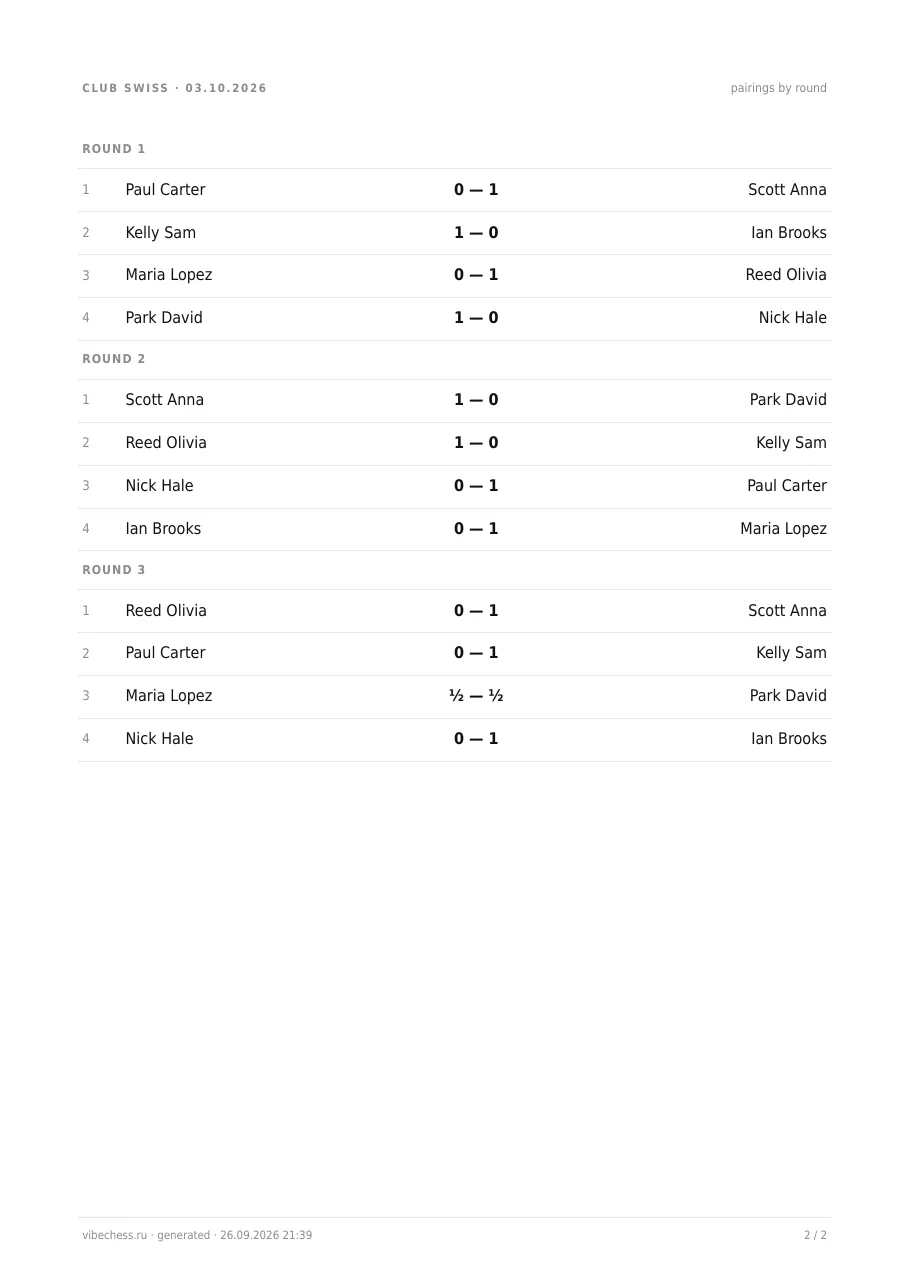
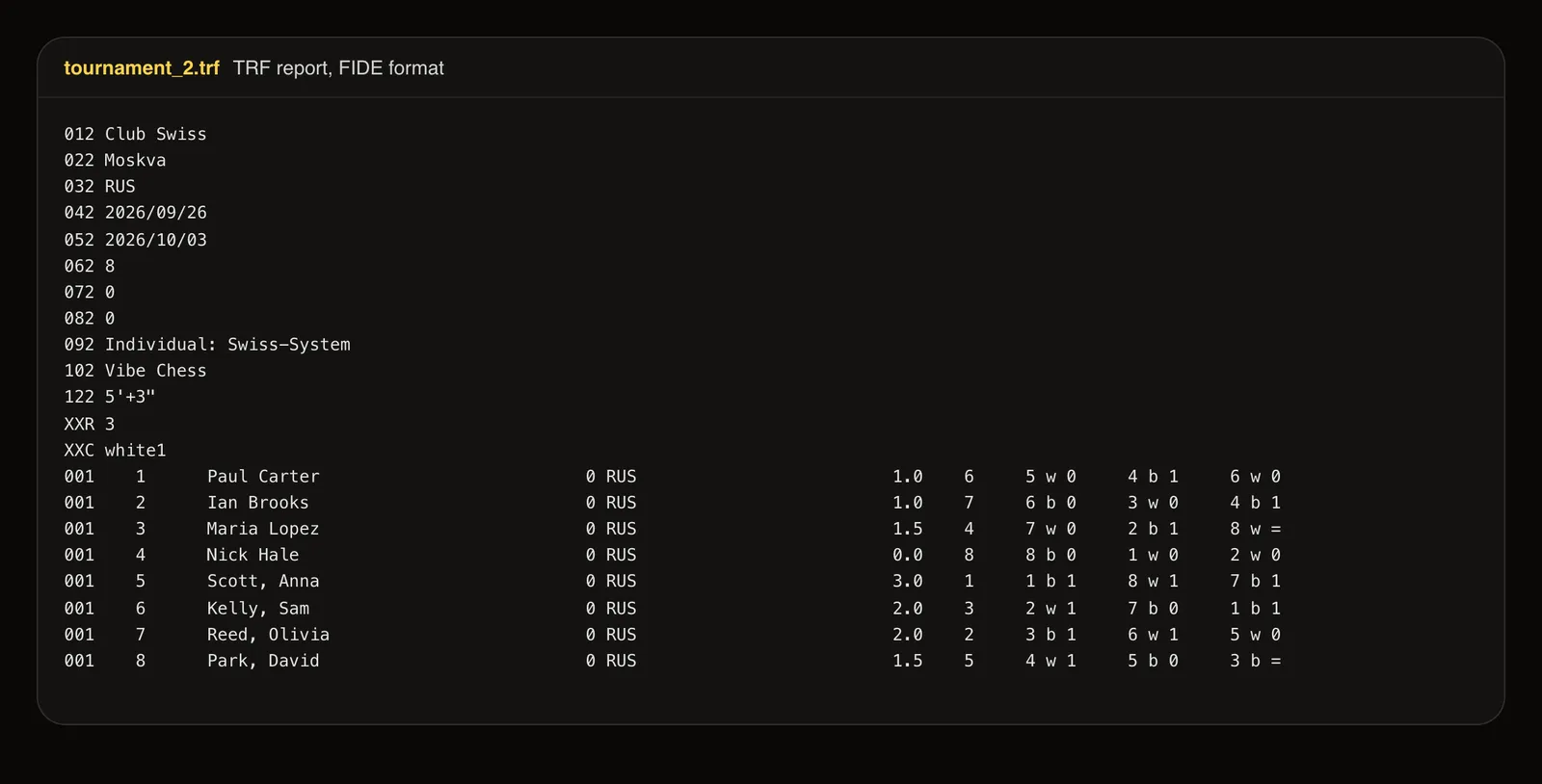
A finished event card has Final standings, Export TRF report, Standings as a PDF sheet and Show the tournament on a screen. The hall screen opens in a browser on the computer with the projector or TV: round pairings and standings large, updating themselves, with each player's rating change next to their rating. The PDF sheet is the final table on A4 plus every pairing by round on page two - print it for the wall. The TRF report in FIDE format goes to your federation: the event header and every game of every player with colour and result. The PDF and TRF arrive in the organiser's chat with the Telegram bot.
What the app gives a Swiss organiser
- FIDE Dutch-system pairing after every round - no paper slips, no recalculating.
- Players sign up themselves by link or QR code, get their table, colour and opponent on their phone and report their own results.
- Guests without Telegram or an account - added by name, in the same event as everyone else.
- The opponent confirms each result, and a wrong entry can be disputed.
- Standings with Buchholz and Sonneborn-Berger after every round; players' ratings are updated.
- A hall screen, a printable PDF sheet and a TRF report for your federation.
- Free, in a browser or in Telegram, nothing to install.
What the Swiss system in chess is
The Swiss system is a tournament format invented in Zurich in 1895 for a chess event with a large field. Since then it has become the standard for open chess tournaments, from club blitz events to national championships. The name “Swiss” stuck from the city where the system was first used.
The key idea
In every round players on the same or a similar score meet each other. Nobody is eliminated - every player plays every round whatever their results. The winner is decided on the total points for the tournament rather than by knockout. That makes it possible to run a full competition among 30-100 people in just 5-6 rounds.
How the pairs are formed by round
In round one the pairing is either random or by rating: the top half plays the bottom. From round two the players are split into groups by points scored: those on 1.0 in one group, those on 0.5 in another. Inside a group the players are sorted by rating and split in half again - the top half plays the bottom. The main rule: the same pair never meets twice in the whole tournament.
Colour alternation
In chess the colour matters: the first move gives White a statistical advantage. So when the pairs are made the system keeps an eye on the colour balance - every player should have White and Black roughly the same number of times. Where two pairings are otherwise equal, preference goes to the one where both players get the colour they are “due”.
How many rounds a chess tournament needs
The minimum sufficient number of rounds is close to log₂(N), where N is the number of players. In practice:
- 8 players - 3 rounds
- 16 players - 4 rounds
- 32 players - 5 rounds
- 64 players - 6 rounds
- 128 players - 7 rounds
Organisers often add a round or two above the minimum, to separate players on the same score more precisely and reduce the role of the tie-breaks.
How places are split on equal points: the tie-breaks
If two players finish on the same score, tie-break scores are applied:
- Buchholz score - the sum of the points of all the opponents a player faced. The stronger those opponents were, the higher the score. The most common tie-break in a chess Swiss.More about the Buchholz score →
- The cut Buchholz- the same thing, but without the opponents' worst result (or the two worst). It reduces the effect of a randomly weak opponent met in round one.
- The progressive score- the running total of a player's points after every round. It rewards those who won early rather than picking up points only in the last rounds.
- The number of wins - the number of games won outright (rather than drawn). Used as the final arbiter when every other measure is equal.
The Swiss system against the other formats
| Format | Elimination | Rounds with 32 players | When it suits |
|---|---|---|---|
| Knockout | Yes | 5 | Cup competitions, the final stages |
| Round robin (everyone plays everyone) | No | 31 | Small groups of up to 12, match tournaments |
| Swiss | No | 5–6 | Open tournaments from 10 to 500+ players |
It is exactly this balance - nobody eliminated, only 5-6 rounds, an objective result - that made the Swiss system the standard for open chess competitions. A tournament for 50 people can be run in a single evening.
An odd number of players: the bye
If the number of players is odd, one of them is left without a pair each round. That player receives a bye - a point with no game. Under the rules each player can have a bye no more than once in the whole tournament, and it goes to the lowest-rated player among those who have not had one.
Frequently asked questions
What is the Swiss system in chess?›
The Swiss system is a tournament format in which the players play a limited number of rounds and the pairs are formed on the basis of the current scores. Players on similar scores usually play each other, and repeat meetings are avoided. There is more on the pairing page.
How do I pair a chess tournament online?›
Create a tournament, add the players and start generating the pairs. The service will make a Swiss-system pairing, after which you can enter the results and move on to the next round. The whole process takes a few minutes.
Can I run a tournament without Excel?›
Of course. The players, the pairings, the results and the table all live in one browser window. There is nothing to recalculate by hand and no formulas to check between rounds.
Does the service suit go or draughts tournaments?›
It does. The logic of the Swiss system works the same for chess, go, draughts, renju and other games with rounds, points and sides to allocate.
What do I do if the number of players is odd?›
With an odd field the service automatically handles the player left without a pair in the current round - that is called a bye. Such a player gets 1 point with no game. Each player can have a bye no more than once in the whole tournament.
Can I use the service for a school tournament?›
A class or year-group championship is run exactly like a club tournament: the teacher adds the pupils, plays 5-6 rounds and gives the parents a link to the table. You do not have to know the tie-break formulas - it is all worked out automatically.
Does the service calculate the Buchholz score?›
Yes. When players are level on points the service uses tie-break scores, the Buchholz among them, for the Swiss system. There is more on how it is calculated on the Buchholz page.
Can players see their own pairings and report results in a Swiss event?›
Yes, in the Vibe Chess app. Players sign up by link or QR code, see their table, colour and opponent on their phone every round and report the result themselves after the game. The opponent confirms or disputes it, and with no objection the score is accepted after 15 seconds. The next round is built on its own once every result is in.
Can one event mix players with the app and guests without a phone?›
Yes. The organiser adds guests by name, with no Telegram or account, and enters their game results. Players and guests play in the same event, with one pairing and one standings table.
How do I get Swiss results as a PDF and a TRF report for my federation?›
A finished event card has Standings as a PDF sheet and Export TRF report. The A4 sheet with the final table, Buchholz and every pairing by round, and the FIDE-format report, arrive in the organiser's chat with the Telegram bot.
Create a tournament right now
Open the app, add the players and run a Swiss-system chess tournament online in a minute. No Excel, nothing to install and nothing to recalculate by hand.
The web app works in any browser. The Vibe Chess bot on Telegram is for people who want to run the tournament from a phone.