A Swiss, a round robin, a timed arena or two-against-two bughouse - all of them are set up in one free app in a couple of minutes. Below: how the formats differ and which one fits your group, then every step from an empty screen to the final standings. Every screenshot is a real screen of the app; the players in them are made up.
The key question is what limits your evening. A Swiss is limited by the number of rounds, a round robin by the field, an arena by time, while bughouse and a free meetup run until the organizer closes them. Not sure how many rounds fit? Work it out with Swiss or round robin.
| Format | Players | Limited by | Who picks the opponent | How places are decided | When to choose it |
|---|---|---|---|---|---|
| Swiss system | 8-200 | The number of rounds, which you set | The app, after every round, by score | Points, then Buchholz | A big field, or one you can't predict, on a time-boxed evening |
| Round robin | 4-10 | The field: everyone plays everyone once | A schedule for the whole event at the start | Points, then Sonneborn-Berger | A small group where everybody wants to play everybody |
| Arena | 4+ | Time: from 30 minutes to three hours | The app, as soon as your game ends | 2/1/0 points within the time | People come and go, nobody wants to wait for the last board |
| Bughouse | 4+ | Nothing, until the meetup is closed | Pairs pick who to play | The pair's score and rating | A fun night, two against two on two boards |
| Team Swiss | 16+ | The number of rounds | The app, pairing teams Swiss-style | Team and individual standings | A company event, a match between departments or clubs |
| Free meetup | any | Nothing, until the meetup is closed | The players themselves | Each player's own rating | A club night with no bracket |
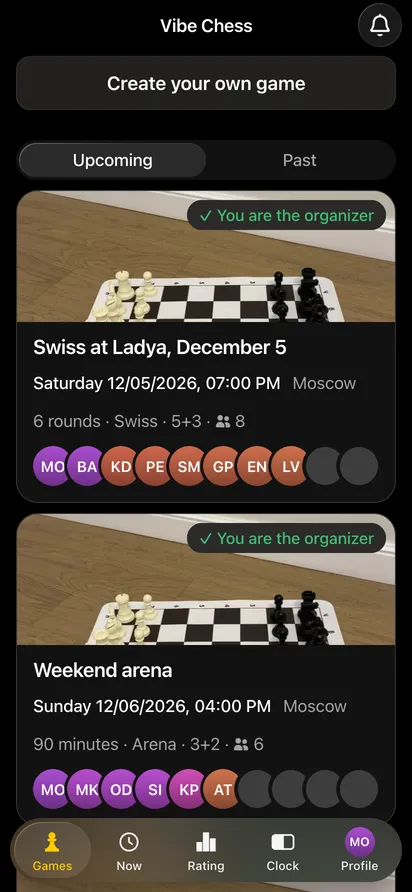
The app opens from a link and needs nothing installed: it is a web page that works in the phone's browser and inside Telegram. The first screen is the Games tab: “Create your own game” at the top, and below it the upcoming events in your city, including your own, marked “You are the organizer”.
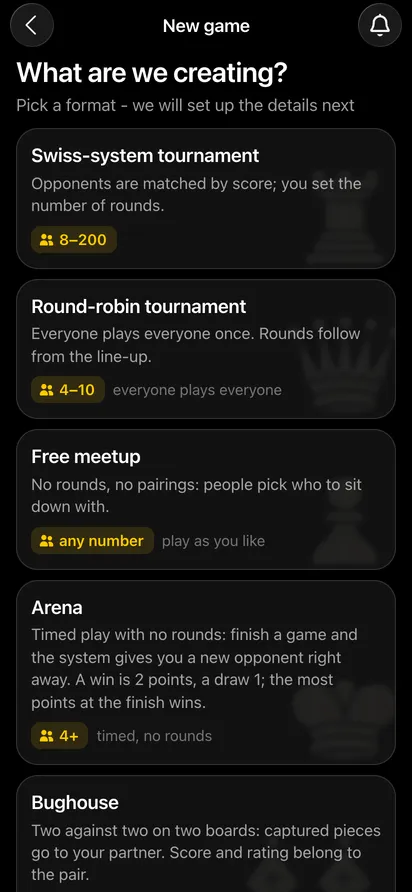
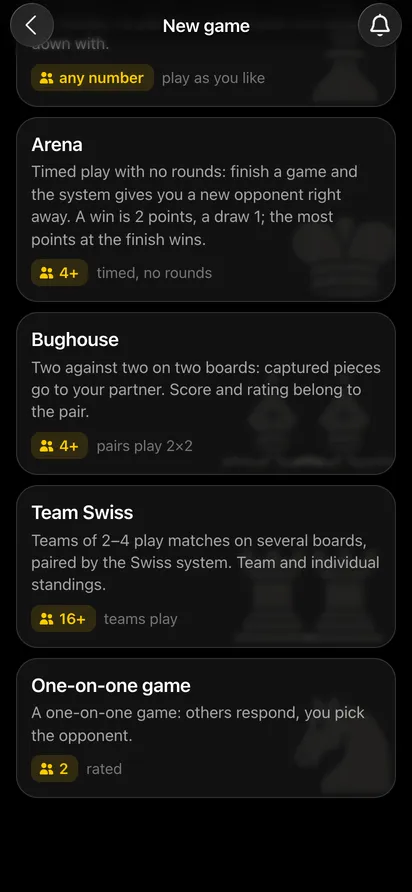
The “What are we creating?” screen shows every format at once, each with the field size it suits. Tap a card and you get the form for that format: the arena gets a duration, the round robin loses the round count, bughouse has no pairing at all.
Picked the wrong one? No harm done: the system can be changed in the event settings until the tournament starts.
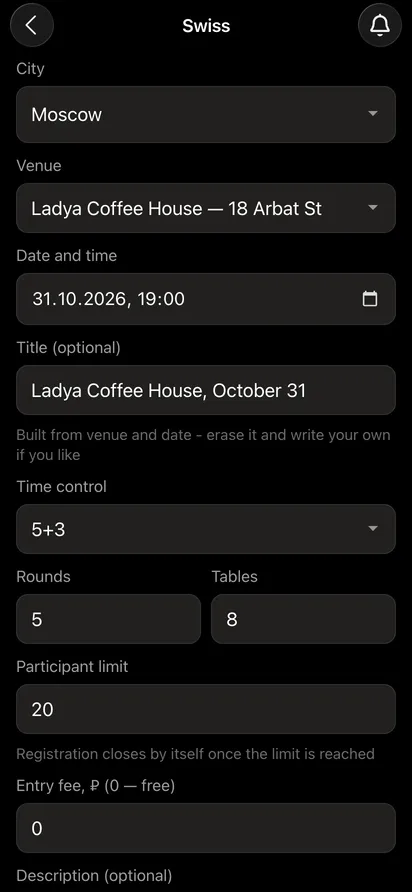
The city is already set, and the venue comes from the places where you have run events before, or you add a new one: name, address, map link and a photo of the room. The photo then appears on the card of every event at that venue.
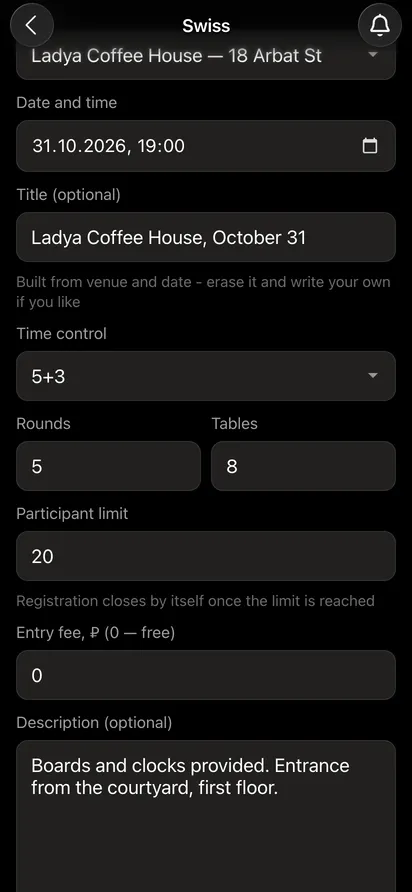
You don't have to invent a title - the app builds one from the venue and the date, and you can overwrite it. Then the time control from 1+1 to 90+30, the number of rounds and tables, the participant limit (when it is reached, sign-up closes by itself) and the entry fee. The description is the place for what usually gets lost in the chat: the courtyard entrance, the floor, whether to bring your own clock.
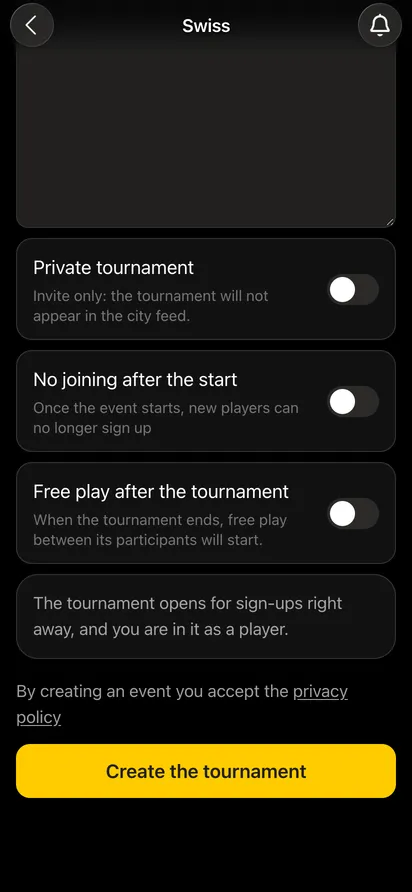
At the bottom there are three switches. “Private tournament” keeps the event out of the city feed, so people can only get in by invitation. “No joining after the start” shuts the door on latecomers. “Free play after the tournament” turns the evening into a meetup right after the last round, where people sit down with whoever they like.
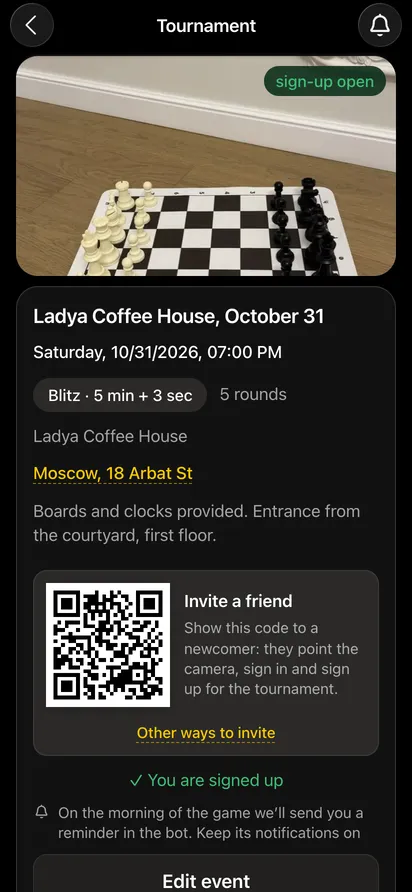
Once it is created you land on the tournament card, already signed up. The card carries an invitation QR code: show it at the table or on a screen, and people point a camera at it, sign in and join on their own.
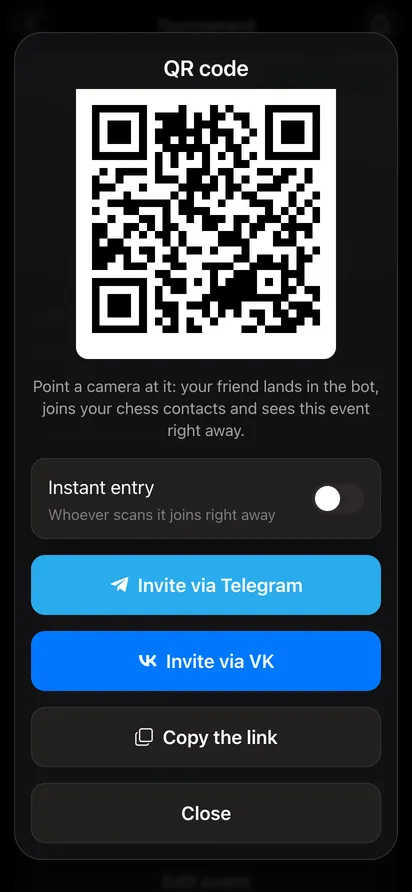
“Other ways to invite” opens the same code with three buttons: “Invite via Telegram”, “Invite via VK” and “Copy the link”. The “Instant entry” switch is for the room itself: whoever scans the code goes straight into the line-up without another tap.
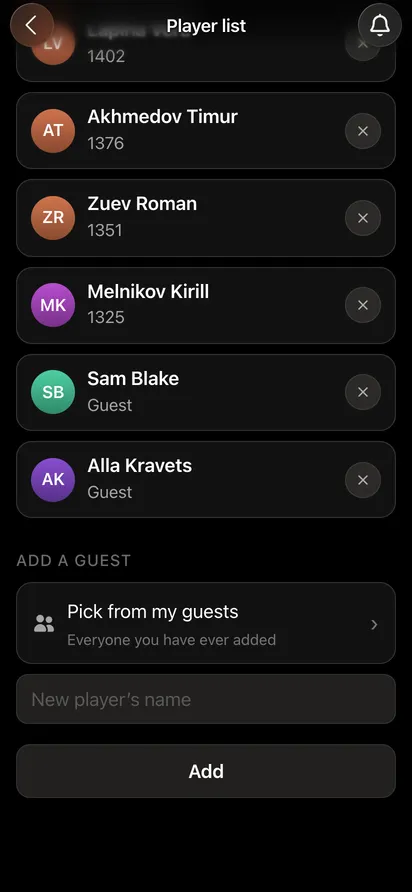
Not everyone who turns up has Telegram or wants to install anything. The organizer adds them: “Edit” above the player list, then the “New player’s name” field and “Add”. “Pick from my guests” brings back people you added on earlier evenings.
A guest is a full participant: they are paired, get opponents and a place in the standings - the organizer just enters their results. In the list they are labelled “Guest” instead of a rating. The same screen has “Split into groups” for a tournament that runs in several groups.
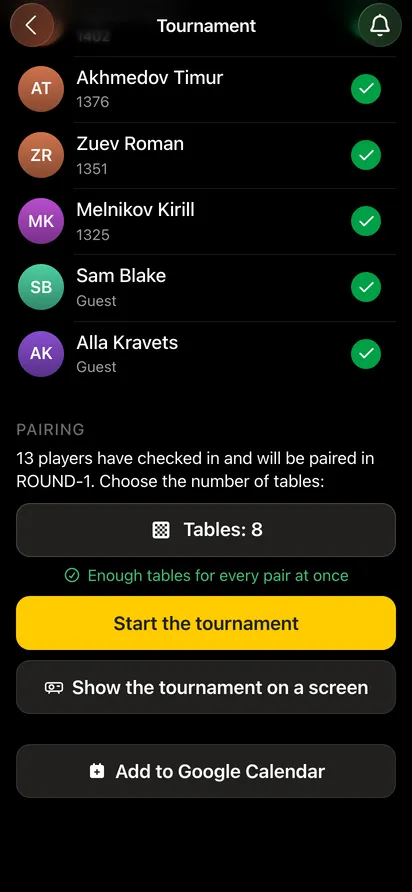
On the day, mark who has arrived: the circle next to a name, or a single tap on “Here” above the list to check everyone in. Only checked-in players go into the first pairing, so a no-show can't wreck a board. Under the list you can see whether there are enough tables for every pair.
“Start the tournament” asks for confirmation and announces the first round. What happens next depends on the format - each one is covered below.
The most common format for an evening of 12-30 people. Before every round the app pairs players on equal points, avoiding rematches and alternating colours. Nobody is knocked out, and five to seven rounds produce a winner whatever the field.
How many rounds to set for your field - see how many rounds a Swiss needs.
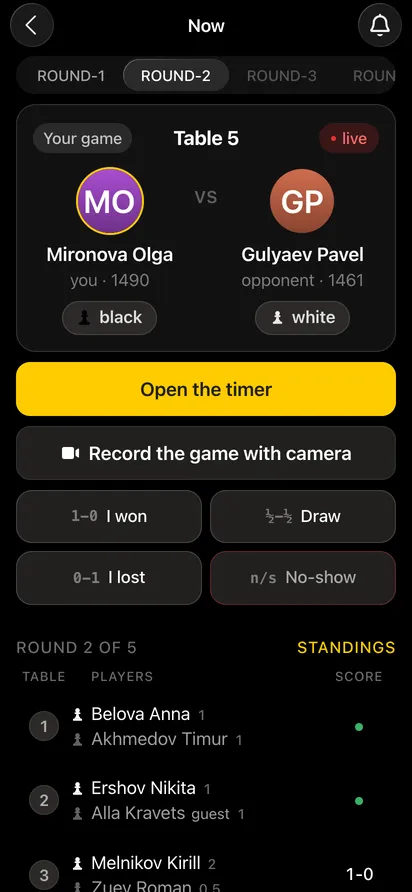
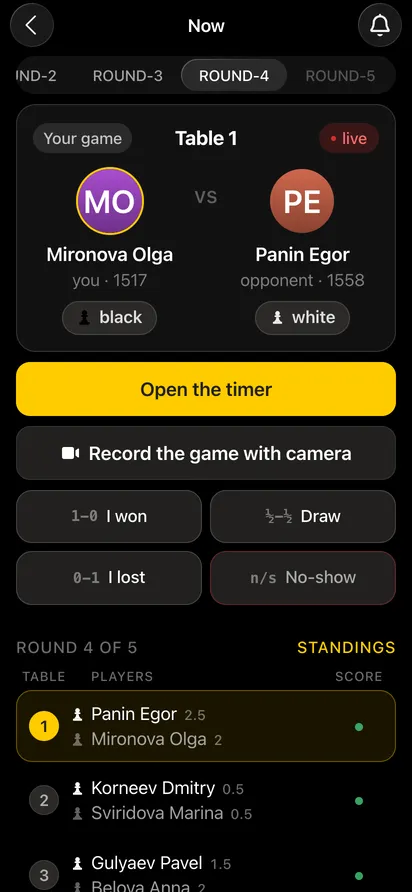
Each player sees their own game in large type: table, opponent and colour. Below are “Open the timer”, “Record the game with camera” and four result buttons - “I won”, “Draw”, “I lost”, “No-show”. One player reports, the other agrees, and the score goes into the standings.
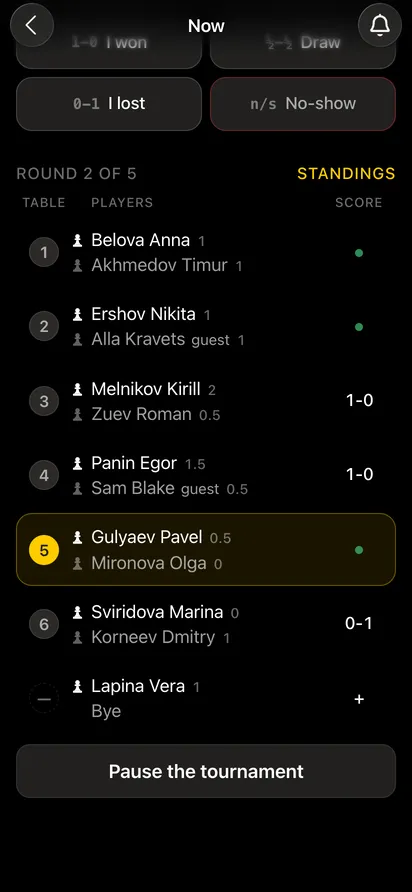
Below that, every board of the round. Finished ones show the score, live ones a green dot. With an odd field one player sits out and gets a point. The app announces the next round by itself as soon as the last result is in. The organizer can set the score on any board, and “Pause the tournament” holds the next round while everyone has tea.
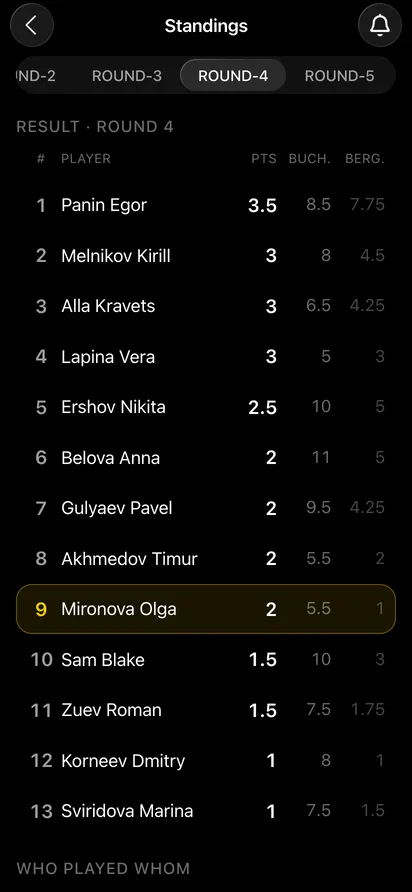
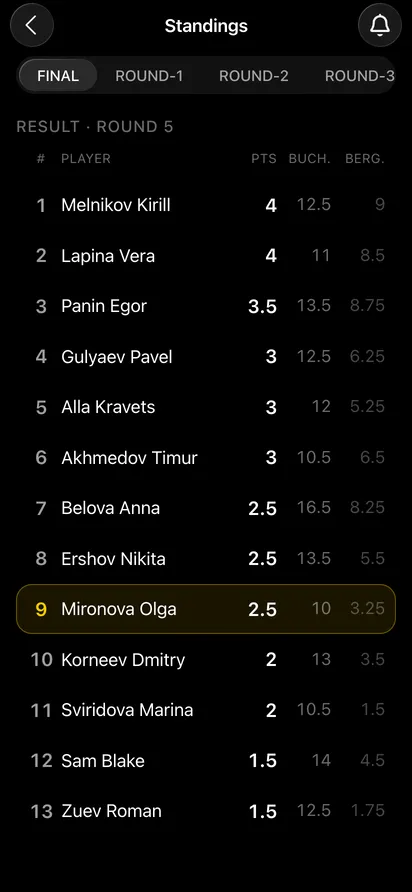
The “Standings” link opens the table after any round. On equal points the player with the higher Buchholz - the sum of their opponents' scores - goes higher: whoever earned their points against stronger opposition ranks first. Sonneborn-Berger is calculated alongside. Nothing has to be worked out by hand.
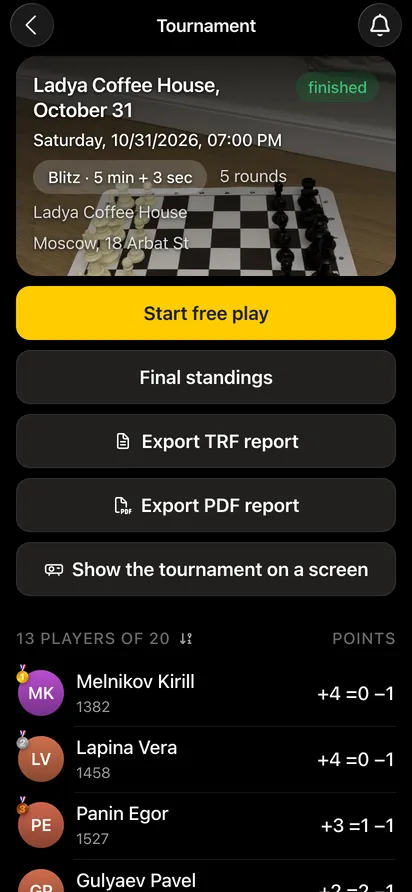
After the last round the tournament closes by itself. The card gains “Final standings”, “Export TRF report” and “Export PDF report”. TRF is what arbiter software and rating services accept; the PDF is handy to print or drop into the club chat. Ratings change once, at the finish, and “Start free play” keeps the room at the boards.
Everyone plays everyone exactly once. It suits 4-10 players: six people means five rounds, ten people nine, so a big field won't fit into one evening. You don't set the number of rounds - the line-up decides it at the start.
How the schedule works and where the rounds come from - see the round-robin system.
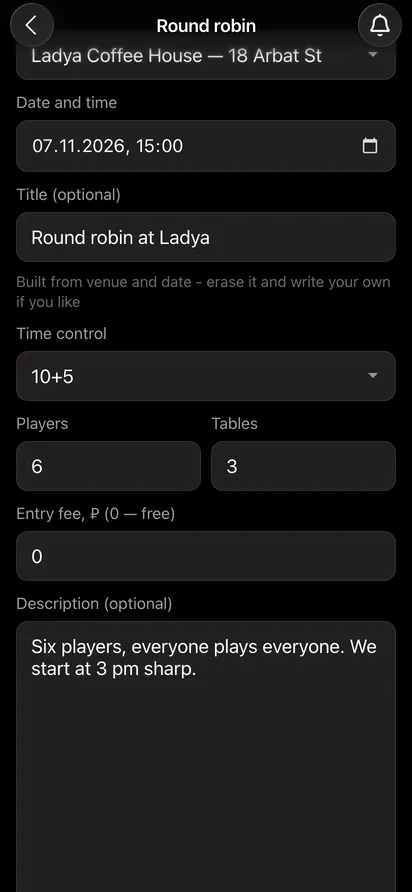
Instead of a round count the form asks for the number of players, with a note that rounds are calculated at the start. Once it begins, every round shows as a tab at the top; the game screen is the same as in a Swiss. A latecomer can't be added to a running round robin: the schedule already covers everyone.
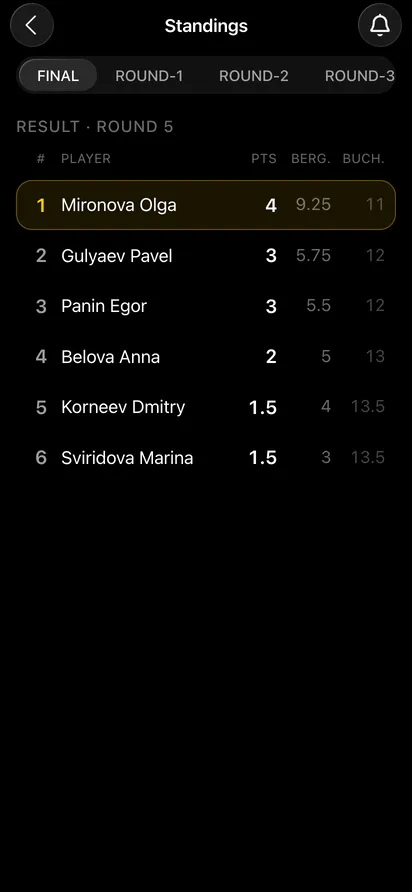
In a round robin everyone met the same opponents, so Buchholz is almost identical for all. The first tie-break is Sonneborn-Berger: add up the scores of the opponents you beat and half the scores of those you drew with. Whoever beat the strong players goes higher. In the screenshot second and third both have 3 points, and that is what separated them: 5.75 against 5.5.
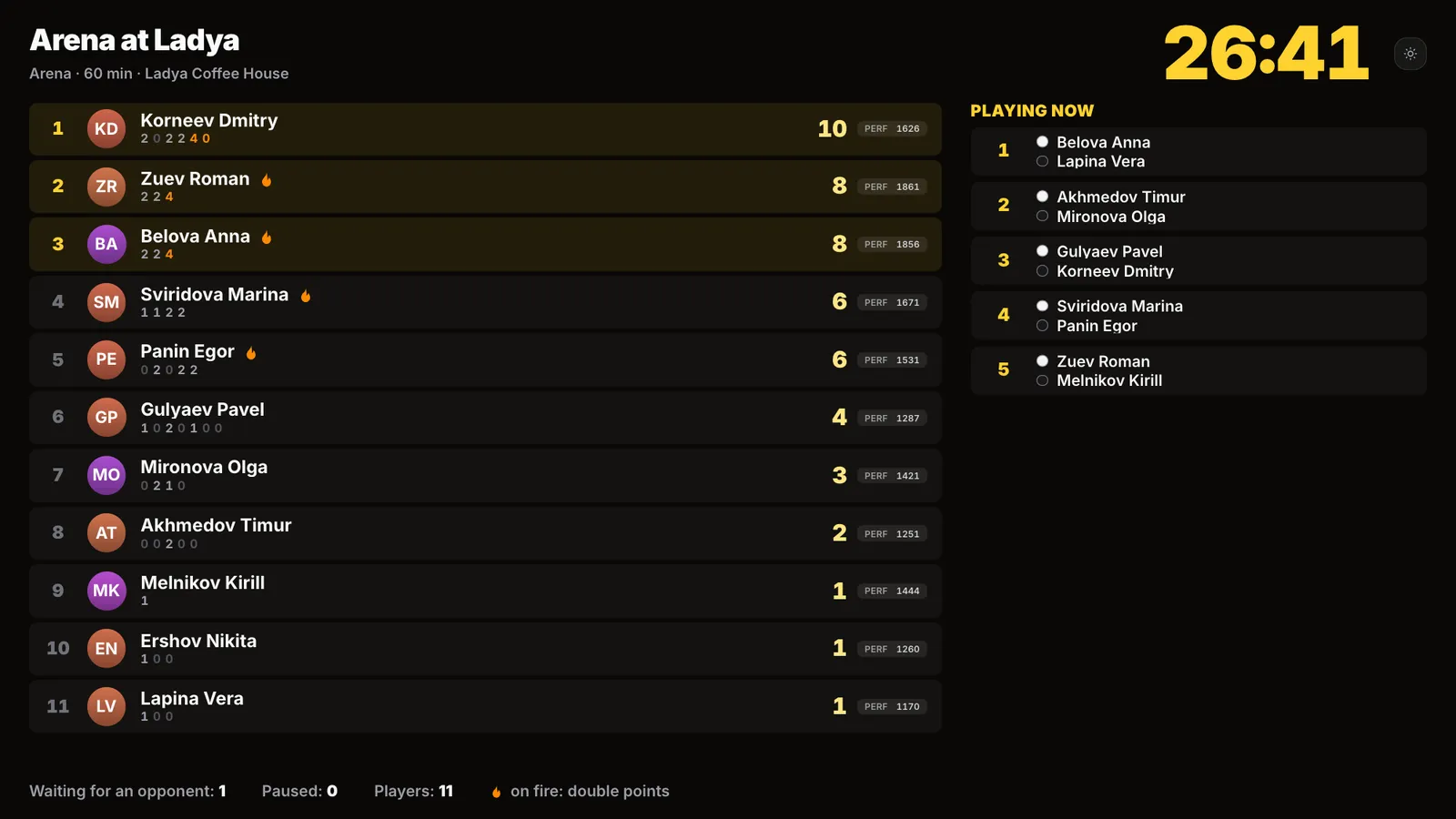
The Lichess format brought into the room: timed play with no rounds. Finish a game and the app immediately gives you a new opponent from those who are free, close to you in the table. Nobody waits for the last board, and you can arrive or leave at any time.
The full arena rules and a plan for the evening - see over-the-board chess arena.
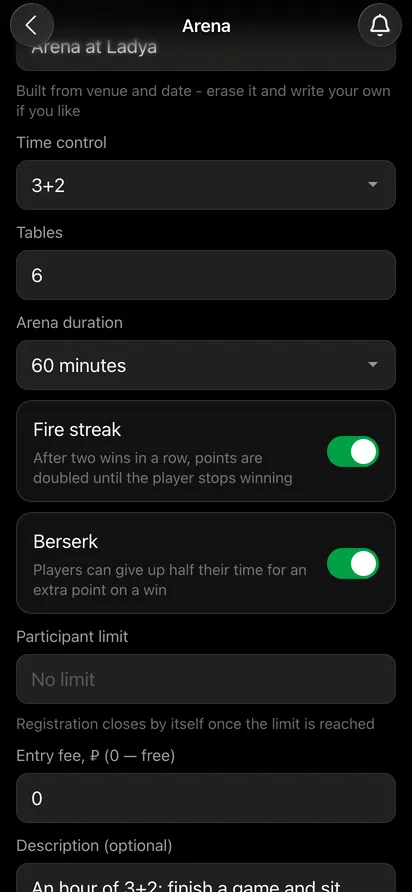
The form gains “Arena duration”, from 30 minutes to three hours (an hour by default), and two switches. “Fire streak”: after two wins in a row your points double until you stop winning. “Berserk”: before a game you can give up half your time and get an extra point for a win.
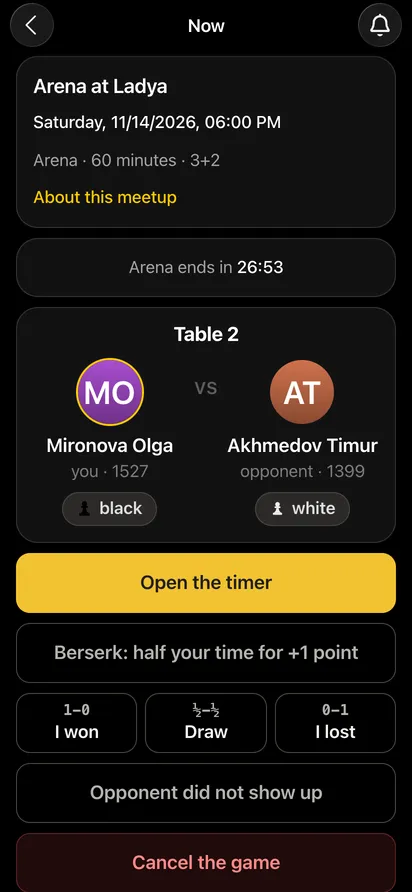
A countdown to the end of the arena runs at the top, with the current game, table and colour below. A win brings 2 points, a draw 1, a loss 0. A draw in the first ten moves on our clock scores nothing, so nobody agrees a quick split. Anyone who wants a break pauses themselves and gets no new opponents.
Games still running at the finish are played out but don't count - as on Lichess. On equal points the player with the better performance, the strength of their play against their opponents, goes higher.
An arena is best watched on a big screen: a large timer, the table with fire icons for streaks, performance and a “Playing now” list. The bottom line shows how many people are waiting for an opponent and how many are paused.
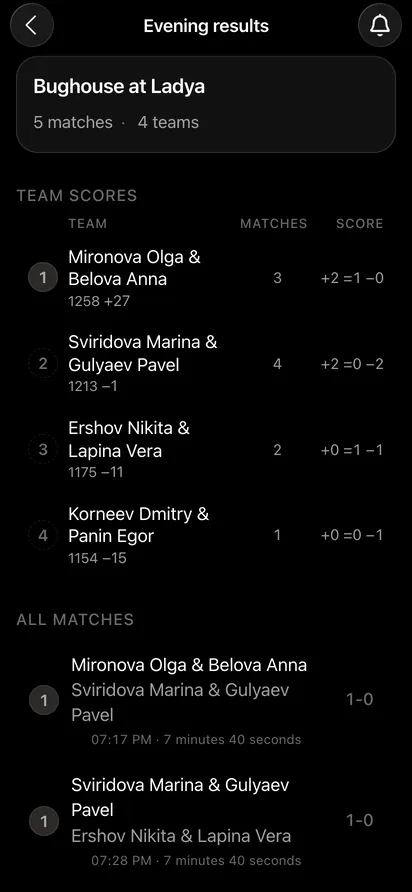
Two against two on two boards: partners play opposite colours, and a captured piece goes to your partner, who can drop it onto their own board. The match ends as soon as the game on either board ends. There is no pairing: pairs choose who to play.
How pieces are passed and what is not allowed - see bughouse chess rules.
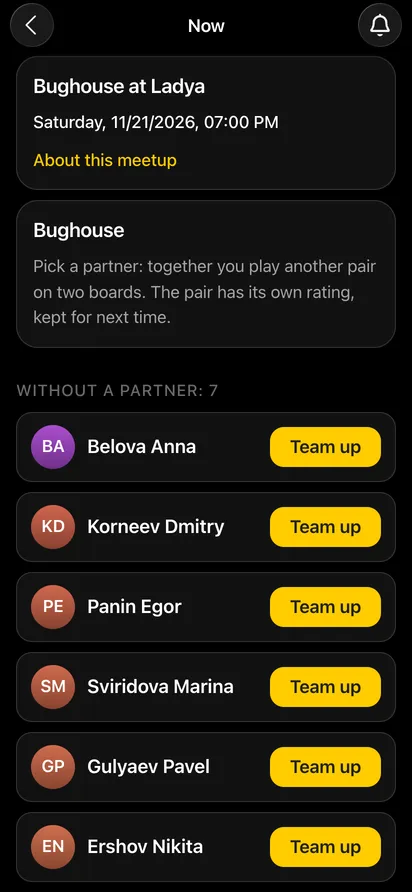
After the start everyone sees who is still without a partner and a “Team up” button: tap it and you are a pair, no consent from the other person needed. You can split up while there is no match. A pair has its own rating, starting at 1200 and kept until the next bughouse night. Bughouse games don't touch personal ratings.
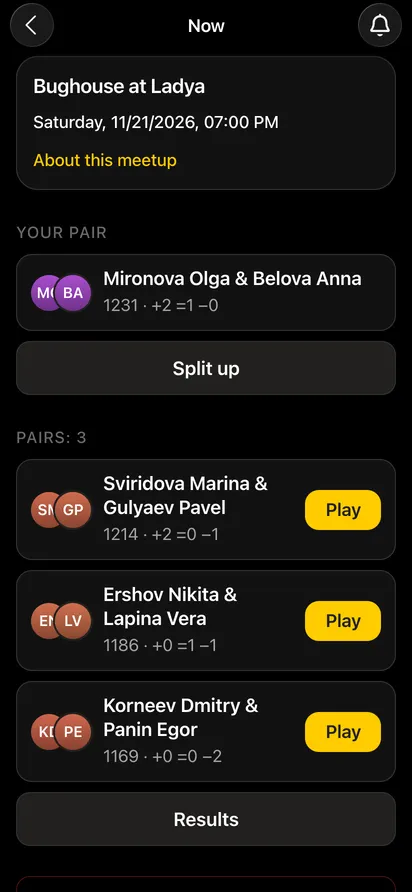
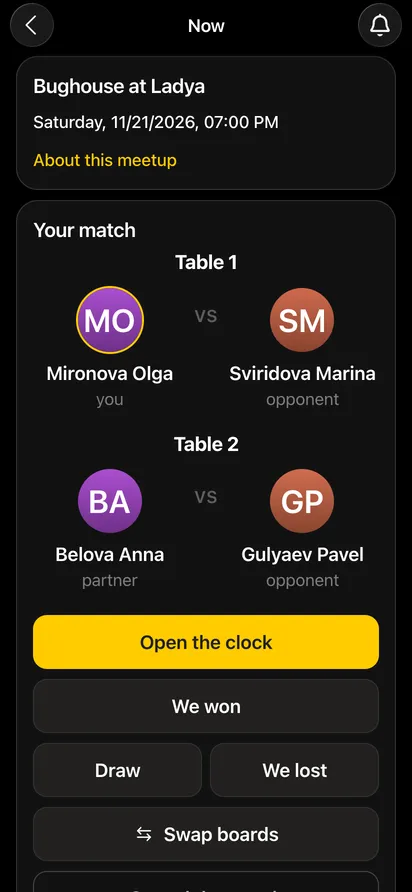
“Play” seats two pairs at two tables, and the screen shows who faces whom on each board. “Open the clock” starts the clock for your board, and the first press on either board starts both. The result is one button - “We won”, “Draw” or “We lost”; “Swap boards” lets partners change places.
“Results” shows the pairs' scores, their rating changes and every match of the evening with its time and length. The meetup ends with “Finish the meetup”.
Teams of 2-4 play matches on several boards, and team pairings follow the Swiss system. You can lay out the teams yourself, let players form them or shuffle at random. There are two standings: team and individual. The format starts at 16 people and works well for company events and matches between departments.
No rounds and no pairing: people sign up and sit down with whoever they like. A game's result changes the personal rating straight away rather than at the finish. This is the format for an ordinary club night where playing matters more than finding a winner.
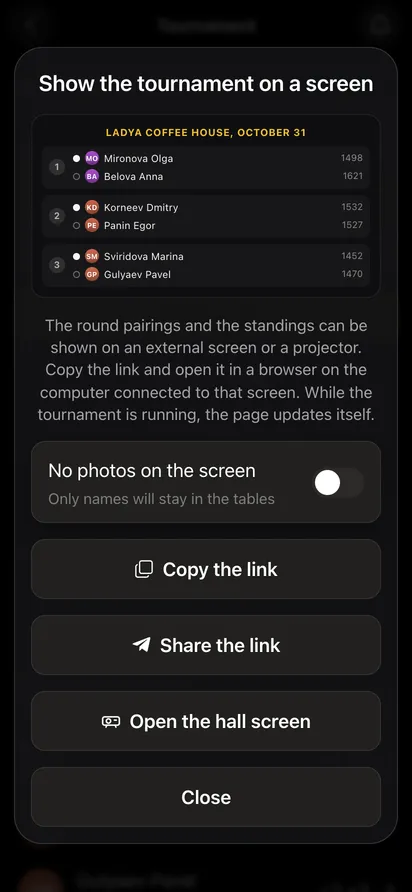
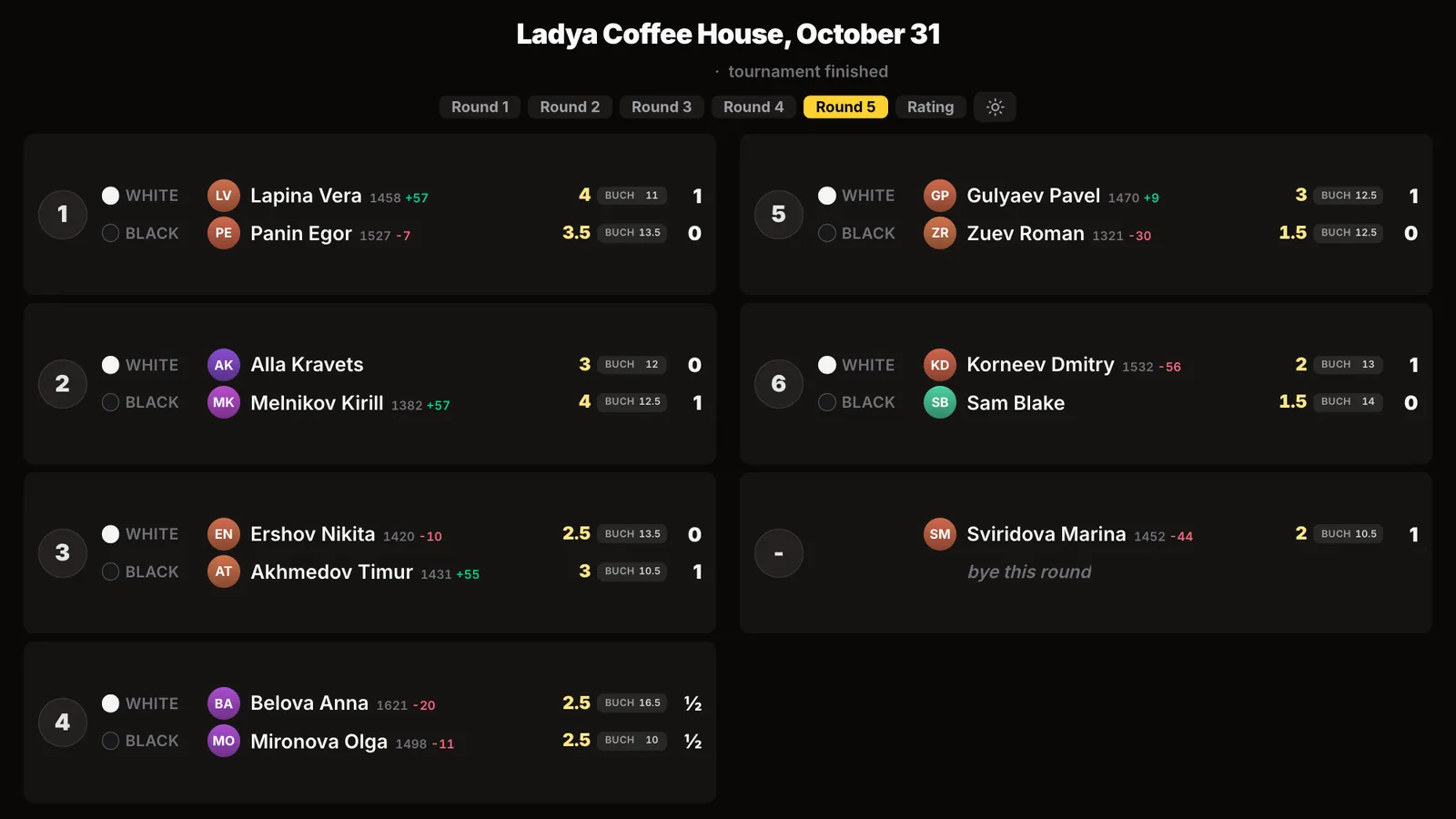
“Show the tournament on a screen” on the card of any format gives you a link to open in a browser on the computer by the projector or TV. The page updates itself: the current round's pairings with colours, points and Buchholz, tabs for earlier rounds and the standings. The “No photos on the screen” switch removes the face circles if the room is being filmed or it is a children's event.
More on setting up a screen in the room - in projector or TV for a chess tournament.
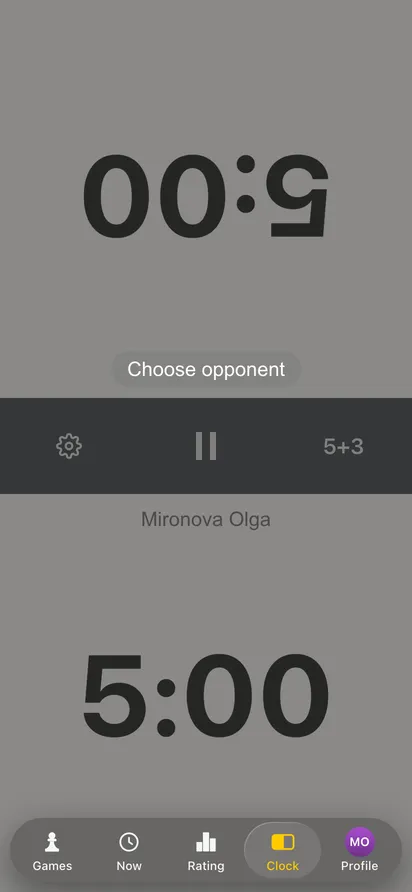
The Clock tab turns the phone into a chess clock: two dials face opposite ways, and the phone lies between the players. “Open the timer” on the round screen starts it with the tournament's time control and the players' names, and the result from the clock goes straight into the standings. The clock on the website works without a tournament too.
No. The app opens from a link in a browser or inside Telegram. If you like, save it to the phone's home screen and it launches from an icon.
Nothing. The app is free, with no subscriptions, paid features or limits on tournaments or players.
If the evening is long and everyone wants to play everyone, a round robin - that is nine rounds. With about two hours, a five-round Swiss or an hour-long arena: in an arena nobody waits for the last board.
In a Swiss the rounds are shared: everyone sits down together and waits for the last board. An arena has no rounds, you get an opponent right after your game, and the winner is whoever scores most in the time.
Two against two on two boards, with captured pieces passed to your partner. In the app the pair has its own score and rating, and a match ends as soon as the game on either board is over.
The organizer adds them as guests: a name is enough. A guest is paired and appears in the standings; the organizer enters their results.
In a Swiss, yes - a latecomer joins the pairing from the next round, unless the organizer switched on “No joining after the start”. An arena and bughouse take people at any time. A round robin can't take anyone after the start: the schedule covers everyone.
Yes. In a Swiss Buchholz comes first, in a round robin Sonneborn-Berger, and in an arena equal points are split by performance.
“Show the tournament on a screen” on the card gives you a link. Open it in a browser on the computer connected to the screen, and the page updates by itself while the tournament runs.
A finished tournament exports a TRF report, which arbiter software and results services accept. There is a PDF report for printing too.