Vibe ChessVibe ChessApp

Internet for a chess tournament broadcast: what connection you need and how to keep the app running smoothly

Alexey Mudry · updated October 26, 2026
A chess tournament broadcast runs over the internet: the moves from the camera at each table fly to live.playvibechess.com, while the pairings, tables and results live in the app. So good, stable internet in the hall is as much a part of the tournament equipment as the boards and clocks. Below - what connection you need, how to insure against failures, how signing in through Telegram and VK ID works, and why the simplest thing is to install the app on your phone once: after that it works directly, without Telegram and without a VPN.

Why a chess tournament needs internet

The Vibe Chess app is an online app for an over-the-board tournament: the boards and opponents are real, but everything that connects them goes through the server. Internet is needed in four places:
📡

Moves on air

Every move from the camera at a table goes to the broadcast page. No connection - viewers see a frozen board.
🎲

Pairings and tables

The pairings, table number and colour arrive on the players' phones. Without internet a player does not know where to sit.
✅

Score and standings

A game result, the opponent's confirmation, the standings and the next round - all go through the app's server.
🔔

Notifications

"Your opponent marked the result", "you have been invited to a game", the start of a round - they arrive only while the phone is online.
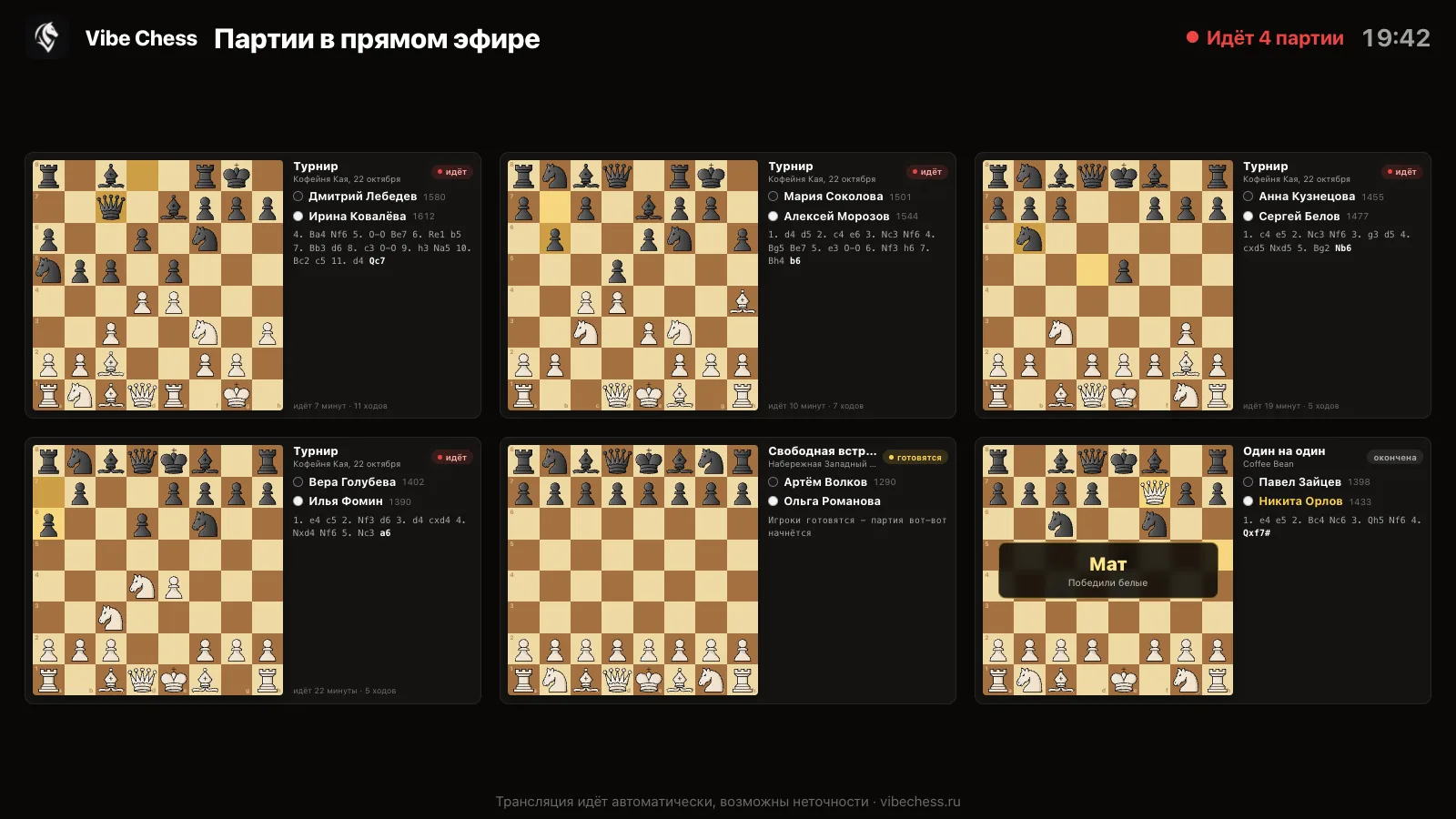
The broadcast page: six tournament boards with players, latest moves and game results
This is the broadcast when the connection in the hall is fine: every board is live.

The main requirement is stability: a connection that works all tournament long without drop-outs. If every camera phone uses one venue network, test it under load in advance - with several phones at once, not just one.

What internet the hall needs

You need a stable connection at every table until the end of the tournament. It can be mobile data from a good operator that works without failures at the venue, the venue's own Wi-Fi or your own mobile router. Best of all, two channels at once: a main one and a backup.

Check the connection in advance

A day or two before, come to the venue with a phone and open the app at the furthest table. Basements, ground floors and halls behind thick walls often block mobile signal.

A good operator

Choose the operator with a steady signal at this venue. Ask the players whose connection works best in the hall - that is faster than any coverage map.

Venue Wi-Fi

If the hall has Wi-Fi, ask for a separate network for the tournament, or at least check that it copes with several dozen phones at once. Public networks in cafés and shopping centres often cut off after half an hour.

A backup channel

Keep a second way online: a mobile router or a hotspot from a phone on another network. If the venue network goes down, the organiser switches to the backup and the tournament carries on.

Camera phones come first

If the connection is weak, sort it out first for the camera phones at the tables: they are the ones sending moves to the broadcast. Players' phones will manage on mobile data.

Charging

The camera and the screen work all tournament long. A power bank or an extension lead at the tables saves you from a phone that dies in the last round.

If you are still choosing a hall, checking the connection is one item on the list, together with light, tables and sockets: a venue for a chess tournament.

What happens if the internet drops

A short drop-out does not break the tournament - the app is ready for it:

  • • The chess clock runs on the phone even offline: the game goes on as usual.
  • • The camera does not lose the game: moves are stored on the phone and sent as soon as the connection is back. Viewers see a pause for that time, and the game record stays whole.
  • • You are not signed out: if the server does not answer, the app shows "Network not responding - try again" with a Retry button instead of throwing you back to the sign-in screen.
  • • The score can be marked when the connection returns - or the organiser enters it.

A long outage is another matter: without a network the next round's pairings will not arrive and the standings will not update. So for a broadcast tournament a backup channel is not a luxury but insurance.

Signing in to the app: Telegram and VK ID

To sign up for a tournament and play, you need to sign in to the app. There are two ways - Telegram and VK ID.
✈️

Through Telegram

The main way. Press Sign in with Telegram, the bot sends a code - check it against the code on screen and confirm. The bot then writes to you about rounds, opponents and new evenings.
🆔

Through VK ID

The backup way - if Telegram does not open for you. Sign in with a VK account or a phone number. You can play and sign up for tournaments the same way, but there will be no messenger messages: check the schedule and rounds in the app yourself.
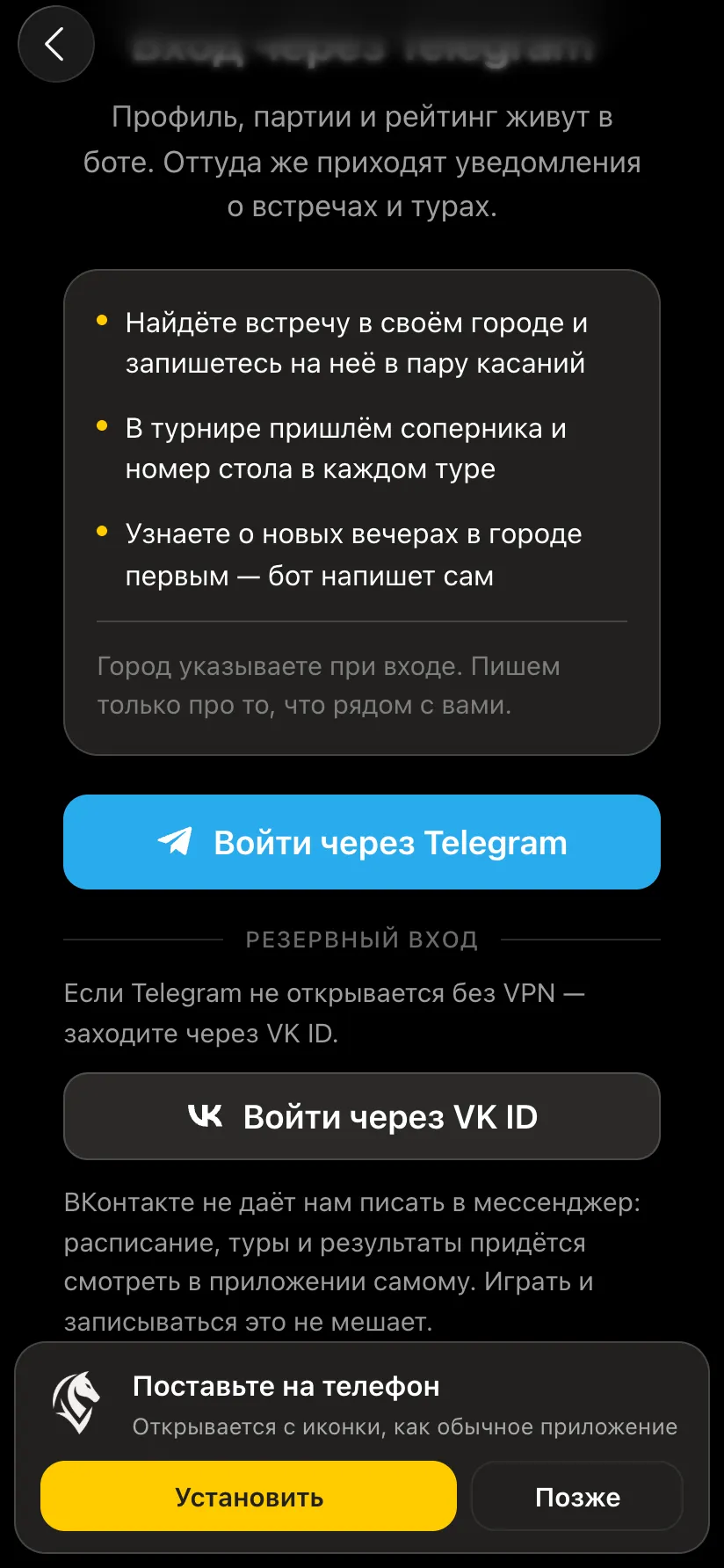
The Vibe Chess sign-in screen: the Sign in with Telegram button, a Backup sign-in section with Sign in with VK ID below, and an Install on your phone banner
The sign-in screen: Telegram, backup sign-in with VK ID and an invitation to install the app.
Need another way to sign in? If your federation, club or company prefers to sign in through its own service - a corporate account, another social network, email - write to the developers. We build the app ourselves and will add the sign-in you need: write to the developers on Telegram.

If Telegram works intermittently

Signing in through Telegram and the app inside Telegram depend on how the messenger works. If players' Telegram opens intermittently, there are two ways.

Way 1: make Telegram work reliably

If players use the app inside Telegram, their phones need services that keep the messenger running reliably. That is each player's own decision, and at a tournament it may fail at the worst moment: one person's service switched off, another's subscription ran out.

Way 2: install the app - and Telegram is no longer needed

It is more reliable to put Vibe Chess on the phone as a separate app. You sign in through Telegram once - at the first launch. After that the installed app goes straight to our server and never looks into Telegram again. So it works even where the messenger is unavailable - without a VPN.

If Telegram will not open even for the first sign-in, use VK ID - that works for the installed app too.

How to install the chess app on a phone

The app installs straight from the browser, without an app store: its own icon on the phone screen, its own launch, no address bar. The easiest start is from the profile - there is an Install the app banner there, and inside it step-by-step instructions for your phone.
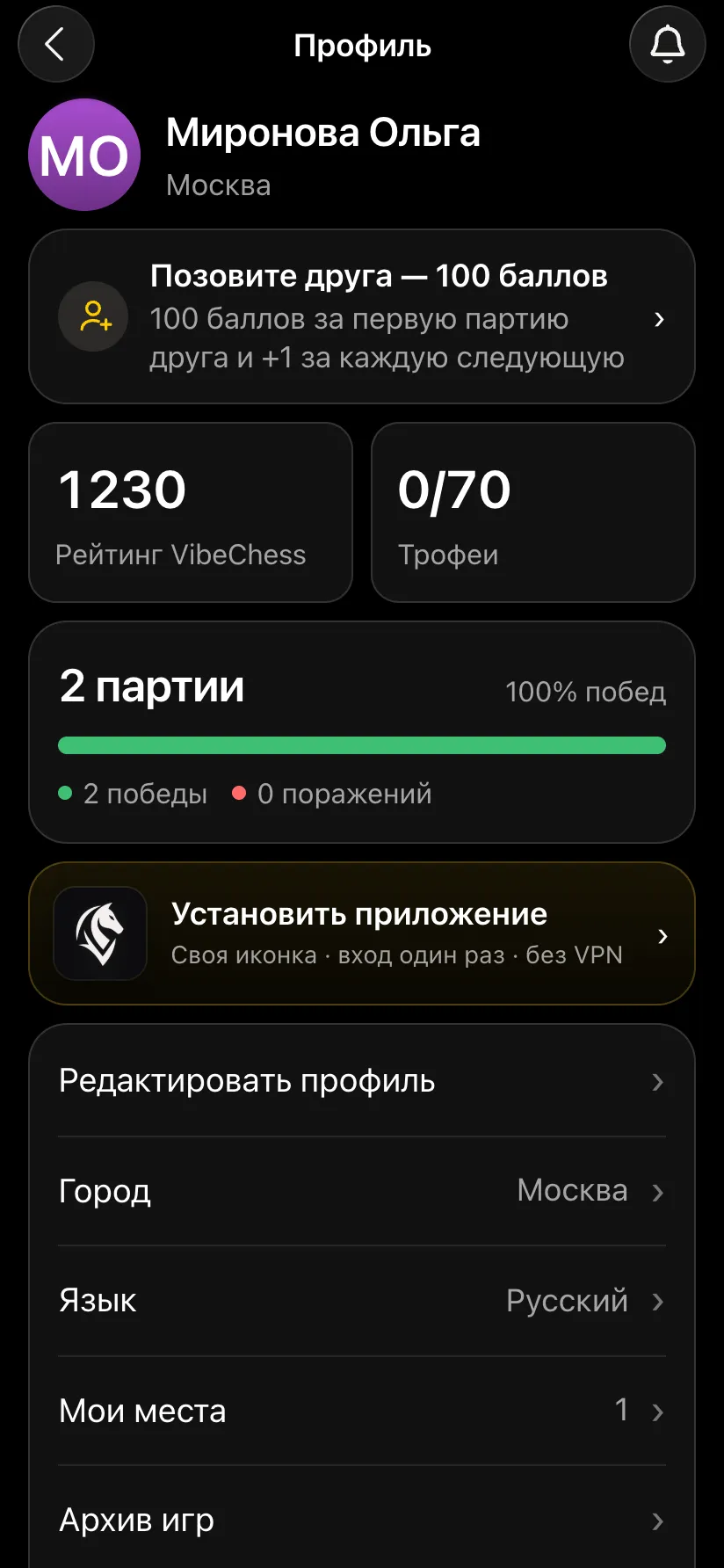
The profile in the Vibe Chess app: an Install the app banner - your own icon, sign in once, no VPN
The Install app banner in the profile.
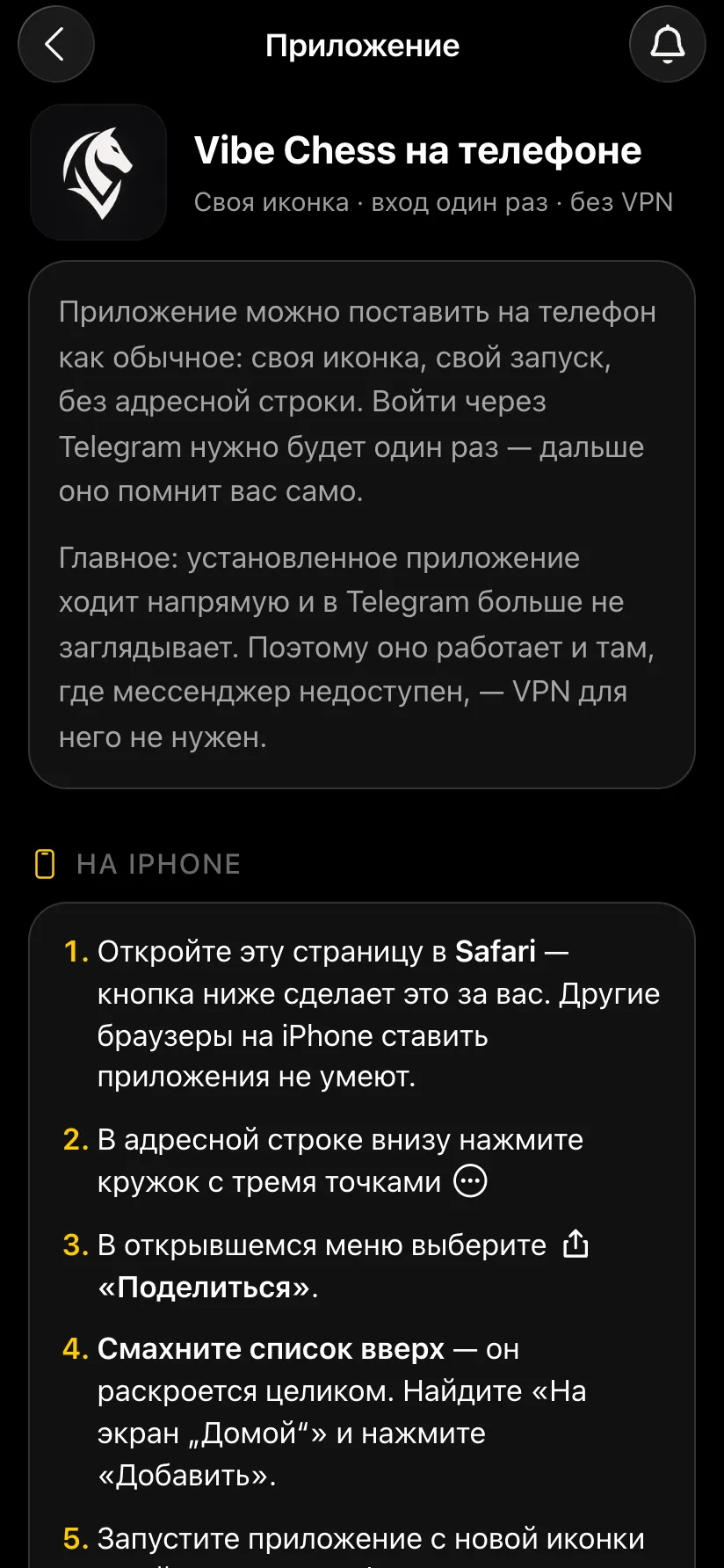
The Vibe Chess on your phone screen: why install the app and step-by-step instructions for iPhone
Instructions for iPhone.

On an iPhone

  1. Open playvibechess.com/app in Safari - other browsers on iPhone cannot install apps.
  2. Tap the circle with three dots in the address bar at the bottom.
  3. Choose Share.
  4. Swipe the list up, find Add to Home Screen and tap Add.
  5. Launch the app from the new icon and sign in - once.

On Android

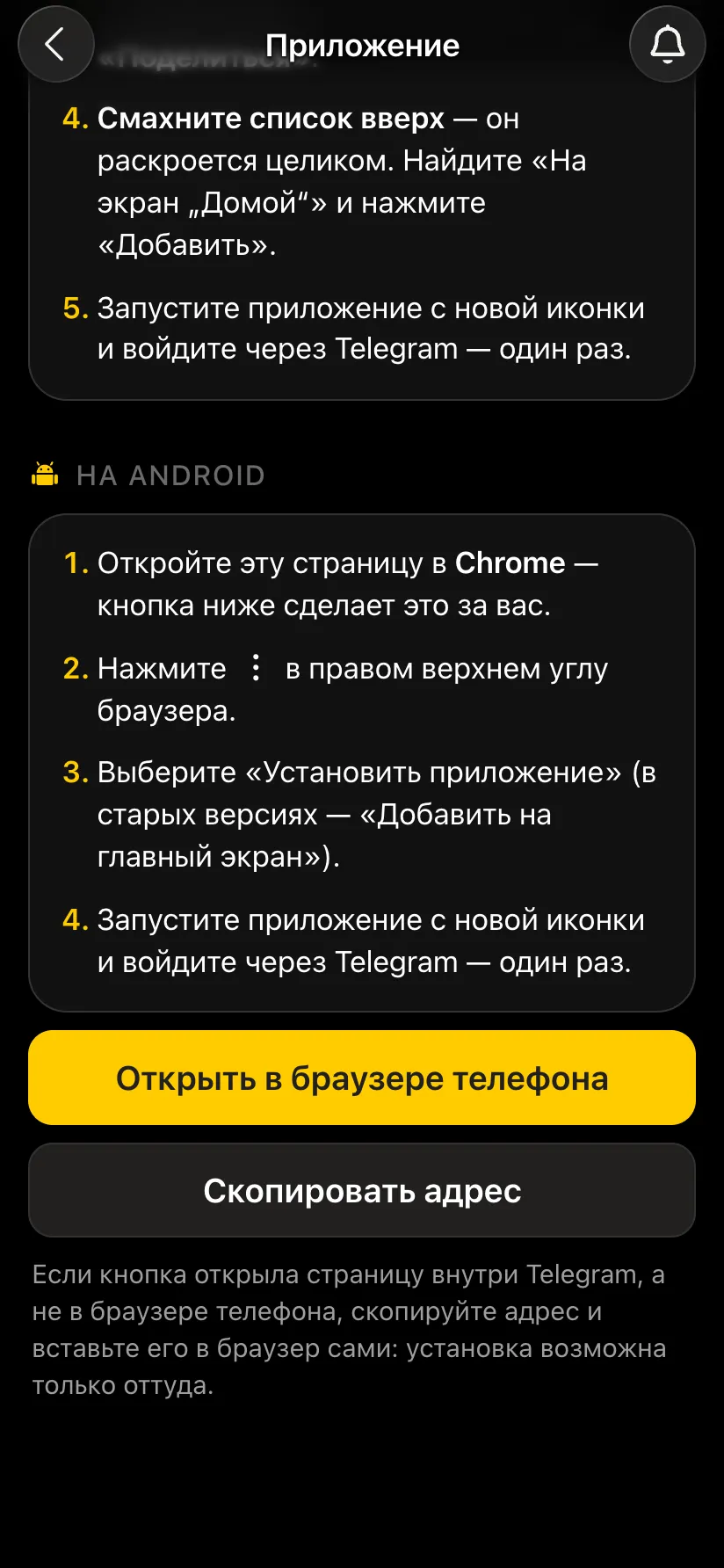
  1. Open playvibechess.com/app in Chrome.
  2. Tap the three dots in the top right corner.
  3. Choose Install app (in older versions - Add to Home screen).
  4. Launch the app from the new icon and sign in - once.
Instructions for Android and the Open in phone browser and Copy address buttons
Instructions for Android.

If you opened the app inside Telegram, you cannot install it from there: tap Open in phone browser, or copy the address and paste it into Safari or Chrome.

A tip for the organiser: ask players to install the app in advance, before the tournament day - for example, in the announcement. Then nobody in the hall will have trouble signing in, and the tournament will start on time.

How to turn on notifications

Once the app is installed, you can turn on phone notifications - they arrive even on a locked screen. For example, when your opponent marks the result of a game, you will know straight away.
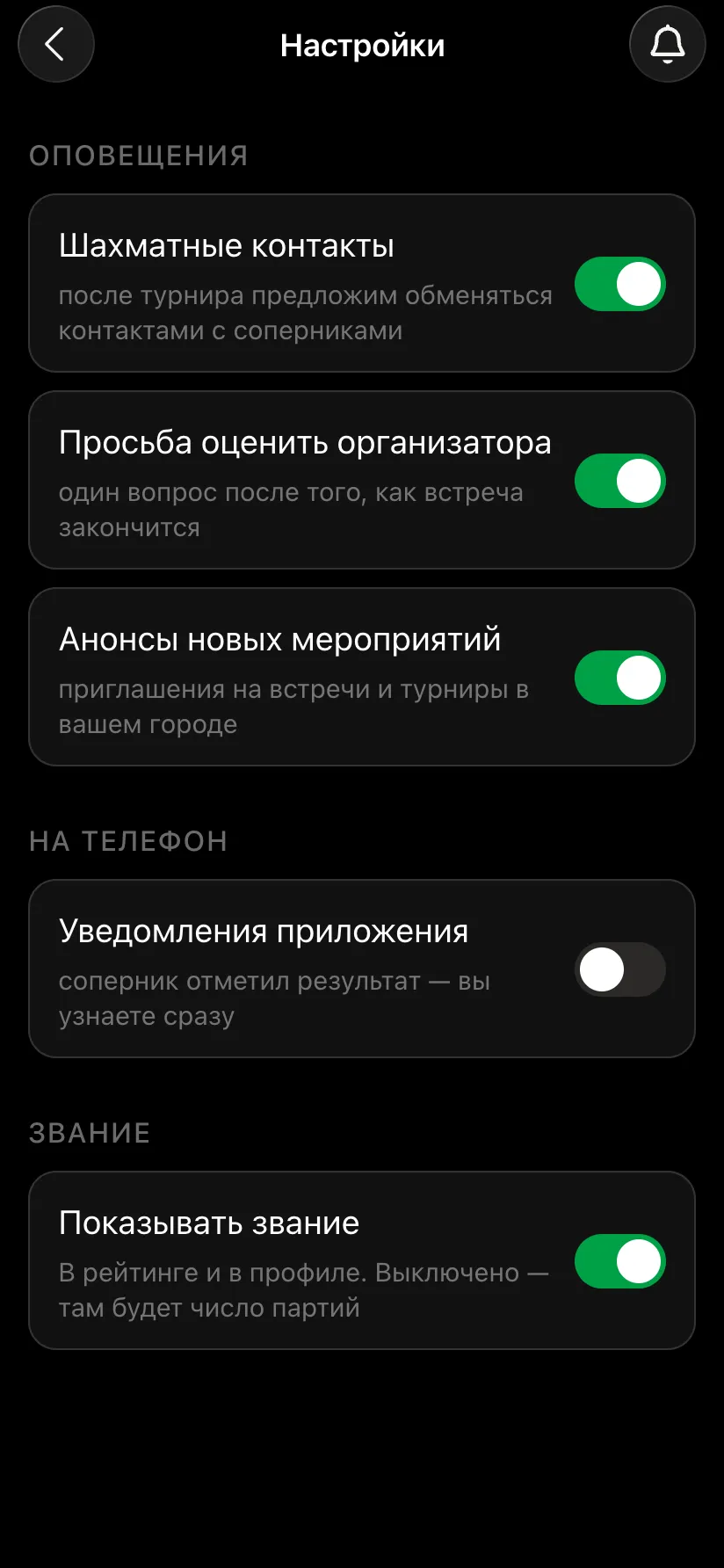
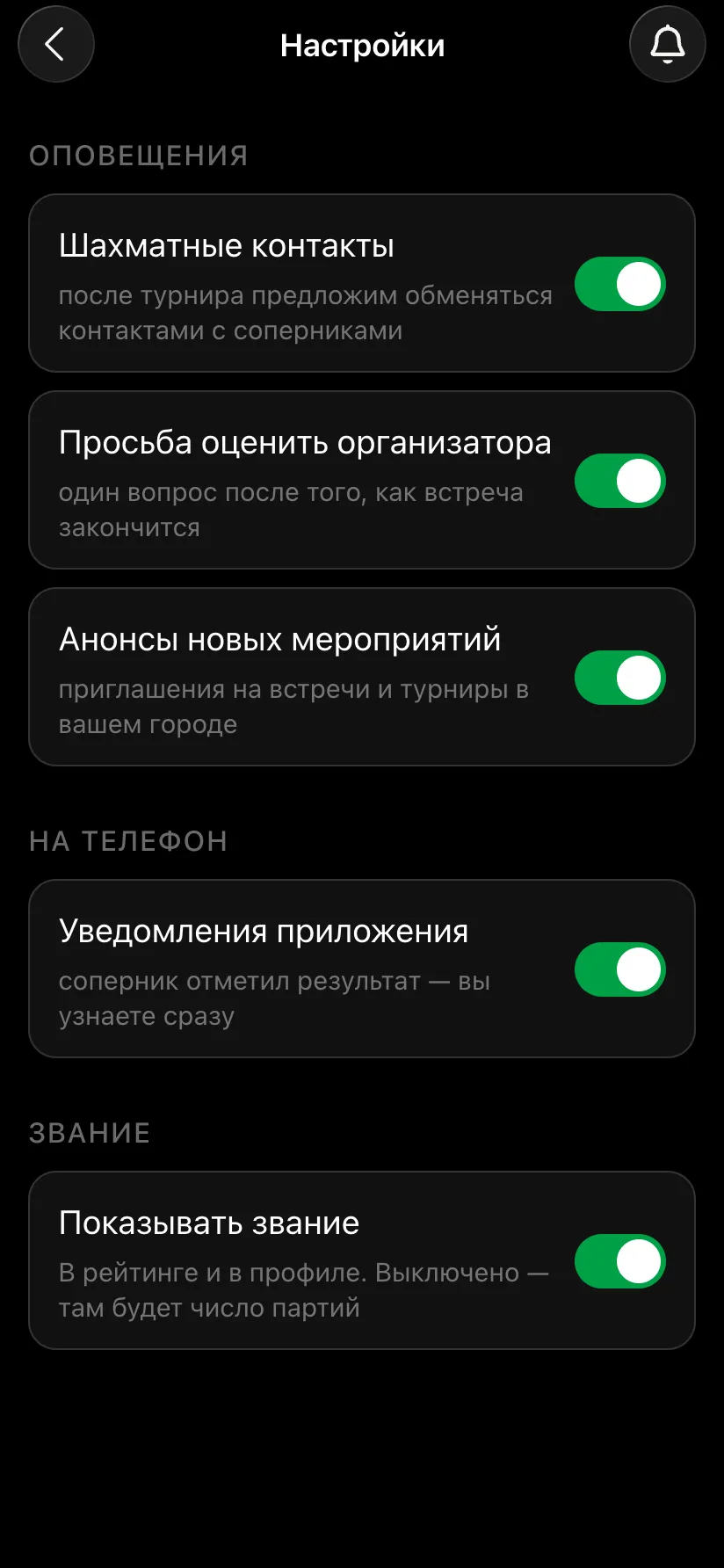
  1. Open the app from the icon on your phone screen.
  2. Go to Profile → Settings.
  3. In the On your phone section turn on App notifications.
  4. Allow notifications when the phone asks.
App settings: the On your phone section, the App notifications switch is off
Before: notifications off.
App settings: the App notifications switch is on
After: notifications on.
  • • iPhone sends notifications only to an installed app - so install first, then the switch.
  • • Android allows notifications in the Chrome browser too, but the installed app is more convenient.
  • • Inside Telegram there is no such switch: there the bot sends the messages.
  • • If the phone says Notifications are blocked - allow them in the phone's own settings.

The organiser's checklist: internet and phones

WhenWhat to do
A week beforeCheck the connection at the venue, arrange Wi-Fi, decide what the backup channel will be.
In the announcementAsk players to install the app and sign in ahead of time, through Telegram or VK ID.
The day beforeCharge the router and power banks, check that the camera phones sign in to the app.
On the dayConnect the phones at the tables to the main network, keep the backup ready, open the broadcast on the hall screen.
During the tournamentCheck that the boards on the broadcast page are live; if the connection drops, switch to the backup channel.

Need help? Write to the developers

We build the app ourselves and are open to working together. Write to us if you need to:

  • • add your own way to sign in - a corporate account, another social network, email;
  • • run a tournament at a venue with a difficult connection;
  • • set up the broadcast for your tournament;
  • • help players install the app.
Write to the developers on Telegram

Install the app in advance

Open @vibechessbot or playvibechess.com/app, install the app on your phone and sign in once - at the tournament everything will work straight away. Questions and requests - write to us on Telegram.

Frequently asked questions about internet at a chess tournament

What internet does a chess tournament broadcast need?

A stable one: mobile data from a good operator that works without failures at the venue, or the venue's Wi-Fi. If every camera uses one network, test it under load in advance. It is best to have a backup channel: a mobile router or a hotspot from a phone on another network.

Does the chess app need internet?

Yes: pairings, tables, score, standings and the broadcast go through the server. The chess clock works offline, and if the connection drops the camera stores the moves on the phone and sends them when it is back.

How do I sign in to the Vibe Chess app?

Through Telegram or VK ID. With Telegram, the bot sends a confirmation code and then writes to you about rounds and opponents. VK ID works if Telegram does not open.

What if Telegram works intermittently?

Either make Telegram run reliably on the phone or - more reliably - install the Vibe Chess app on the phone and sign in once through Telegram or VK ID. The installed app works directly, without Telegram and without a VPN.

Does the app need a VPN?

The installed app does not. It goes straight to the Vibe Chess server and never looks into Telegram.

How do I install the app on an iPhone?

Open playvibechess.com/app in Safari, tap the circle with three dots, Share, find Add to Home Screen and tap Add. Then launch it from the icon and sign in once.

How do I install the app on Android?

Open playvibechess.com/app in Chrome, tap the three dots in the top right and choose Install app. Then launch it from the icon and sign in once.

How do I turn on notifications?

In the installed app: Profile - Settings - App notifications, then allow notifications when the phone asks.

Can we sign in through another service instead of Telegram or VK?

Write to the developers on Telegram: we will add the sign-in your federation, club or company needs.

What happens to the broadcast if the connection drops?

Viewers see a pause, but the game is not lost: the camera phone sends the moves when the connection returns. The players' clock runs offline.

How to run a tournament without being an arbiter

No arbiter skills required. The app takes over the part that usually stops people from running tournaments at all: who plays whom in each round and who finishes first.

Swiss system

works for ten players and for fifty

Round robin

for a small group that wants to play everyone

Free meetup

for those who do not need a bracket at all

How the tournament runs
  1. 1Creating the event takes a minute
  2. 2Open registration and drop the link into the chat
  3. 3Pairings follow FIDE rules (Dutch system, the bbpPairings engine)
  4. 4Results go in with two taps and the table recalculates instantly

More than a bot: the app, FIDE rules and a TRF report

  • The app. Besides the bot there is an app - inside Telegram and simply at playvibechess.com/app: what is on in your city, the player list, a live table, the current round, your profile and game history - everything that is awkward to read as chat messages.
  • Pairings by FIDE rules. Pairings are computed by bbpPairings, an open-source engine implementing the Dutch system: score groups, floats on an odd field, colour alternation, no rematches, and no player gets a bye twice.
  • A TRF report. A finished tournament exports as a single file in the FIDE data exchange format - the one arbiter software and federations accept. Your profile stores the FIDE ID, national federation code, title, sex and date of birth for it.
  • Free. All of the above, with no subscriptions, paid plans or limits on the number of tournaments and players.

Full overview

Missing a feature? Message the developers

The bot is constantly improved based on real tournaments. If you need a feature that isn't there yet, message the developers right inside the bot with the /support command. Many features appeared exactly because organizers asked for them, and useful ideas get added quickly.

What to read next

How the whole chess tournament live broadcast works. Recording moves with a camera - recording a game with a camera. Which phone you need - which smartphone suits Vibe Chess. A clock on the phone - a chess clock on your phone. What to buy for the hall - chess sets for events. A hall for the tournament - a venue for a chess tournament.

Alexey Mudry
Alexey Mudry · hosted 37 events for Vibe Chess · 157 reviews · rating 5.0

At the board since childhood: hazy about his rating, precise about every rook he has blundered. Counts an evening as a good one if the opponent stayed to talk afterwards instead of rushing off to check with an engine. Message →