Vibe ChessVibe ChessApp

An over-the-board chess arena: a live arena tournament, just like on Lichess, in the Vibe Chess app

Alexey Mudry · updated November 1, 2026
Anyone who has played on Lichess knows the arena: the tournament lasts an hour, there are no rounds, and a second after one game ends the next one begins. Just as people play arenas online on Lichess, in the Vibe Chess app they play them offline, in person: on real boards, with a live opponent across the table. The app pairs opponents, assigns tables and keeps score, and all the organiser has to do is press "Start the arena". Below is how it works, how pairing happens in an arena, how points are counted and how to run such a tournament yourself.

What a chess arena is

An arena is a tournament limited not by the number of rounds but by time. Players do not wait for every table to finish: as soon as you finish, you get a new opponent. In the time available one player might get ten games and another six, and that is fine: whoever scores the most points wins.
1

A timed arena

The organiser sets the length: 30 minutes, an hour, two hours. There are no rounds - people play while the timer runs.
2

Finish a game, get a new opponent

Once the result is entered, both players go back into the queue. Within seconds the app seats them at a free table with new opponents.
3

Points and streaks

A win is 2, a draw 1, a loss 0. Win two in a row and your points are doubled for as long as you keep winning.
4

The timer decides

When time is up, no new pairings are made. Whoever has scored the most points in the time wins.
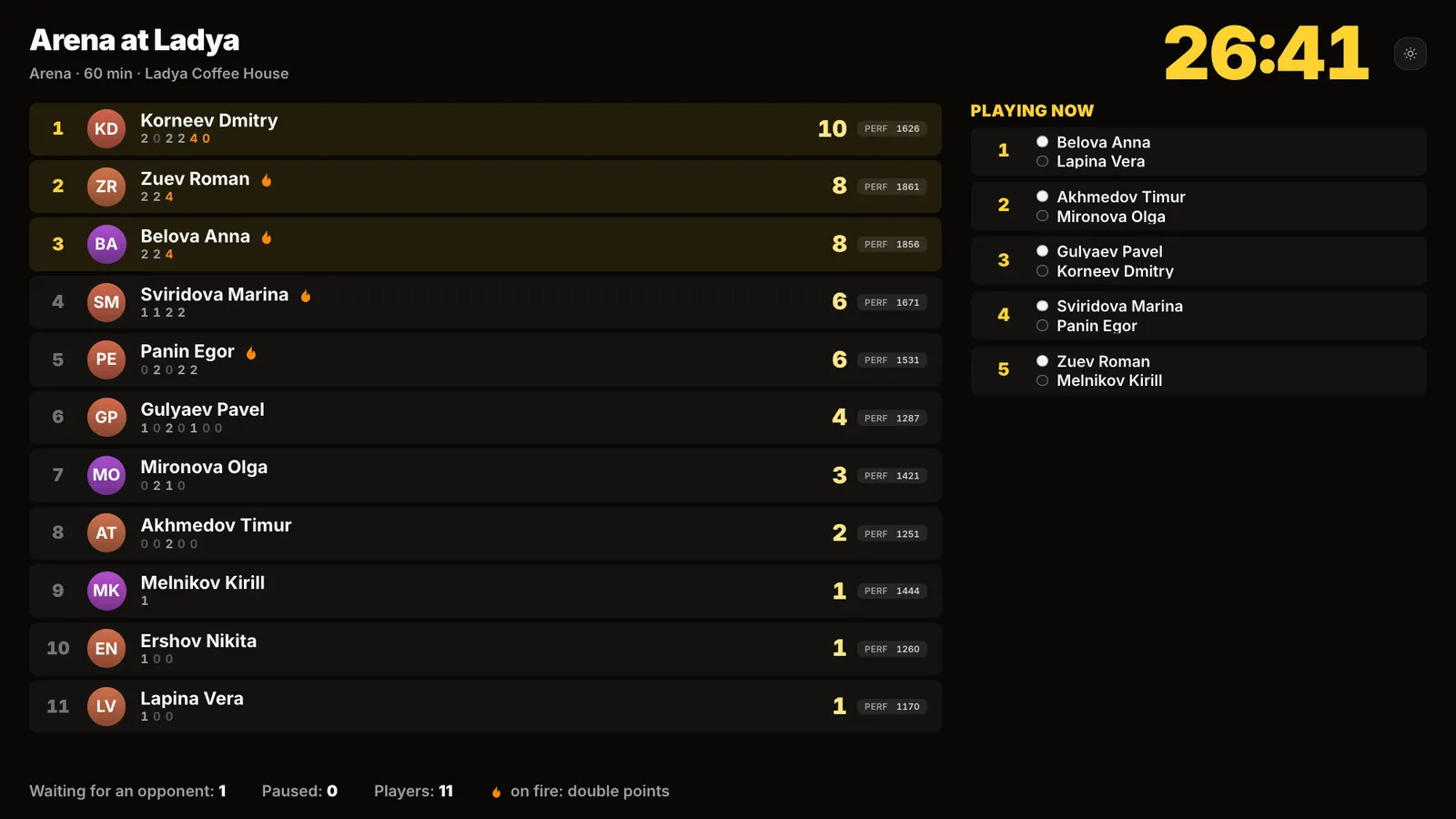
Hall screen of a chess arena: the timer, a table of players with points, streaks and performance, and the games in progress
The arena on the hall screen: timer, table and games at the boards.

An arena like on Lichess, only in person

The arena rules in Vibe Chess are taken from Lichess: the same 2/1/0 scoring, the same fire streak, the same berserk, the same finish on the timer and the same performance tie-break. If you have played arenas on Lichess, the rules here are identical. The one difference: your opponent sits opposite you, the pieces are real, and time runs on a chess clock on the phone.

Arena on LichessArena in Vibe Chess
Where it is playedonline, on a screenin person, at a board in the hall
Opponentanyone who is connectedanyone who has come to the hall
Pairingby place in the tableby place in the table, never your last opponent
Points2/1/0, streak, berserk2/1/0, streak, berserk
Timebuilt-in clocka chess clock on the phone
Tablesunlimitedas many as there are boards in the hall
RatingLichess ratingVibe Chess rating for every game

How an arena on Lichess itself differs from a Swiss and which to choose for an online tournament - Swiss versus arena on Lichess.

How to create an arena in the app

An arena is created just like any other tournament in Vibe Chess. In the app: "Games" - "Create your own game" - "Arena". It sits in the list next to the Swiss system, the round robin and the free meetup.
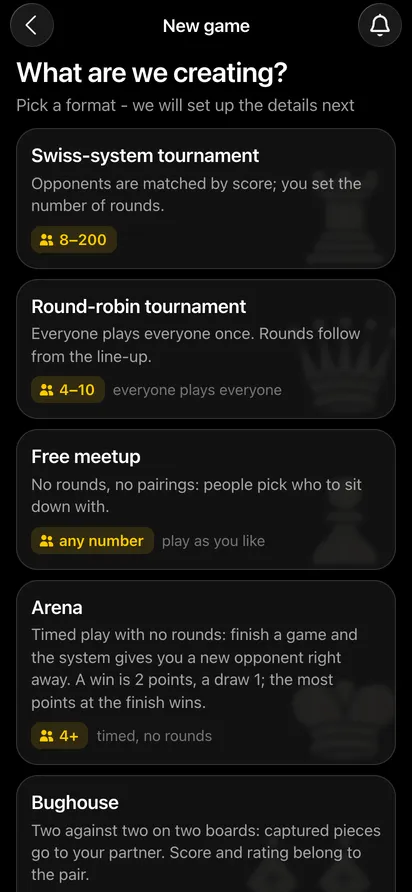
The "New game" screen: Swiss-system tournament, round-robin tournament, free meetup, arena, bughouse
The arena in the list of formats.
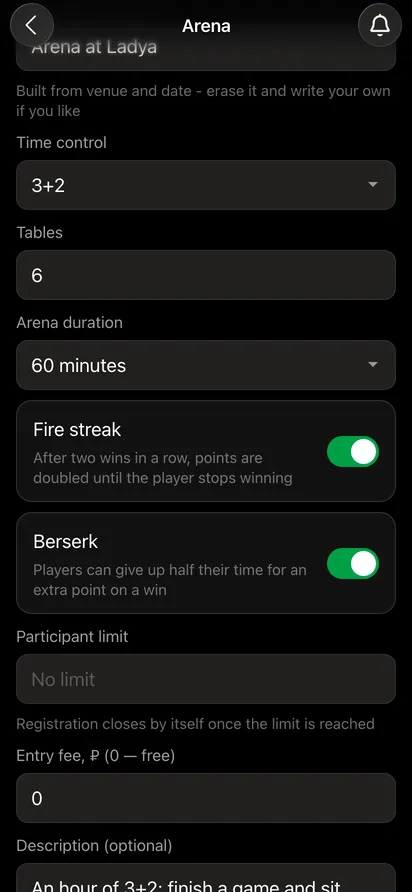
The arena form: time control 3+2, tables, arena duration 60 minutes, the "Fire streak" and "Berserk" switches
Duration, tables, streak and berserk.

What you set when creating it:

  • Venue and time - the venue, date and city.
  • Time control - 3+2 blitz by default; 1+1, 5+3, 10+5 and others are available.
  • Tables - how many boards there are in the hall. If there are more players, the extra ones wait their turn.
  • Arena duration - from 30 minutes to three hours, 60 minutes by default.
  • Fire streak - points are doubled after two wins in a row.
  • Berserk - give up half your time for an extra point on a win.
  • Participant limit, entry fee, private tournament - as for any event.

Once it is created, the app gives you an invitation link: send it to the club chat and players sign up in the Telegram bot. How invitations and sign-ups work - the organiser's guide.

The start: attendance and "Start the arena"

On the day, the organiser opens the arena card and marks who has arrived. Only those marked start the arena: the rest are paused and join automatically when they turn up. Below the list the app tells you whether there are enough tables: 11 players need 6 boards, and if there are only 4, three people will wait for the first free one.
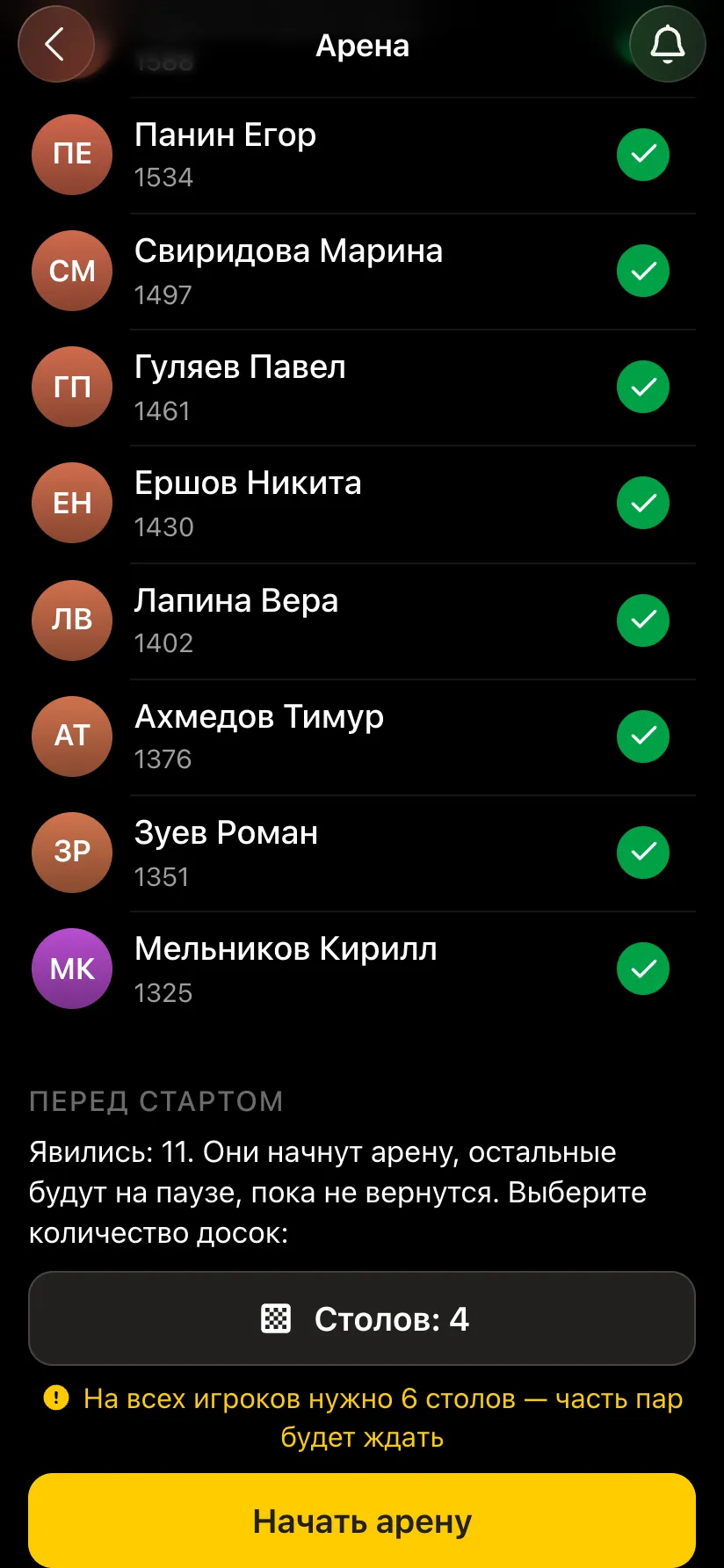
The arena card before the start: all 11 participants marked, 4 tables, a warning that some pairs will wait, the "Start the arena" button
Attendance marked - ready to start.
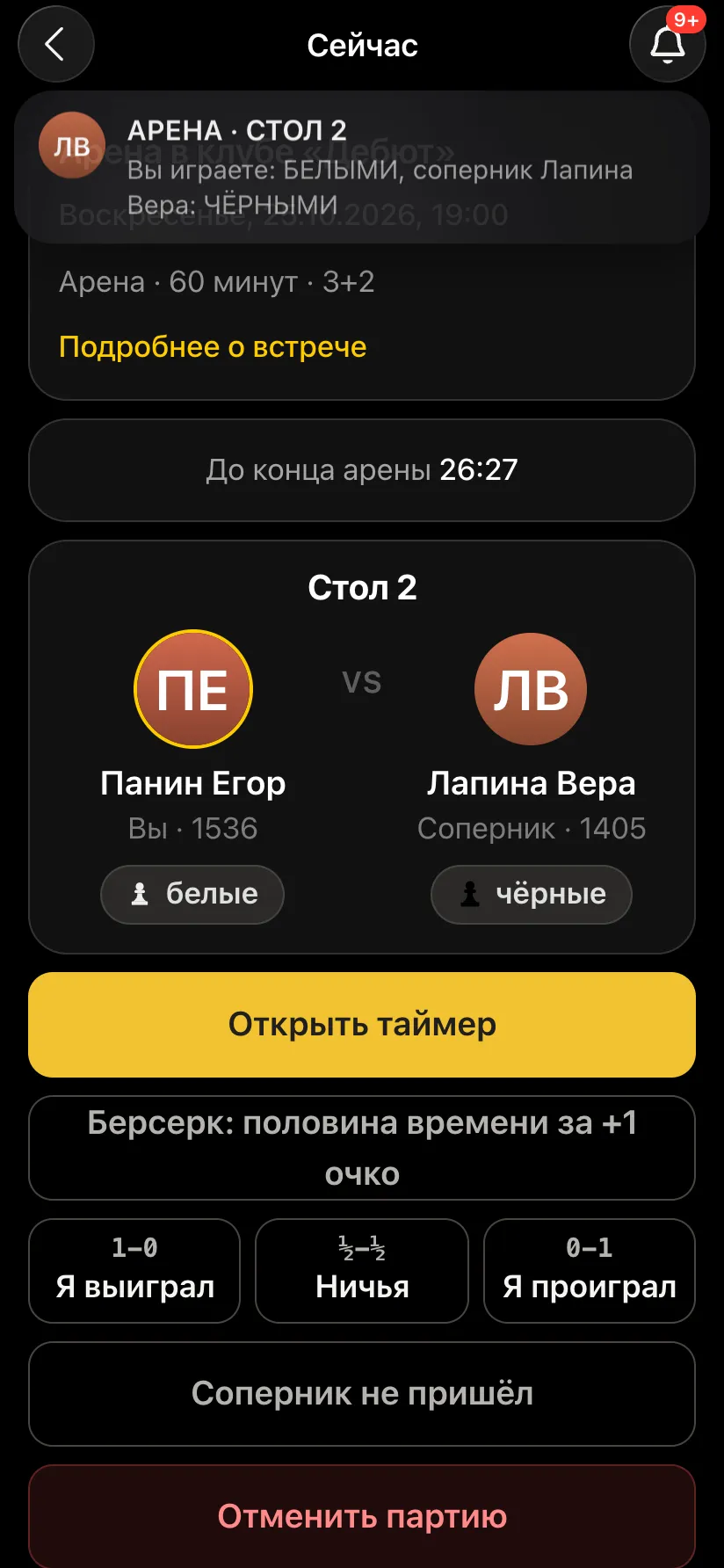
A player's screen after the start: a notification with the table number and colour, and the table card with the opponent
Everyone receives their table and colour.

Press "Start the arena" and the timer starts, and the app immediately seats everyone. Each player sees their table number, opponent and colour on their phone, and gets a Telegram message saying "Table N - you are White". Nobody has to hunt for their name on a paper pairing sheet.

How pairing works in an arena

There is no round-by-round draw in an arena: pairs are made continuously, as tables free up. A game ends, the result is entered, and both players join the queue. Every few seconds the app looks at who is waiting and pairs them by these rules:
Neighbours in the standings

Waiting players are paired with those next to them in the table: leaders with leaders, newcomers with newcomers. The strongest soon face tough games, and beginners are not beaten by everyone in turn.

Not your last opponent

If anyone else is available, two players who have just met will not be paired again. A rematch happens only when there is nobody else, and not immediately: the app waits half a minute in case a third player becomes free.

Colours take turns

White goes to whoever had Black in their last game. If both had the same colour, it goes to the one who has had White fewer times that evening.

The board goes to whoever has waited longest

More pairs than tables? A table that frees up goes to the players who have waited longest. Rested players go before those who have just finished, so the boards are shared fairly and the leaders do not hog them all evening.

Pause

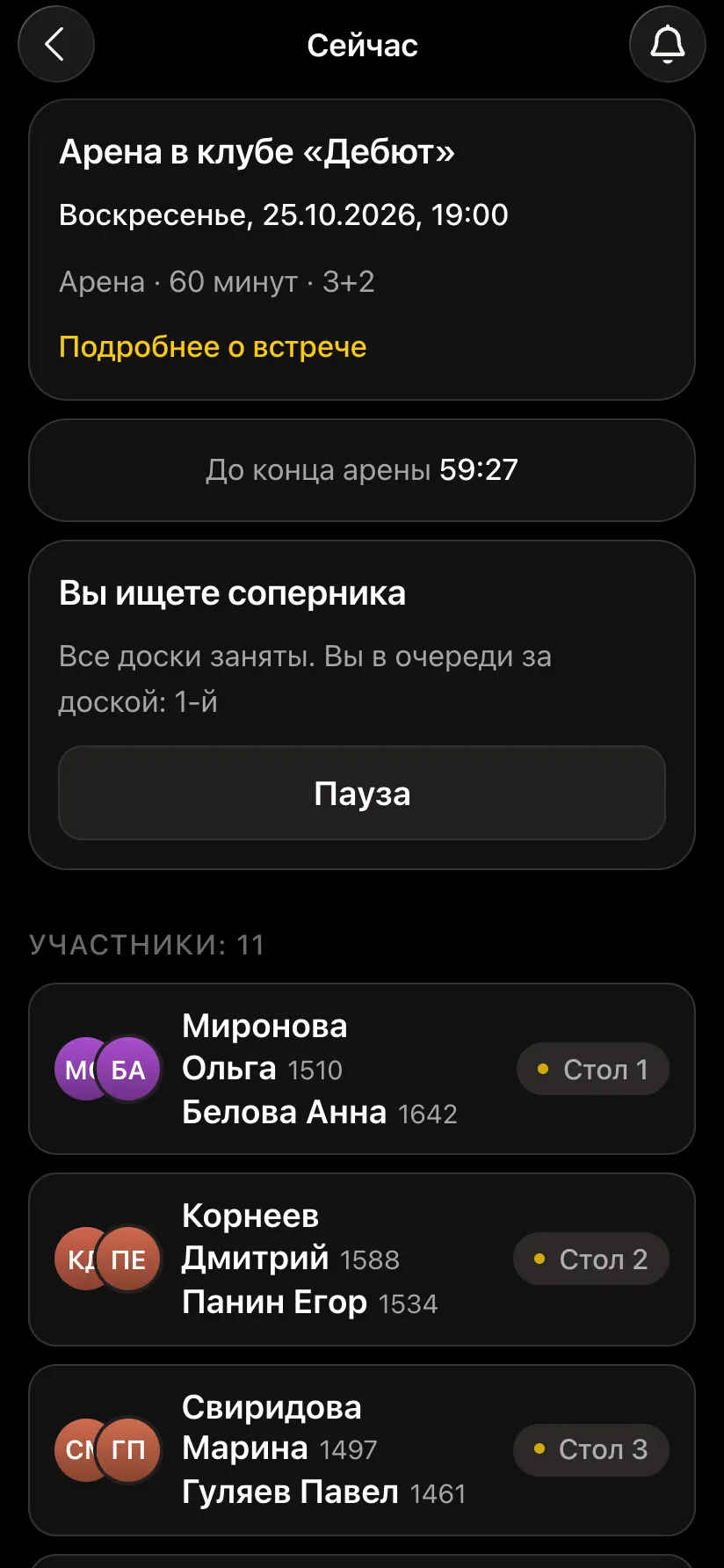
You can step away for a coffee at any moment: press "Pause" and the app will not seat you until you are back. Your points stay where they are.

Latecomers

Arrived twenty minutes after the start? Sign up and play. You will have less time to score, but you do not have to wait for the next tournament.
A player's screen in the queue: looking for an opponent, all boards busy, first in the queue for a board, the "Pause" button and the list of tables
All boards are busy - the player sees their place in the queue.
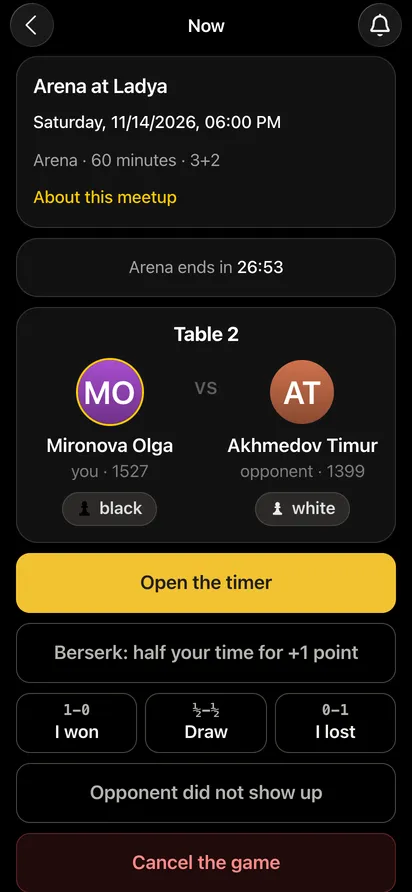
A player's screen at the board: table 2, the opponent, colours, the "Open the timer", berserk, "I won", "Draw" and "I lost" buttons
At the board: clock, berserk and result entry.

It is the same principle as in the Swiss system - strong players meet strong players - only without shared rounds and without waiting for the last table.

How points are counted in an arena

ResultPointsDetails
Win24 on a fire streak
Draw12 on a streak; a draw before move 10 - 0
Loss0the streak ends
Win with berserk+1if the game lasted at least 7 moves
Second draw in a row0only the first one scores if the game is 30 moves or shorter

The fire streak

Two wins in a row light a flame next to the player in the table. While it burns, every game brings double points: 4 for a win, 2 for a draw. The flame goes out as soon as the player stops winning: a draw still scores double but ends the streak, and a loss ends it at once. On the hall screen double points are highlighted in orange.

Berserk

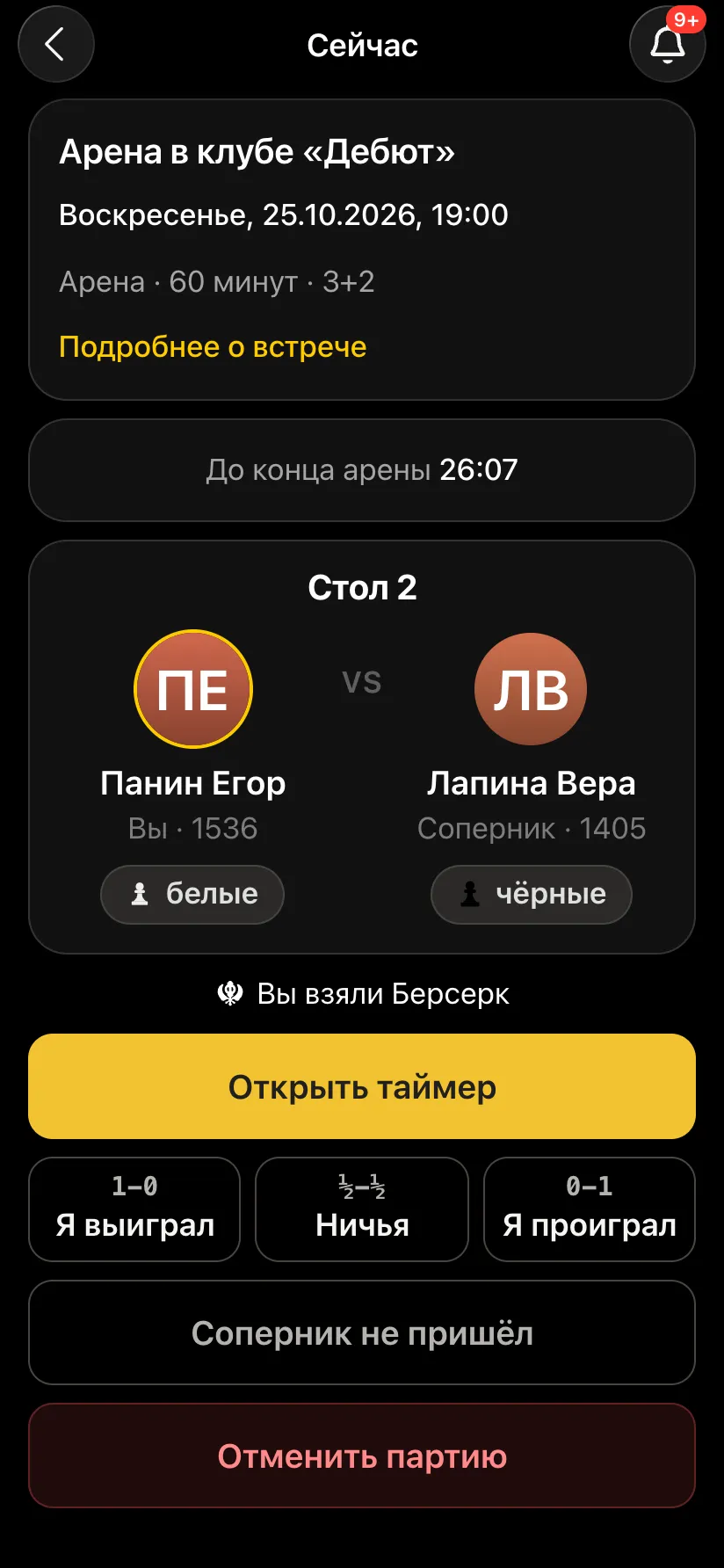
Before the first move a player can press "Berserk": their clock time is halved, the increment disappears, and a win brings an extra point - provided the game lasted at least seven moves. There is no going back. Berserk stacks with the streak: a berserk win on fire is 4 + 1 = 5 points.
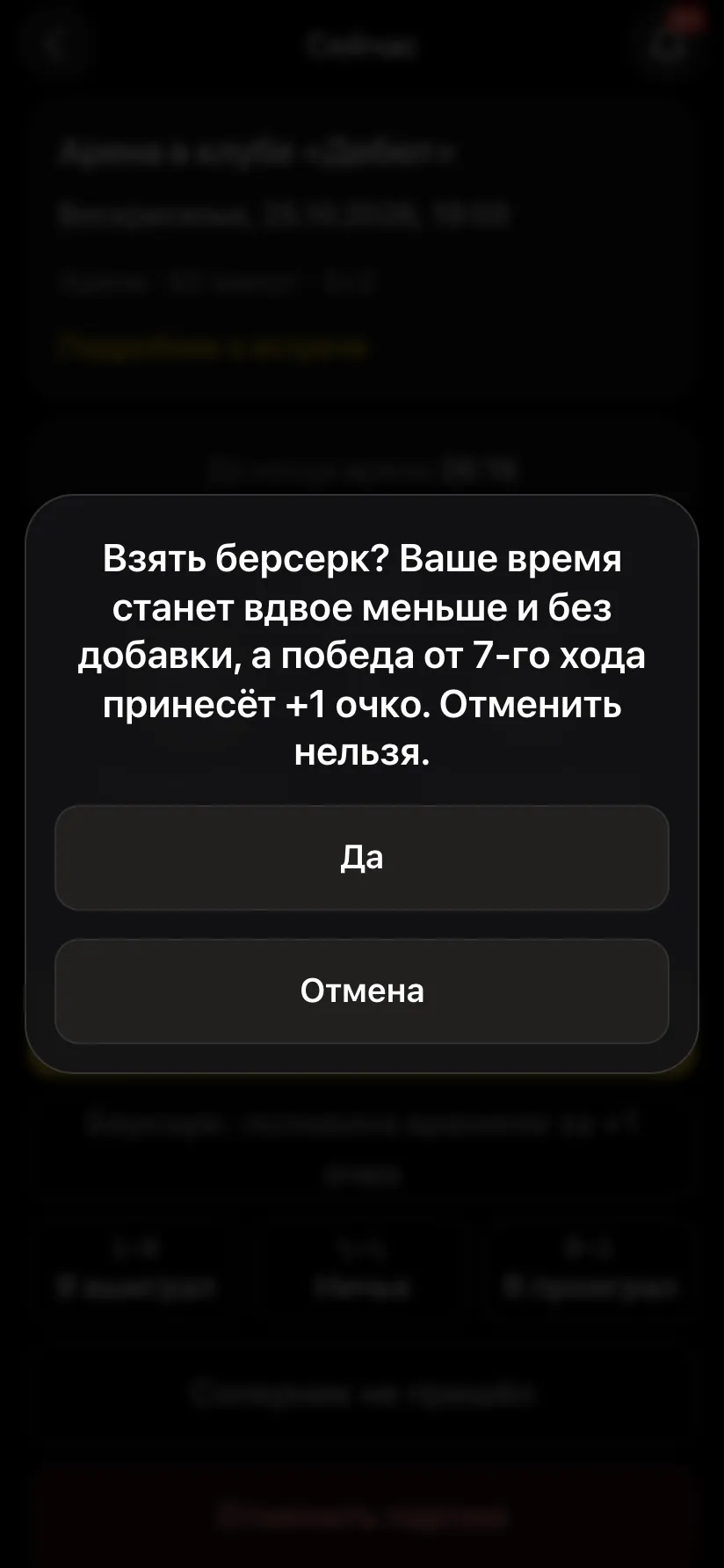
The berserk dialog: your time will be halved with no increment, a win from move 7 brings +1 point, it cannot be undone
Berserk is taken before the first move.
The table card showing that the player has taken berserk
Berserk taken - the clock knows.

Short draws

To stop players agreeing draws for points, a draw before move 10 scores nothing for either side. After the first draw, any further draws in a row score zero if the game was 30 moves or shorter; only a win breaks the chain. The app takes the number of moves from the chess clock the game was played on.

Equal points

If points are level, the player with the higher performance ranks higher: the average rating of their opponents plus an adjustment for wins and losses. Beating strong players is worth more than scoring the same points against beginners. Performance is shown in the table next to the points.

If an opponent does not show, a game must be cancelled or a result is disputed

The same situations arise in an arena as in any tournament, and each one has its own button:
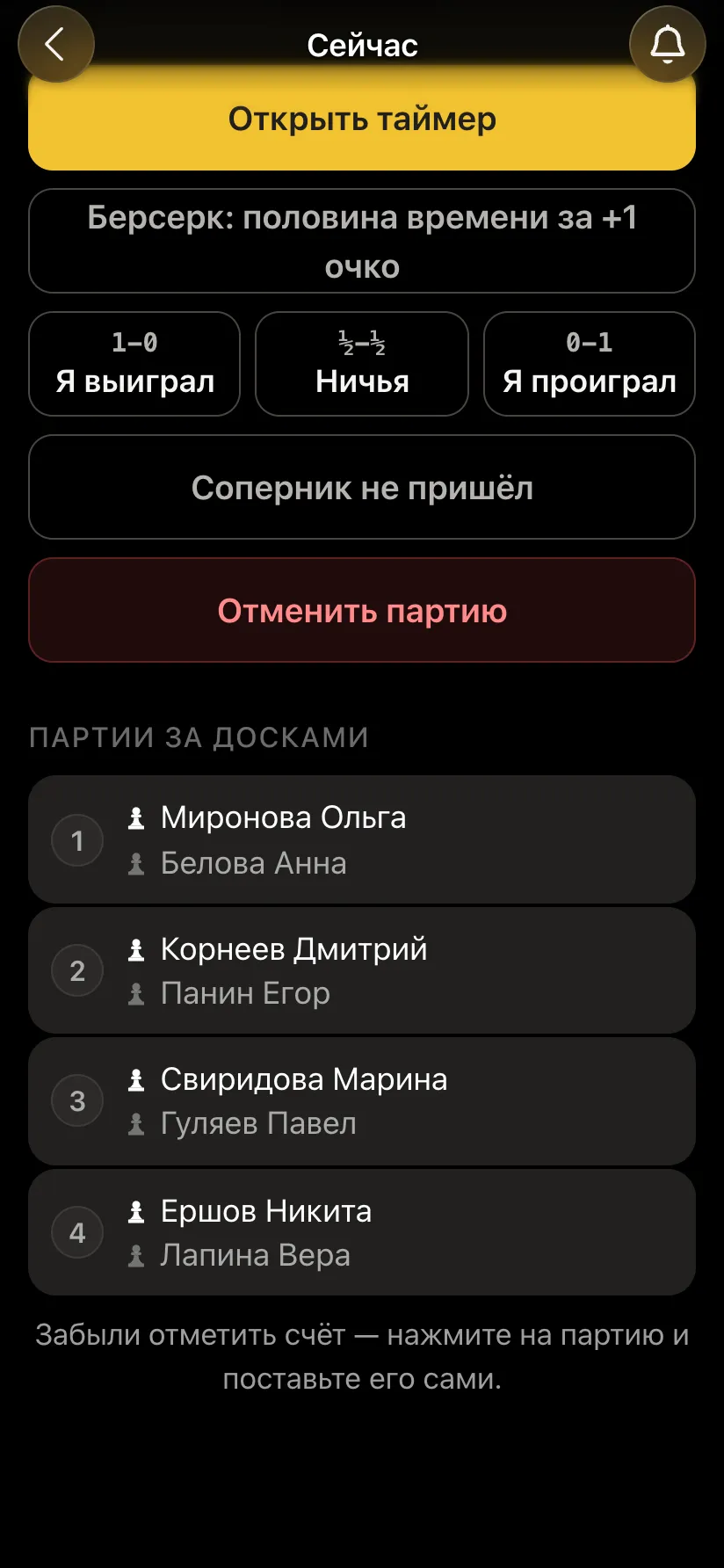
  • "Opponent did not show up" - the player who pressed it goes straight back into the queue for a new opponent, and the absent one is paused.
  • "Cancel the game" - if players sat at the wrong table or the game did not happen: both return to the queue.
  • Only one player entered the result - the opponent confirms or objects; a disputed game is settled by the organiser.
  • Forgot to enter it - the organiser taps the game in the "Games in progress" list and enters the result themselves.
The organiser's screen: the "Opponent did not show up" and "Cancel the game" buttons and the list of games in progress at four tables
The organiser sees every game at the boards.
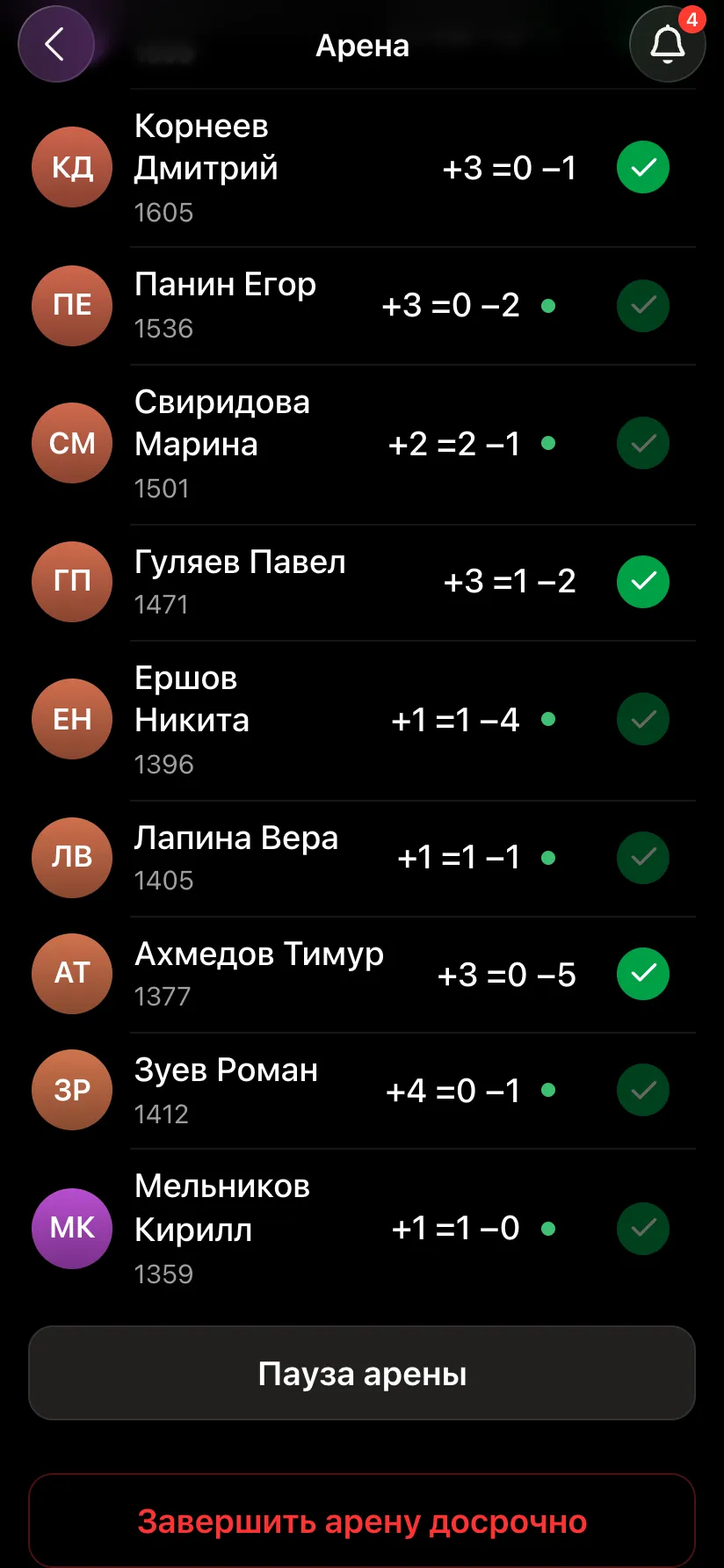
The organiser's arena card during play: participants with wins, draws and losses, the "Pause the arena" and "End the arena early" buttons
Pausing and ending early.

The organiser can pause the whole arena - for an announcement or a break, say - and end it early if the venue closes sooner than planned.

The hall screen and the arena results

For a projector or TV the arena has its own screen: a large countdown timer, the table with points, flames and performance, the games being played right now and how many people are waiting for an opponent. The table updates by itself after every game. It opens with the "Show the tournament on a screen" button in the arena card.

When the timer reaches zero, no new pairings are made. Games in progress at that moment are played out but do not count - just as on Lichess. The screen switches to the results by itself.
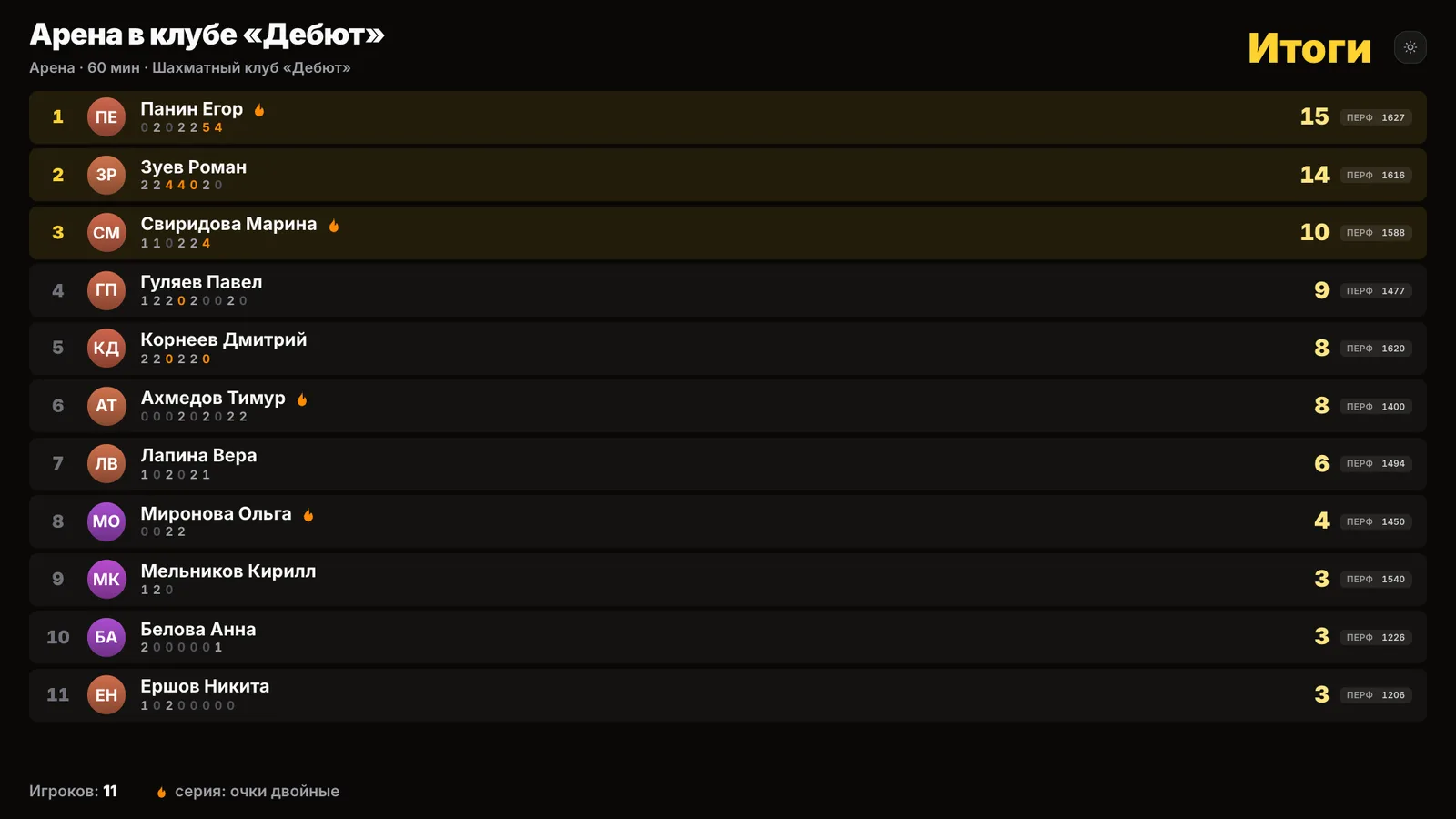
Arena results on the hall screen: first place 15 points, second 14, third 10, each with a row of points per game and the doubled ones in orange
Results: the top three highlighted, with points for each game under the name.

Look at the winner: 0, 2, 0, 2, 2, 5, 4. Two wins in a row lit the flame, the next win with berserk brought 5 points, and another one 4. The runner-up scored one point fewer with the same number of wins: their flame went out sooner.

Every arena game is an ordinary rated game in Vibe Chess: ratings change after each game, not at the end of the evening. If the moves were recorded, the games can be followed live and analysed with an engine afterwards; how it works - a tournament with live game broadcasts.

Why run an arena rather than a Swiss

Nobody sits idle

In a Swiss event a player who has finished waits for the last table, sometimes for twenty minutes. In an arena they are at a new board within a minute: an hour of blitz gives 7-10 games.

Arrive late, leave early

No round will start without you or end before its time. Come, play as many games as you can, leave - your points stay in the table.

The finishing time is known in advance

An arena ends exactly when the timer does. The venue and the guests do not have to guess how long the last round will take.

Excitement to the last minute

The fire streak and berserk give you a chance to catch the leader right at the end. The table on the hall screen changes after every game.

Who a chess arena suits

Chess clubs

A club blitz night without an arbiter and paper sheets: pairings, the table and the hall screen all run from the organiser's phone - how to start a chess club.

Cafes, bars, anti-cafes

A format where guests do not have to stay to the end: come for an hour and play your games. The table on the screen keeps the room engaged.

Corporate tournaments

A lunch hour or an evening after work: an arena fits any slot, and colleagues join as soon as they are free. More on this - a corporate tournament in the app.

Junior schools and coaches

A training arena between lessons: children play many games in a row, opponents are matched by strength, and the coach sees the whole table at once.

When you need a fair winner and every place decided, a Swiss or a round robin is the better choice. An arena shines where playing a lot without waiting matters more.

What you need for an arena

  • • Boards and pieces for every table - any ordinary set will do.
  • • A phone for every player with Telegram: it shows the table, the opponent and the result buttons.
  • • A chess clock - in the app on one of the players' phones; it counts the moves for the draw and berserk rules.
  • • A screen or projector - optional, for the table in the hall.

Run your own arena

Open @vibechessbot in Telegram, create an arena and send the invitation to your club chat. The app takes care of pairings, tables, points and the hall screen.

Frequently asked questions about the chess arena

What is a chess arena?

A timed tournament with no rounds: finish a game and you immediately get a new opponent. A win is 2 points, a draw 1, a loss 0. Whoever scores the most points in the time available wins.

Can an arena be played offline, in person?

Yes. In the Vibe Chess app the arena is played on real boards in a hall: the app pairs opponents, assigns tables and keeps score, and everyone sees their own table and colour on their phone.

How does an arena in Vibe Chess differ from an arena on Lichess?

The rules are the same: 2/1/0 scoring, streak, berserk, finish on the timer, performance tie-break. The difference is that it is played in person, the number of tables is limited by the boards in the hall, and two players who have just met are not paired again if someone else is available.

How are opponents paired in an arena?

Waiting players are paired with their neighbours in the table, never with their last opponent if someone else is free. White goes to whoever had Black last time. If there are not enough tables, a free table goes to whoever has waited longest.

What is the fire streak?

After two wins in a row your points are doubled: 4 for a win, 2 for a draw. The streak lasts as long as you keep winning.

What is berserk?

Before the first move you can give up half your time and the increment. A win in a game of at least 7 moves earns an extra point. Berserk cannot be undone.

Can I arrive late to an arena or leave early?

Yes. You can sign up and start playing after the start, and the "Pause" button takes you out of the pairing until you come back. Your points are kept.

What happens to games still in progress at the finish?

They are played out but do not count towards the arena - just as on Lichess. They do count towards your personal rating.

How long does an arena last and how many games do people play?

The organiser sets the length, 60 minutes by default. In an hour of 3+2 blitz players usually manage 7-10 games.

How much does it cost to run an arena?

The Vibe Chess app is free. All you need is boards and players' phones.

The app instead of arbiter software

Pairings are computed by bbpPairings, an open-source engine implementing the Dutch system by FIDE rules: score groups, floats on an odd field, colour alternation. Free to use.

  • Swiss system
    proper rounds with correct pairings, not random matchups
  • Round robin
    a full circle, with the round count derived from the field
  • Free meetup
    a light format with no tournament machinery

More than a bot: the app, FIDE rules and a TRF report

  • The app. Besides the bot there is an app - inside Telegram and simply at playvibechess.com/app: what is on in your city, the player list, a live table, the current round, your profile and game history - everything that is awkward to read as chat messages.
  • Pairings by FIDE rules. Pairings are computed by bbpPairings, an open-source engine implementing the Dutch system: score groups, floats on an odd field, colour alternation, no rematches, and no player gets a bye twice.
  • A TRF report. A finished tournament exports as a single file in the FIDE data exchange format - the one arbiter software and federations accept. Your profile stores the FIDE ID, national federation code, title, sex and date of birth for it.
  • Free. All of the above, with no subscriptions, paid plans or limits on the number of tournaments and players.

Full overview

Missing a feature? Message the developers

The bot is constantly improved based on real tournaments. If you need a feature that isn't there yet, message the developers right inside the bot with the /support command. Many features appeared exactly because organizers asked for them, and useful ideas get added quickly.

What to read next

Other formats: a Swiss-system tournament, the round-robin system, a team Swiss. Broadcasting games in any format - a live chess tournament broadcast. How to write down moves - algebraic chess notation. What to buy for the hall - chess sets for a tournament.

Alexey Mudry
Alexey Mudry · hosted 43 events for Vibe Chess · 184 reviews · rating 5.0

At the board since childhood: hazy about his rating, precise about every rook he has blundered. Counts an evening as a good one if the opponent stayed to talk afterwards instead of rushing off to check with an engine. Message →