Vibe ChessVibe ChessApp

Chess tournament for beginners in the Vibe Chess app

Alexey Mudry · updated September 29, 2026
What scares beginners off is not chess but the tournament: pairings, a standings table, an arbiter and the fear of finishing last. In the Vibe Chess app you can start more gently. The first evening is a "Free meetup" with no pairings: everyone picks an opponent at their own level, plays with a clock on their phone and reports the result in one tap, and their rating moves from the very first game. Once people have settled in, there is a small round robin where nobody is knocked out. Below are both scenarios with screenshots. For how to set up a tournament for beginners without scaring them off, with no app involved, see chess tournament for beginners.

Why it is easier for beginners to start in the app

No pairings, no standings table

A "Free meetup": nobody gets knocked out or sits at the bottom of a table, people simply play whoever they like.

An opponent at your level

The list shows everyone's rating and your history with them - it is easy to pick an equal rather than a master.

A clock on your phone

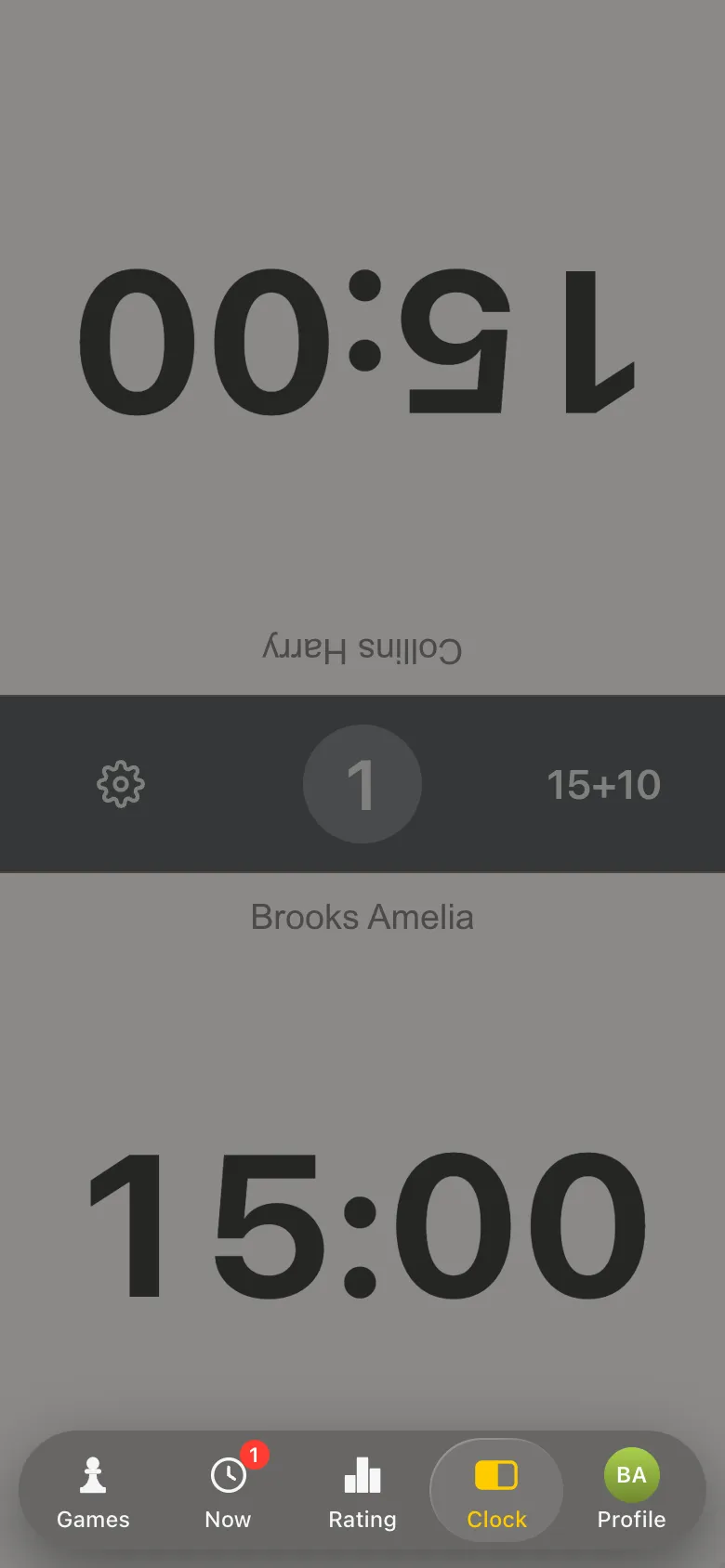
No chess clocks? "Open the timer" turns a phone into a clock with the players' names and the right time control.

Rated from the first game

Everyone starts at 1200, and after one evening you can see how far it has gone up. For a beginner that is the best reason to come back.

Results in one tap

"I won", "Draw", "I lost". The opponent can object - no need to argue with an arbiter.

A first tournament without the stress

A small round robin for six: everyone plays everyone, and nobody is knocked out.

You can join later

People can join a free meetup after it has started - a beginner does not feel they are late for an exam.

Free and nothing to install

Everything runs through the Telegram bot @vibechessbot, and from a computer through the web version.

Step 1. Create a free meetup

Open the Vibe Chess bot and its app button, or the web version. "Create your game". For a first evening choose "Free meetup": no rounds and no pairings, people sit down with whoever they like, and there is no limit on the number of players.

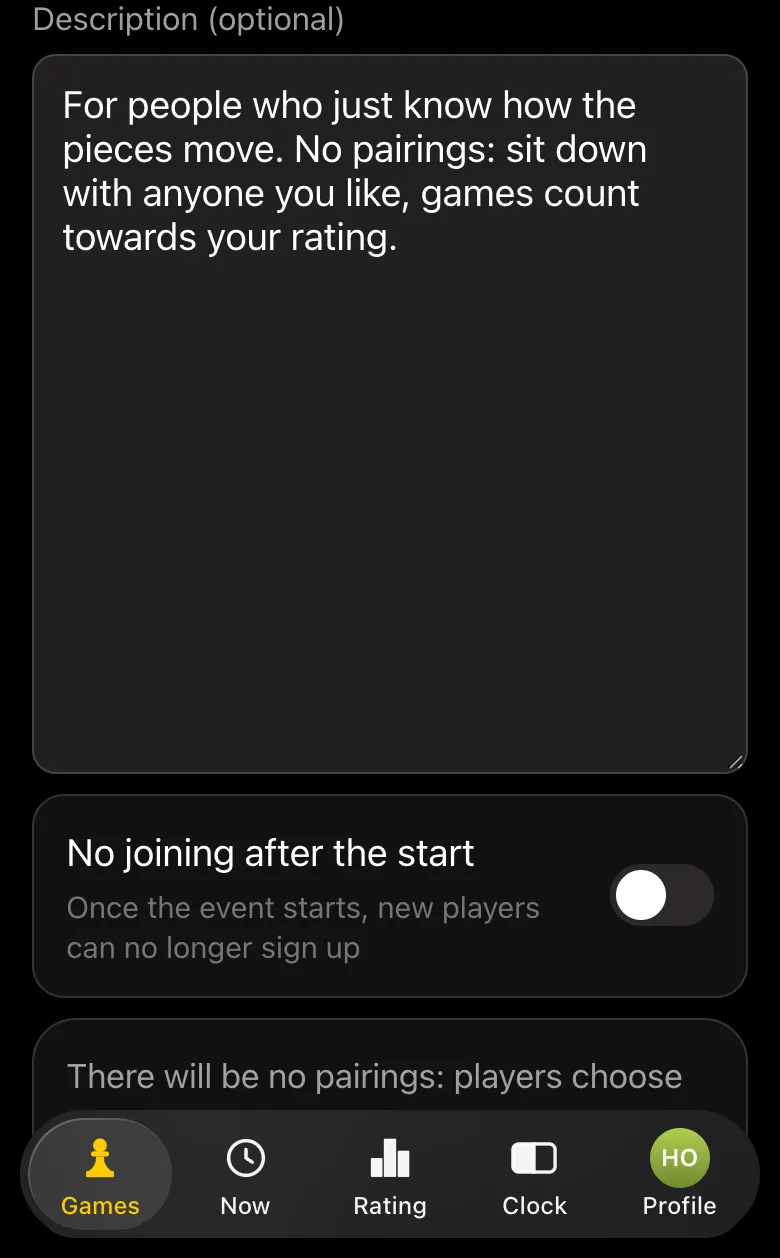
The venue is a café, a board-game café or a club, then the date, time and time control. Beginners need time in hand: 15 minutes plus 10 seconds a move, so they can think instead of panicking about the clock. Tables - as many boards as you have. Better leave the "No joining after the start" toggle off: people can turn up later, and that is a good thing.
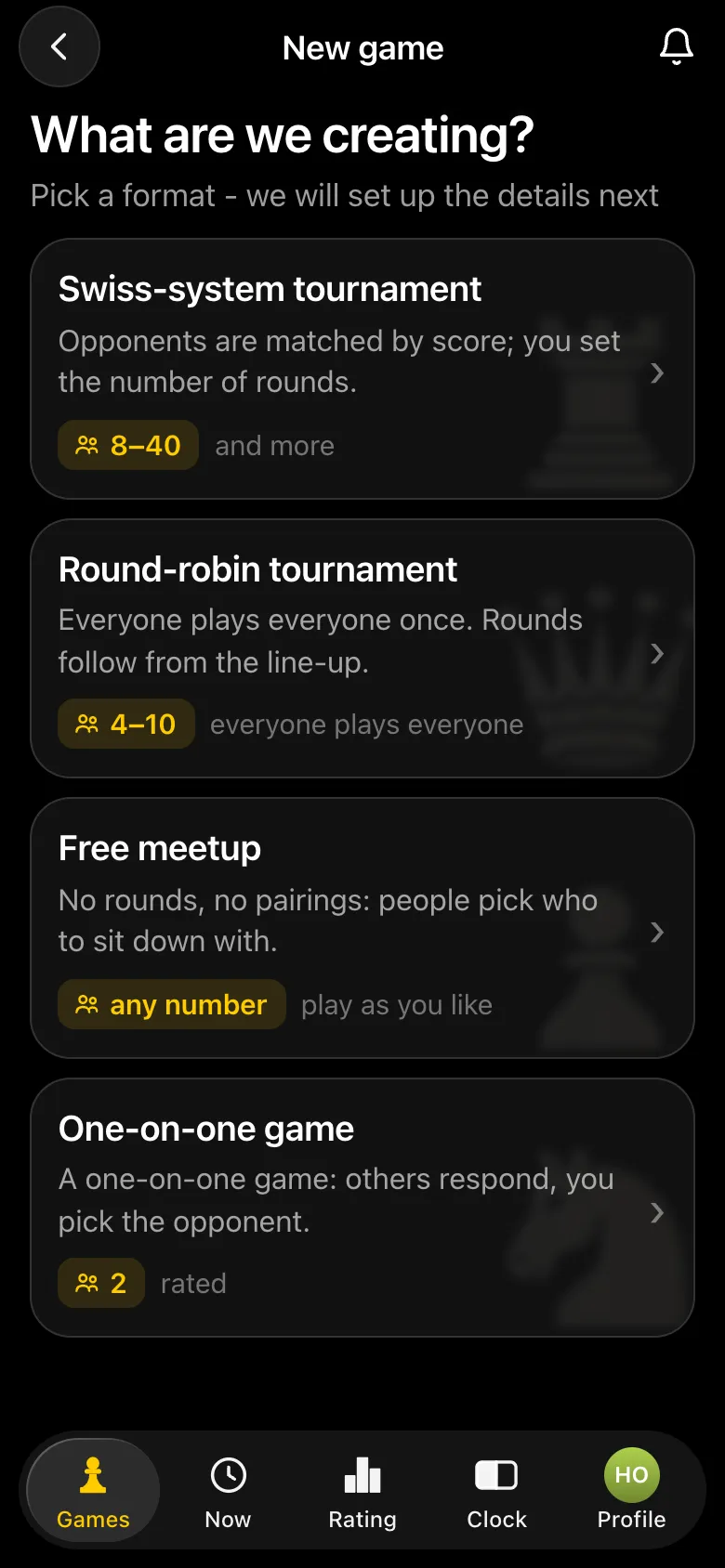
"What are we creating?" screen: Swiss-system tournament, Round-robin tournament, Free meetup and One-on-one game
Four formats. For a first evening - a free meetup.
Free meetup form: description "For people who just know how the pieces move. No pairings: sit down with anyone you like, games count towards your rating.", the "No joining after the start" toggle switched off
The meetup description - be honest about who it is for.

Step 2. Invite people

The meetup card has an "Invite a friend" QR code: point a camera at it, the bot opens and the person joins the meetup. You can also send the link to a chat, on Telegram or VK. An open meetup appears in your city's feed in the app - that is how people you do not know yet find it too.

Once people have gathered, the organiser presses "Start the meetup". From then on they can play as well: the meetup runs without their help.

Step 3. Pick an opponent and play

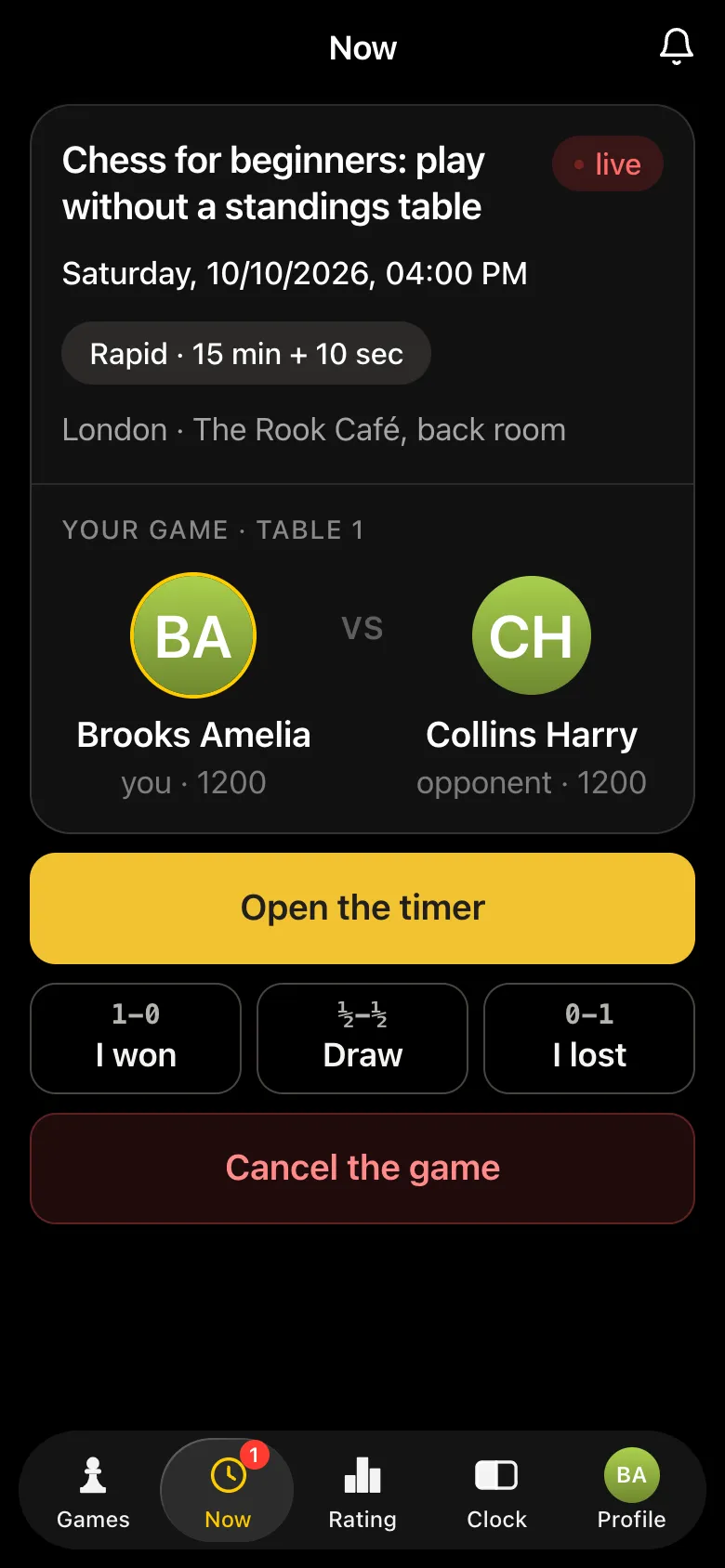
On the "Now" screen everyone sees the list of players: who is free, what their rating is, whether you have already played and with what score. The app gives a direct hint: "Pick a free opponent and sit down to play. Mind the ratings, so the game is interesting for both of you." Tap "Pick" next to a free opponent and you are sent to a free table.
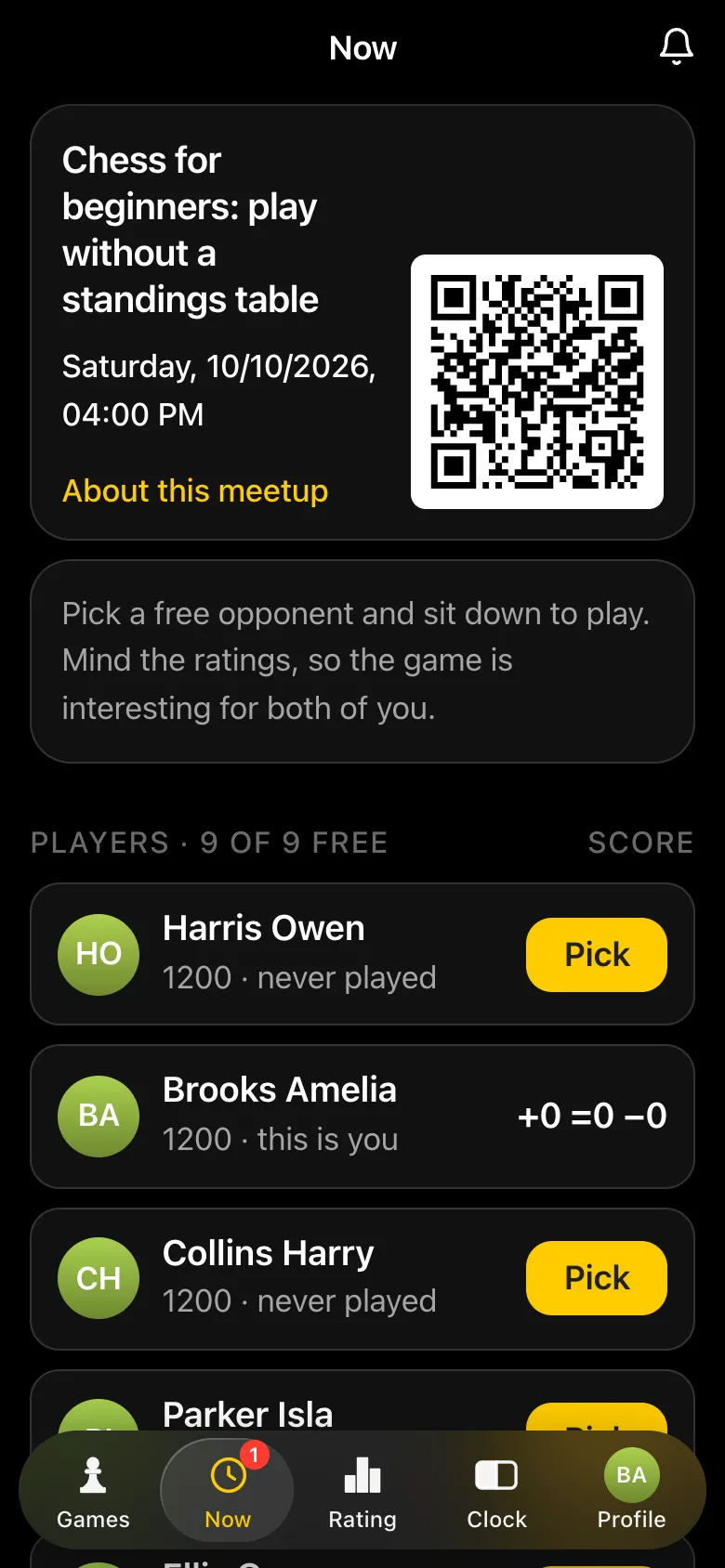
Meetup screen for a beginner at The Rook Café: QR code, the hint to pick an opponent by rating, a list of players with "Pick" buttons
Everyone is free: pick an opponent.
Game screen "Your game · Table 1": Brooks Amelia against Collins Harry, buttons "Open the timer", "I won", "Draw", "I lost" and "Cancel the game"
Picked - and straight to the table.
Chess clock on the phone: 15:00 for each player, time control 15+10, the names Collins Harry and Brooks Amelia
"Open the timer" - a clock with the names and the meetup's time control.

The clock in the app already knows the meetup's time control and the players' names. If a game ends by flag on the clock, the result is recorded automatically - nothing to report. There is also a separate clock on the website - online chess clock.

Step 4. Result and rating

When the game is over, one of the players presses "I won", "Draw" or "I lost". The opponent sees the report and has 15 seconds to dispute it, otherwise the result is accepted automatically. Reporting your own loss is accepted at once. After the game both players are free again and pick their next opponent.

Every meetup game counts towards the Vibe Chess rating. Everyone starts at 1200, and by the end of the evening you can see it move: the winner goes up, the list says "played on September 29, 1–0", and your own screen shows the evening's score, something like "+3 =1 −0". How the rating is calculated - see the Elo rating explained.
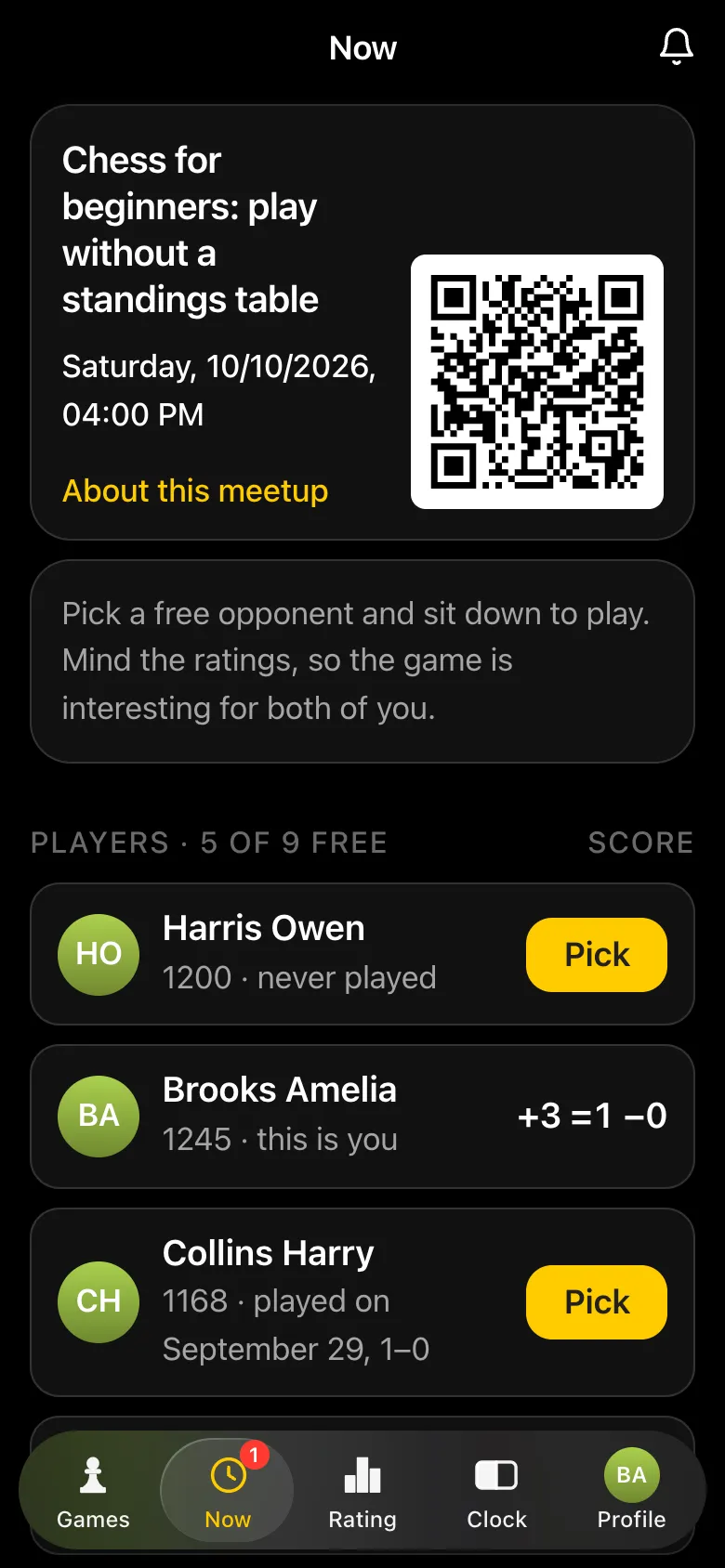
Meetup screen mid-evening: Brooks Amelia on 1245 with a score of +3 =1 −0, the other players with their ratings and history such as "played on September 29, 1–0", two pairs at tables
Mid-evening: the rating has moved, and you can see who you have already played.
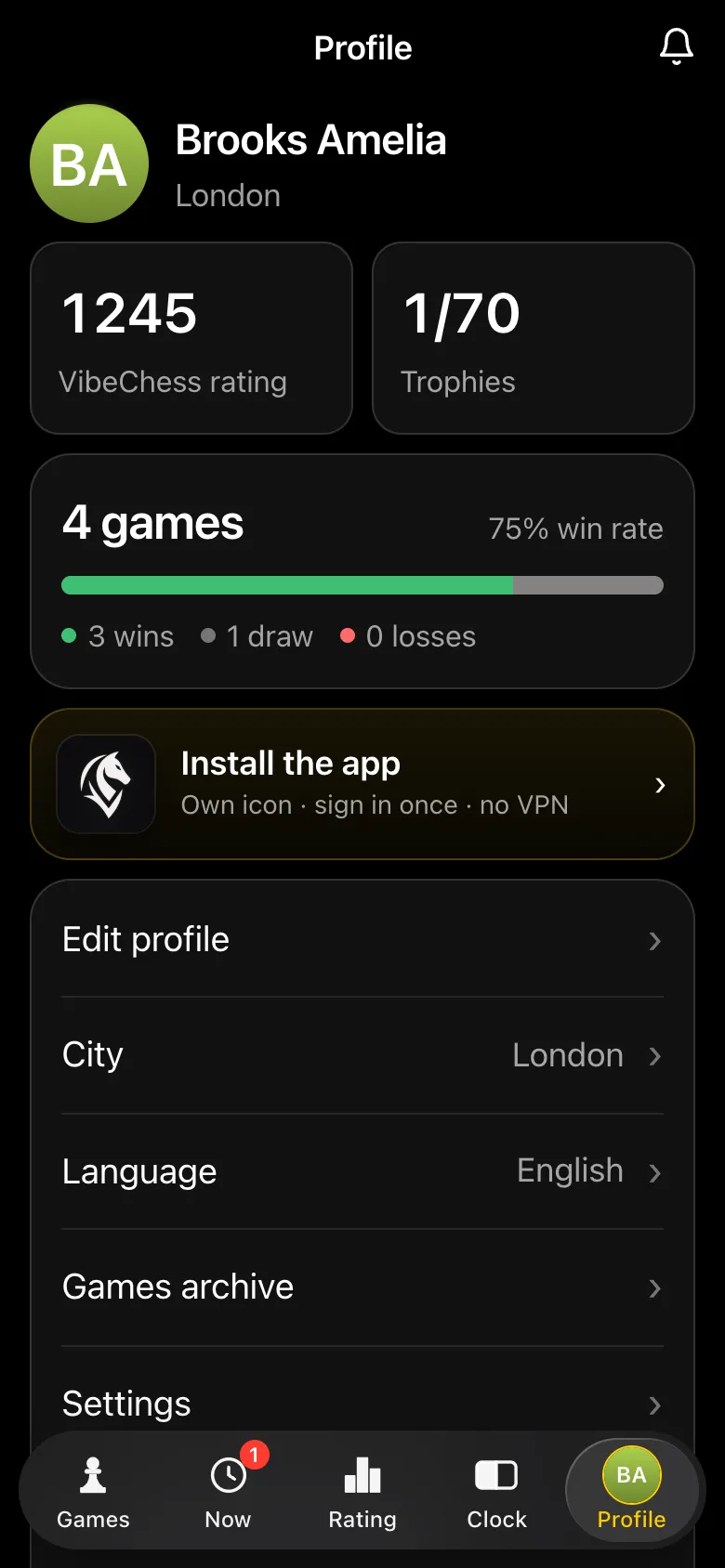
Beginner's profile, Brooks Amelia: VibeChess rating 1245, 4 games, 75% win rate, 3 wins, 1 draw, 0 losses, game history with rating changes
The profile after a first evening: rating, games, history.

Step 5. The organiser and the evening's results

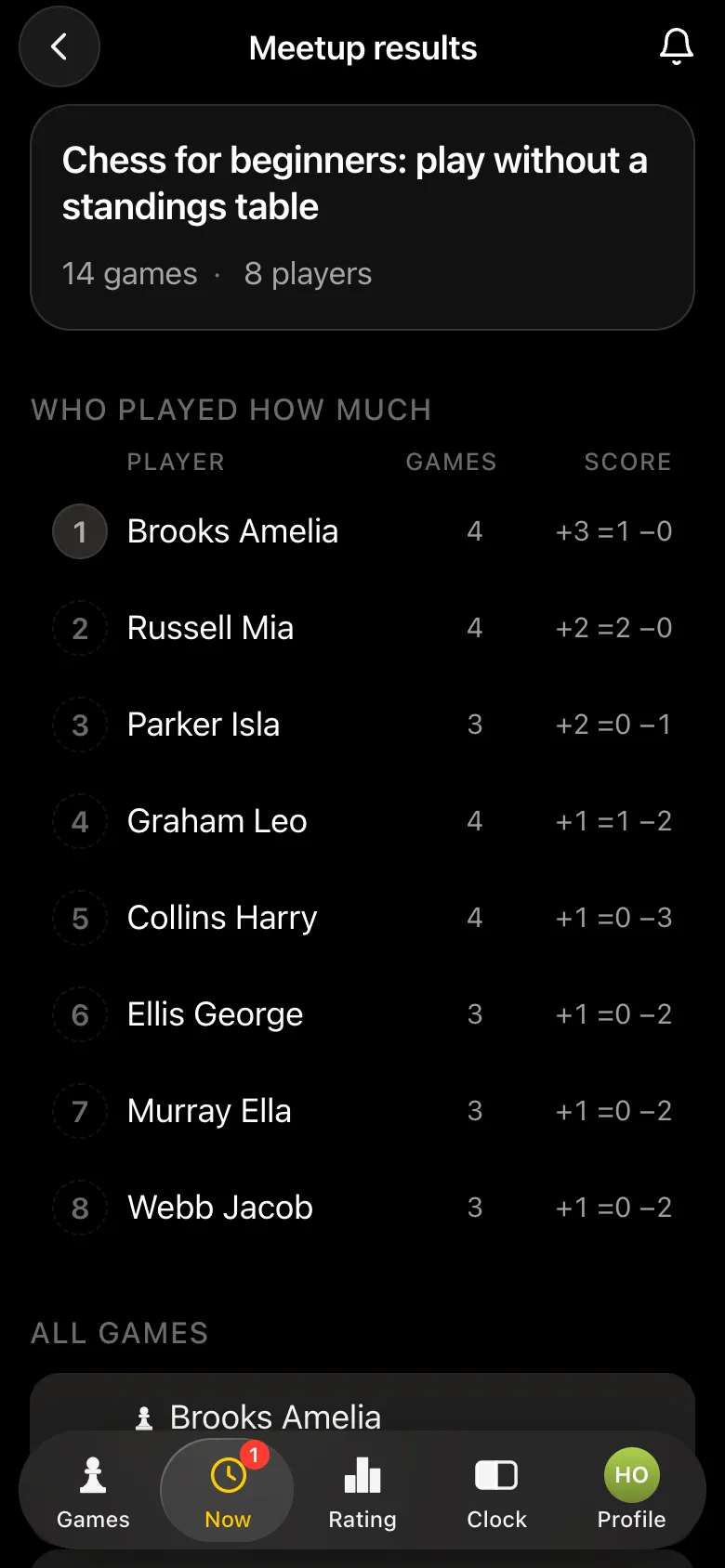
The organiser sees which games are in progress and at which tables, and can set the score themselves if the players forget. "Game results" shows the evening's totals: how many games each player played, everyone's score and every game with its time. "Close the game" stops new games, but the meetup can be reopened, while "Finish the meetup" sends it to the archive.
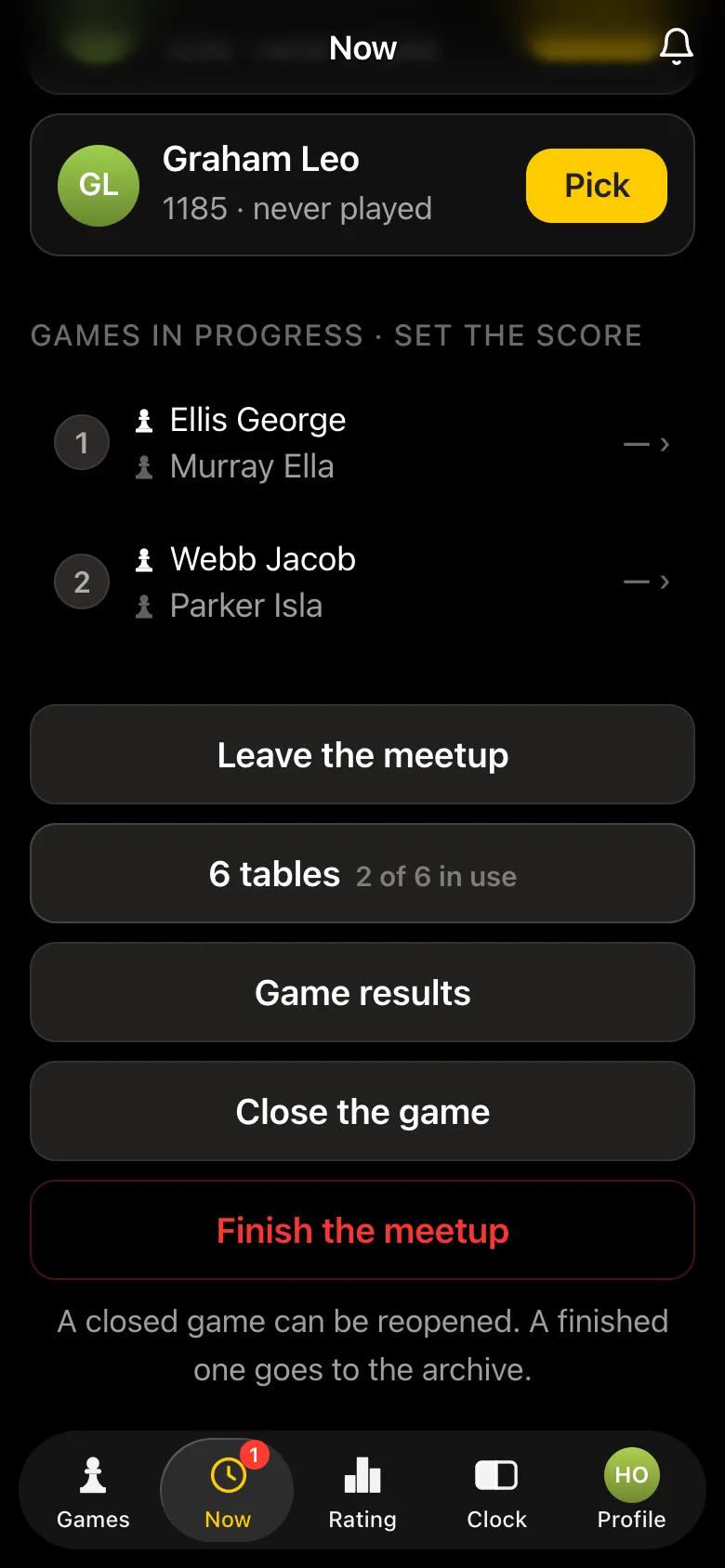
Organiser's screen: "Games in progress · set the score" with two tables, "Leave the meetup", "6 tables · 2 of 6 in use", buttons "Game results", "Close the game", "Finish the meetup"
The organiser sees the games in progress and can set the score.
"Meetup results": 14 games, 8 players, a "Who played how much" table - Brooks Amelia 4 games +3 =1 −0, Russell Mia +2 =2 −0
The evening's results: who played how much.

Step 6. A first real tournament - a round robin

Once people have played at a couple of meetups, you can run a first tournament. For beginners a round robin for six to eight players works best: everyone plays everyone, nobody is knocked out, and nobody meets the same strong opponent twice. The form asks for the number of players, and the app works out the rounds itself: five for six players. How the schedule works - see Berger tables.
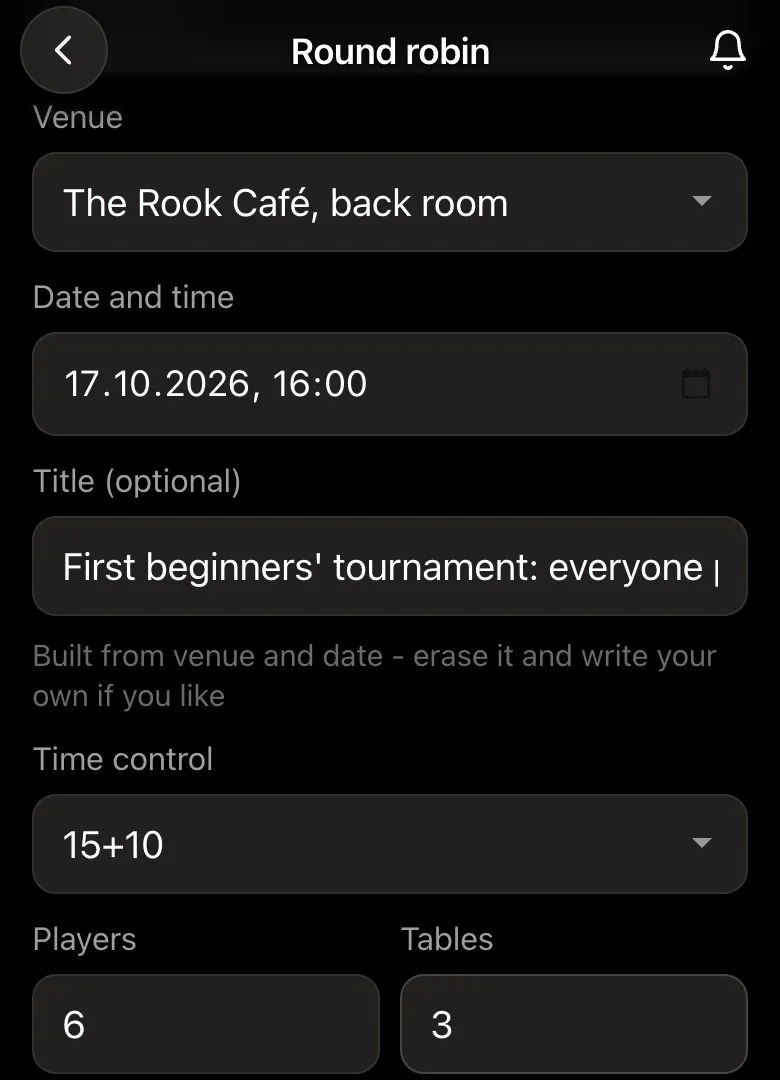
Round-robin form: "First beginners' tournament: everyone plays everyone", time control 15+10, Players 6, Tables 3
Round robin: the number of players, and the app works out the rounds.
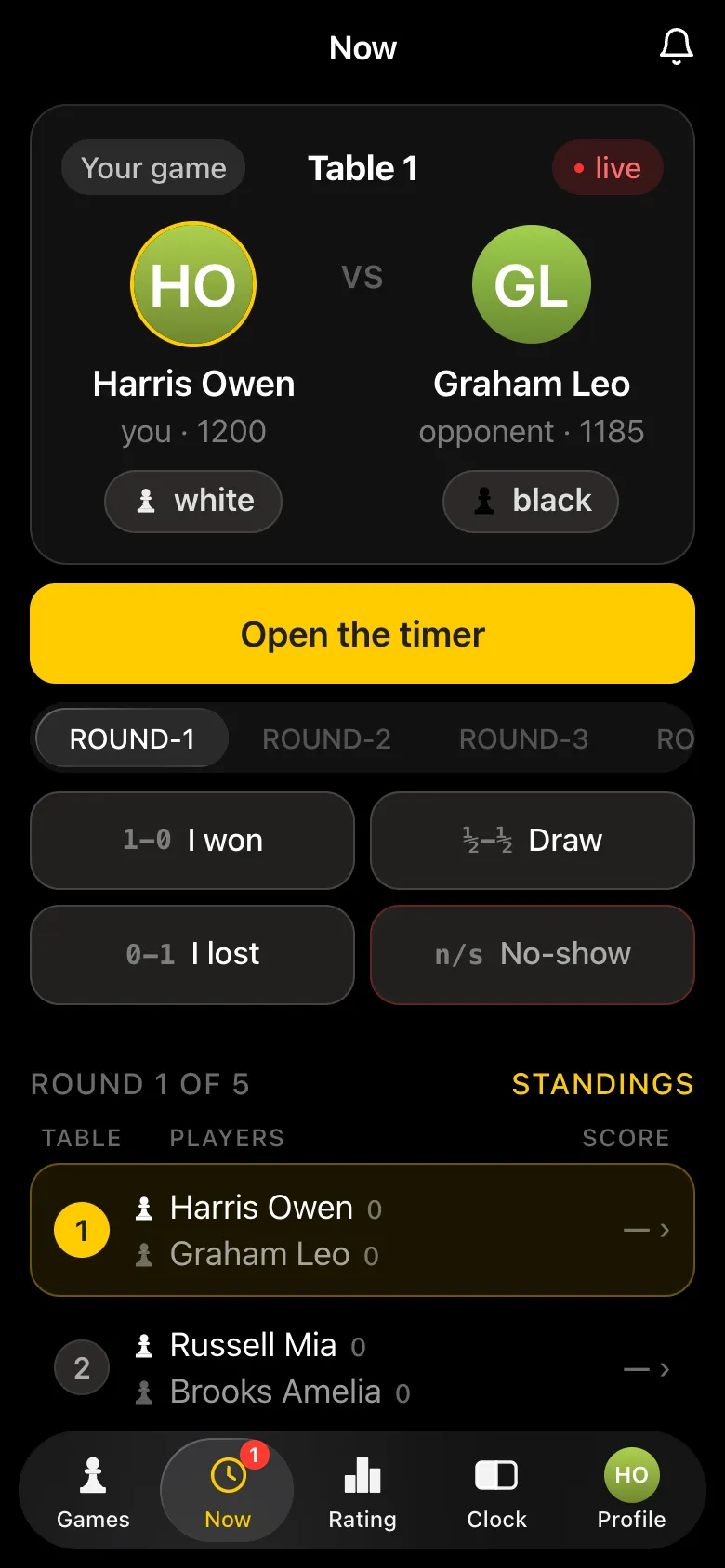
Round 1 of 5 of the round robin: organiser Harris Owen plays at table 1 against Graham Leo, everyone has a screen with a timer and result buttons
Round 1 of 5: the organiser plays too.
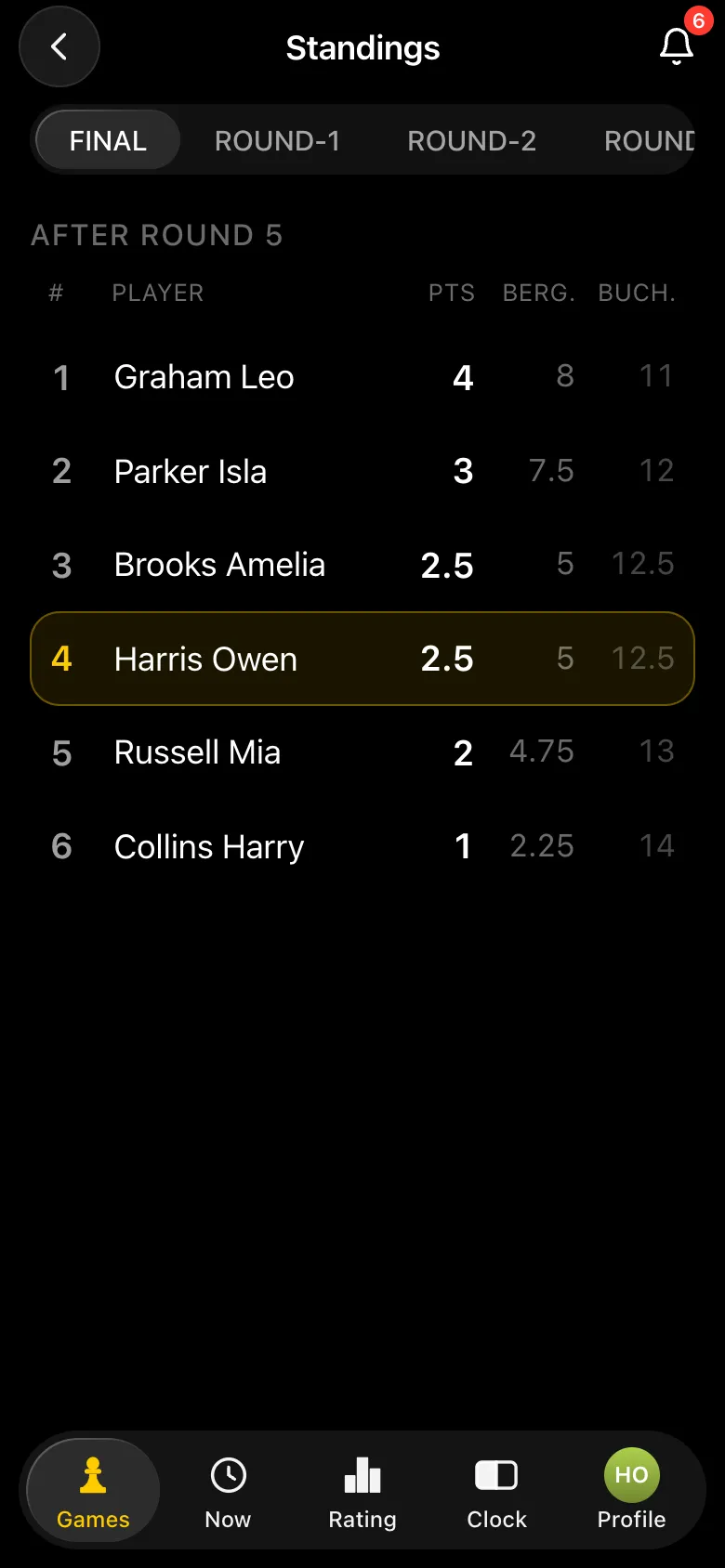
Final standings of the round robin: Graham Leo 4 points, Parker Isla 3, Brooks Amelia 2.5, Harris Owen 2.5
Final standings: points, Berger and Buchholz.

Players report results just as at a meetup, rounds are announced automatically, and the final standings and a PDF results sheet appear after the last round. If there are more than ten beginners, a Swiss system is the better fit - a detailed walkthrough is in a Swiss-system tournament in the app.

Tips from practice

  • Time control 15+10. Blitz scares beginners, and a game without a clock drags on. More in chess time controls.
  • A meetup first, then a tournament.At a meetup nobody loses "the tournament" - only single games. After a couple of evenings a first tournament is no longer frightening.
  • The rules in advance, and kindly. How to explain them without putting anyone off - see explaining chess rules in five minutes; a cheat sheet - how the chess pieces move.
  • Practise with a friend.The "One-on-one game" format is a rated game between two people, with no meetup or tournament.

What the app does not do

  • It does not teach chess.The app runs meetups and tournaments and keeps the results and ratings. The moves and the rules are on the website's pages and with the evening's host.
  • It does not work offline. Players need internet on their phones.
  • Ratings only with an account. Anyone the organiser adds as a guest without Telegram plays unrated.

Get your first chess evening together

Open @vibechessbot in Telegram or the app in your browser and create a free meetup - it takes a minute. Questions about the app? Write to us on Telegram.

Common questions about a beginners' tournament in the app

How is a free meetup different from a tournament?

A meetup has no rounds, no pairings and no standings table: everyone picks a free opponent themselves and plays as much as they like. In a tournament the app makes the pairings, and at the end there are places and a winner.

Do meetup games count towards the rating?

Yes. Every game at a free meetup changes both players' Vibe Chess rating. Everyone starts at 1200.

Do we need chess clocks?

Not necessarily: the "Open the timer" button turns a phone into a clock with the meetup's time control and the players' names. If a game ends by flag, the result is recorded automatically.

Can I join a meetup after it has started?

Yes, you can join a free meetup after the start - unless the organiser has switched on "No joining after the start".

What time control suits beginners?

15 minutes plus 10 seconds a move: enough time to think, and the game does not drag on. Blitz is usually too fast for a first evening.

What format should a first tournament be?

A round robin for six to eight players: everyone plays everyone, and the app works out the number of rounds itself. For bigger groups - the Swiss system.

How much does it cost?

The app is free. It runs inside Telegram through the @vibechessbot bot, and on a computer at vibechess.ru/app.

The app instead of arbiter software

Pairings are computed by bbpPairings, an open-source engine implementing the Dutch system by FIDE rules: score groups, floats on an odd field, colour alternation. Free to use.

  • Swiss system
    proper rounds with correct pairings, not random matchups
  • Round robin
    a full circle, with the round count derived from the field
  • Free meetup
    a light format with no tournament machinery

More than a bot: the app, FIDE rules and a TRF report

  • The app. Besides the bot there is an app - inside Telegram and simply at playvibechess.com/app: what is on in your city, the player list, a live table, the current round, your profile and game history - everything that is awkward to read as chat messages.
  • Pairings by FIDE rules. Pairings are computed by bbpPairings, an open-source engine implementing the Dutch system: score groups, floats on an odd field, colour alternation, no rematches, and no player gets a bye twice.
  • A TRF report. A finished tournament exports as a single file in the FIDE data exchange format - the one arbiter software and federations accept. Your profile stores the FIDE ID, national federation code, title, sex and date of birth for it.
  • Free. All of the above, with no subscriptions, paid plans or limits on the number of tournaments and players.

Full overview

Missing a feature? Message the developers

The bot is constantly improved based on real tournaments. If you need a feature that isn't there yet, message the developers right inside the bot with the /support command. Many features appeared exactly because organizers asked for them, and useful ideas get added quickly.

What to read next

With no app involved - chess tournament for beginners and the rules of chess. The same app for the office - corporate chess tournament in the app. For a university - student chess tournament in the app. For the courtyard - neighbourhood tournament in the app.

Alexey Mudry
Alexey Mudry · hosted 15 Vibe Chess events

At the board since childhood: hazy about his rating, precise about every rook he has blundered. Counts an evening as a good one if the opponent stayed to talk afterwards instead of rushing off to check with an engine. Message →