Vibe ChessVibe ChessApp

Broadcasting a junior chess tournament for parents

Alexey Mudry · updated October 26, 2026
At a junior tournament there are sometimes more parents in the hall than children. They stand at the tables, catch their child's eye, sigh at every move - and the child only finds it harder. A broadcast fixes this: parents see the game on a screen in the fan zone or on a phone, and the playing hall is quiet. Below - why a junior tournament needs a broadcast, what to show on it and what not, and how it works in Vibe Chess.

Why a junior tournament needs a broadcast

Quiet in the hall

Parents do not stand at the tables: everything is visible on the screen in the fan zone or on a phone.

Calm children

A child does not see Mum behind them and does not look round after every move.

Fair play

Nobody can hint from the stands if the parent is not at the board and the broadcast runs with a delay.

Analysis afterwards

The game can be opened at home and gone through together, move by move.

What to show and what not

WhatShow it?Why
Boards and movesyesthat is why people watch
Children's namesfirst name or first name and initialthe surname - only with parental consent
Children's photos on screenbetter notin the app the hall screen can be switched to no photos
Tournament standingsyesby group, if the tournament was split by age
Video from the hallnothe Vibe Chess broadcast shows boards and moves, not pictures of the children

Which children's details may be published and which consents are needed depends on the law of your country and the rules of the event - agree it with the parents in advance.

Hints and a delay

The most common problem at a junior tournament is hints. A parent sees a move on the screen and waves to the child. There are two remedies: a fan zone where the child cannot see the parents, and a broadcast delay - moves reach viewers a few moves or minutes later than they appear on the board.

A broadcast delay and a separate page for your tournament only are set up by arrangement: live online chess tournament broadcasts. Why a hint costs the game is explained in parents at a junior tournament.

Where parents should watch

  • • in the fan zone on the screen - together with other parents;
  • • on a phone by the link - in the corridor, in a café nearby, at home;
  • • not at the tables and not behind the child - even if you really want to.

How to use the broadcast page - how to watch a chess tournament broadcast, how to set up a fan zone - a fan zone at a chess tournament.
How it works in Vibe Chess

  • • a broadcast without photos - live.playvibechess.com shows only names, boards and moves;
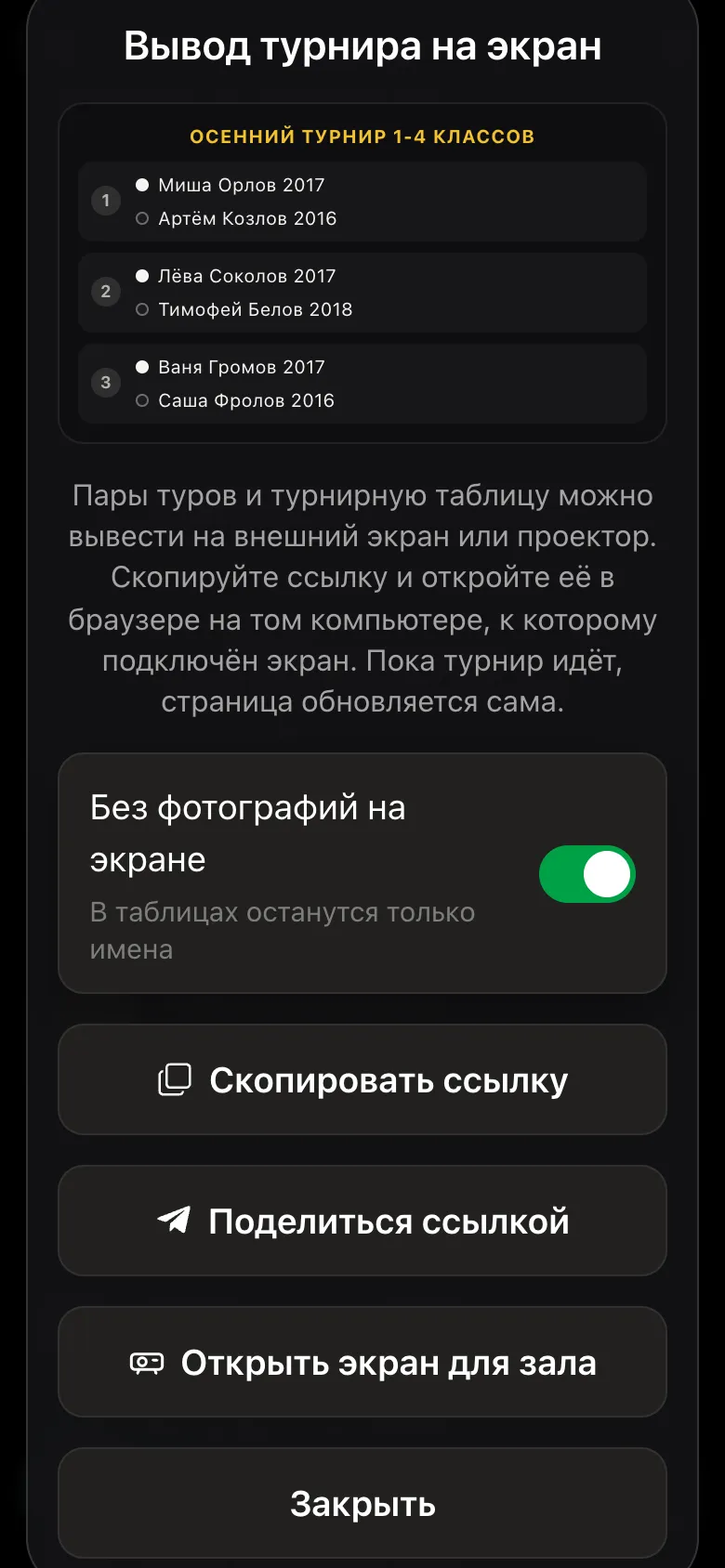
  • • a hall screen without photos - a switch removes the circles with faces, leaving the names;
  • • names - as the organiser entered them: children without a phone are added as guests, first name only is fine;
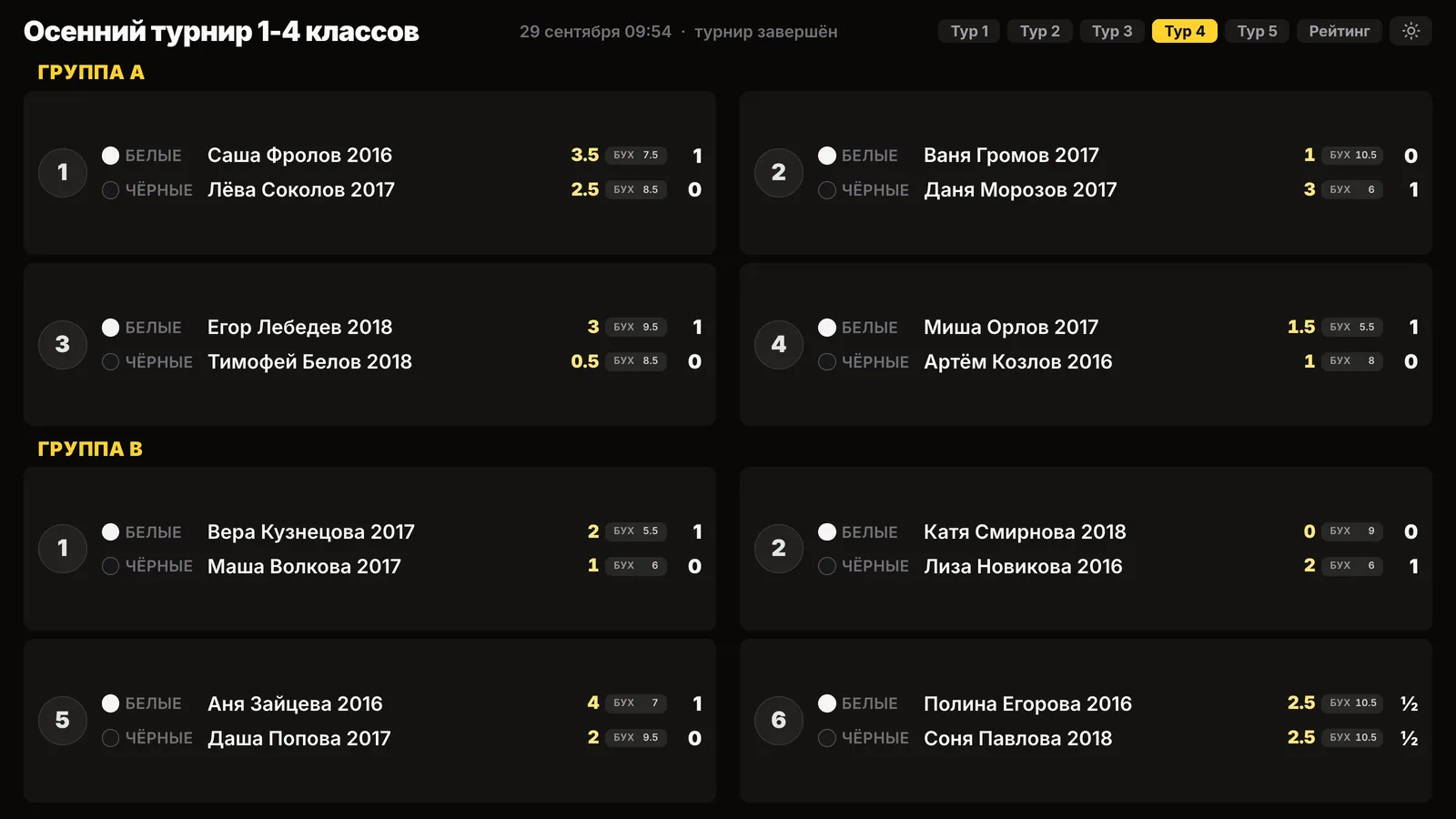
  • • groups - pairings and standings for each age group separately;
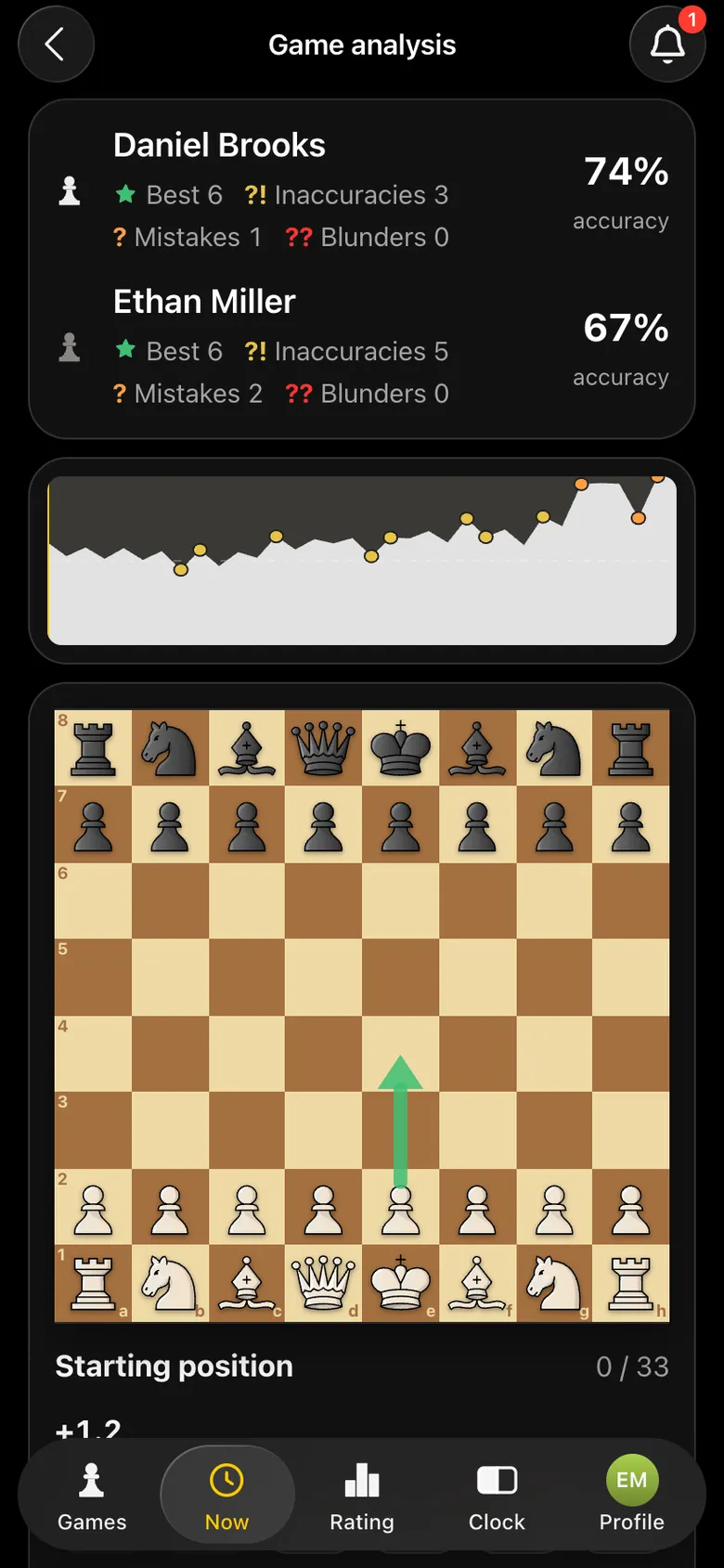
  • • analysis - a recorded game is saved in the app with analysis.
The Show the tournament on a screen window: the No photos on the screen switch is on, Copy link and Open the hall screen buttons
The hall screen - without photos.
Game analysis: player accuracy, mistakes, game graph
The game is saved - analysis at home.
The hall screen on a projector: round four pairings, Group A and Group B separately, names only, no photos
Pairings by group, names only.

After the tournament: going through it with your child

  • • start with the good: which move in the game was the best;
  • • ask the child where they see the mistake themselves - before showing yours;
  • • one main idea per game, not ten;
  • • do not go through it straight after a loss - the next day is better.

A junior tournament where parents watch instead of standing at the tables

In Vibe Chess the broadcast shows boards and moves without photos, and the hall screen shows pairings by group. Create a junior tournament for free.

Frequently asked questions about a junior broadcast

Why broadcast a junior tournament?

So parents watch the games from the fan zone or a phone instead of standing at the tables. The hall is quieter, the children calmer, and there are fewer hints.

Are children's faces visible on the broadcast?

No. The Vibe Chess broadcast page shows only names, boards and moves. The hall screen can be switched to no photos.

Can children's surnames be shown?

Only with parental consent. Without it - first name, or first name and initial.

How do I stop parents giving hints?

Put the fan zone where the child cannot see the parents, and turn on a broadcast delay - it is set up by arrangement.

Can I watch my child's game after the tournament?

Yes, if the game was recorded by a camera: it is saved in the app with the moves and analysis.

Three event formats in one app

The Vibe Chess app is built for an evening over the board, not for online play: it keeps the sign-up list, the pairings and the table while you deal with people and the venue. All of it free.

Swiss system

score groups, no rematches, no second bye

Round robin

everyone plays everyone, the app works out the number of rounds

Free meetup

who is free and who is already at a board is shown under Now

How the tournament runs
  1. 1Create the event and save the venue for next time
  2. 2Open sign-up, players arrive through the link
  3. 3Start the tournament and the app announces the pairings
  4. 4Keep entering results, then take the final table and the TRF file

More than a bot: the app, FIDE rules and a TRF report

  • The app. Besides the bot there is an app - inside Telegram and simply at playvibechess.com/app: what is on in your city, the player list, a live table, the current round, your profile and game history - everything that is awkward to read as chat messages.
  • Pairings by FIDE rules. Pairings are computed by bbpPairings, an open-source engine implementing the Dutch system: score groups, floats on an odd field, colour alternation, no rematches, and no player gets a bye twice.
  • A TRF report. A finished tournament exports as a single file in the FIDE data exchange format - the one arbiter software and federations accept. Your profile stores the FIDE ID, national federation code, title, sex and date of birth for it.
  • Free. All of the above, with no subscriptions, paid plans or limits on the number of tournaments and players.

Full overview

Missing a feature? Message the developers

The bot is constantly improved based on real tournaments. If you need a feature that isn't there yet, message the developers right inside the bot with the /support command. Many features appeared exactly because organizers asked for them, and useful ideas get added quickly.

Alexey Mudry
Alexey Mudry · hosted 37 events for Vibe Chess · 157 reviews · rating 5.0

At the board since childhood: hazy about his rating, precise about every rook he has blundered. Counts an evening as a good one if the opponent stayed to talk afterwards instead of rushing off to check with an engine. Message →