The pawns stand where they always do, on the second and seventh ranks. The other pieces - rooks, knights, bishops, queen and king - are placed on the first rank in random order, following two rules:
Black mirrors White: if White’s queen is on b1, Black’s is on b8. Exactly 960 setups meet these rules, hence the name. One of them is the standard starting position.
The format was invented by the eleventh world champion Bobby Fischer, who presented it in 1996, which is why it is also called Fischer Random. FIDE recognises Chess960 and has held world championships in it. Apart from the setup and castling, everything is as in a normal game: how the pieces move, check and mate, en passant, promotion, draws and the clock.
The full rules, sample setups and a random position generator are in our guide to Chess960 (Fischer Random). This article is about turning the format into a tournament.
Under the hood it is an ordinary Swiss: the same sign-ups, pairings by score, tables, clocks, results, standings and tiebreaks. One thing is different - the starting position.
| Ordinary Swiss | Chess960 | |
|---|---|---|
| Starting position | the standard one, always the same | random, new every round, one for all boards |
| Pairings | Swiss system by score | the same Swiss system |
| What a player sees | table, opponent and colour | the same plus the position number and a setup diagram |
| Rules | standard | standard apart from the setup and castling; a rules window is built into the app |
| Tiebreaks | Buchholz and Berger | Buchholz and Berger |
| Rating | the club tournament rating | a separate Chess960 rating; the usual one does not change |
| In game history | time control and date | time control, date and a “960” tag |
Open @vibechessbot in Telegram and tap “Open the app”. The same app also opens in a browser at playvibechess.com/app. It is free and there is nothing to install.
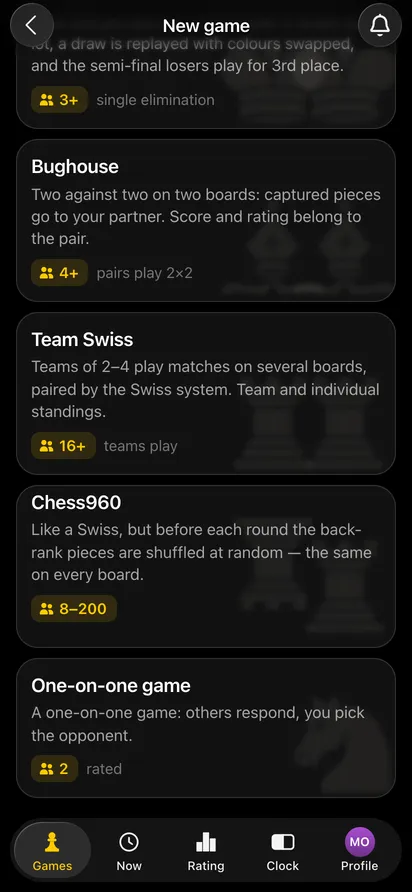
Tap “Organize your own meetup”. A list of formats opens: Swiss, arena, free meetup, round robin, knockout, bughouse, team Swiss, Chess960 and a one-on-one game. Pick the “Chess960” card. It sums the format up: like a Swiss, but before each round the back-rank pieces are shuffled at random - the same on every board.
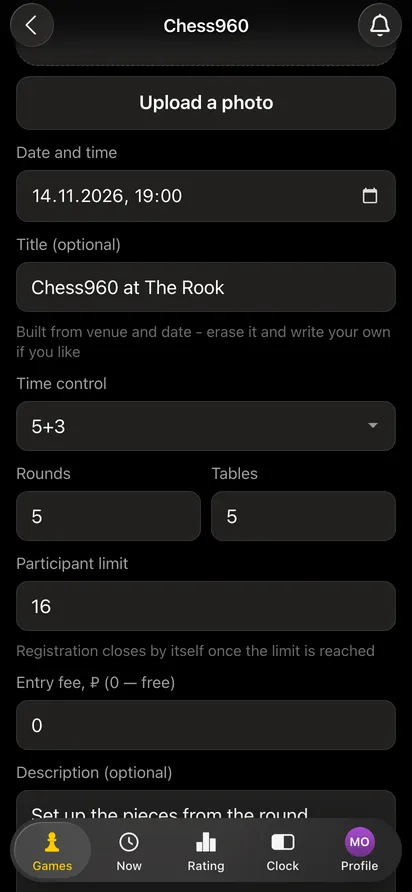
Then fill in the form:
Tap “Create the tournament”. It is open for sign-ups straight away, and you are its first participant. In the city feed the tournament is labelled “Swiss 960”, so players can see at a glance that this evening is different. If you change your mind, the format can be switched in the event settings before the start: Swiss and Chess960 convert into each other, and the rounds and line-up stay as they were.
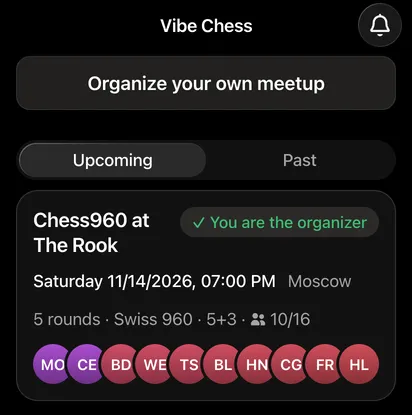
The tournament appears in your city’s feed in the app, and chess players find it on their own. You can also post the link to the tournament card in your club chat or on social media. A player opens the card and taps “Sign up”. On the morning of the game the app reminds everyone who signed up.
It is worth saying in the description that this is Chess960 and briefly explaining castling: not every player knows the format. You can simply link to the Fischer Random rules.
Players without Telegram can be added by the organiser as guests by name - they get into the pairings and the standings too.
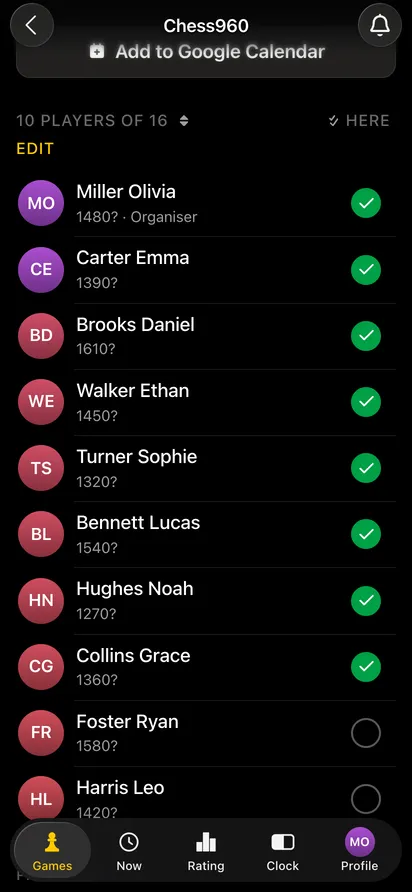
On the day, open the event card. Next to each registered player there is a check-in circle: tick those who have arrived. Only checked-in players go into the first-round pairings. Below is the number of tables, and the app tells you whether there are enough for every pair at once.
When everyone is there, tap “Start the tournament”. The app asks you to confirm that the first pairings will be announced. After that it pairs the players, assigns tables and picks the first-round position. Latecomers can join from the next round, as in any Swiss.
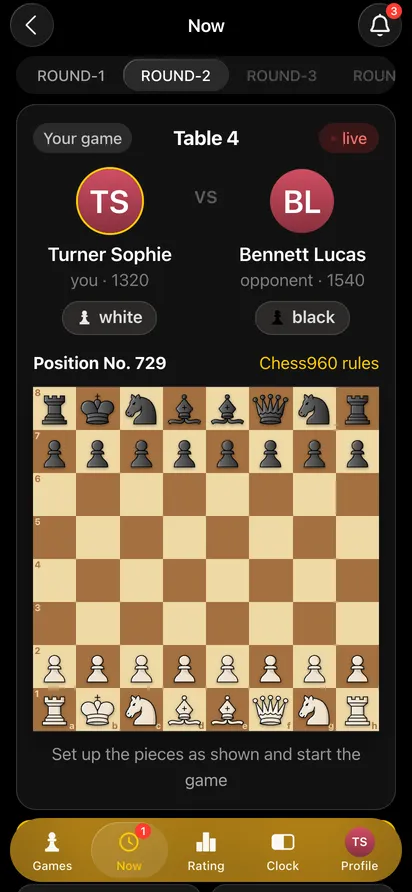
This is the main reason the format is a separate event type. On the “Now” tab a player has a “Your game” block: table number, opponent, colours, ratings - and below them the position number and a board with the round’s setup. The caption under the board reads “Set up the pieces as shown and start the game”.
The board is turned towards the player in their colour. Whoever has White sees the white pieces at the bottom; whoever has Black sees the black ones. It is a small detail, but it is what prevents confusion: people look at the diagram the same way they look at the board in front of them, and nobody has to flip the picture in their head to find their queen.
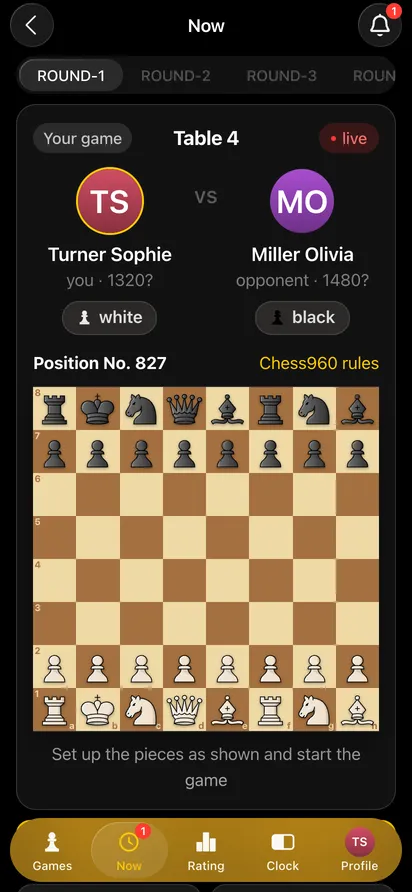
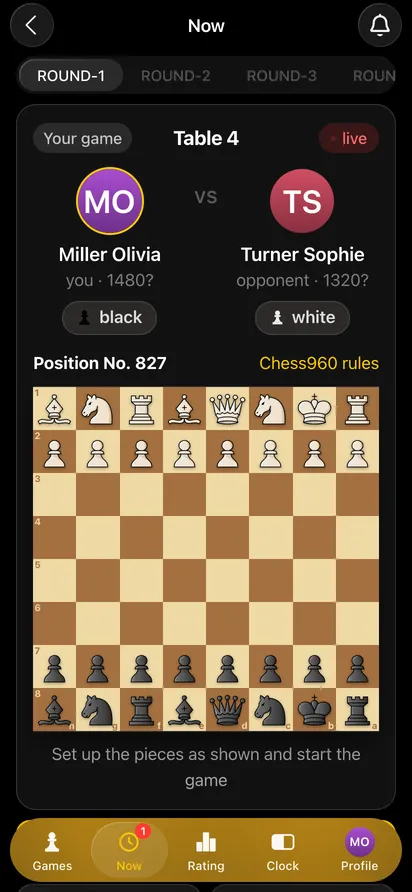
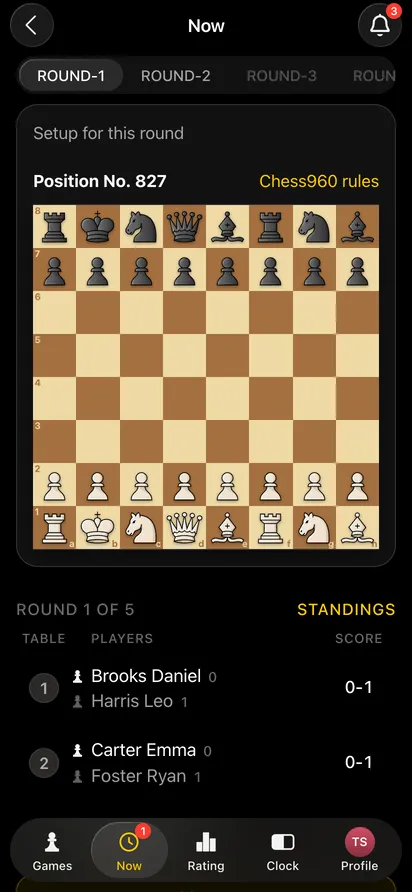
Everyone else sees the same position on a “Setup for this round” card - White at the bottom and without the prompt to set up the pieces:
| Who | What they see |
|---|---|
| A player in their own game | the “Your game” block: table, opponent, colour, position number and a board turned towards them in their colour |
| The organiser, if not playing | the “Setup for this round” card with the same board, White at the bottom |
| Spectators and players who have finished | the same “Setup for this round” card |
| Any participant looking at a past round | that round’s tab with the position it was played in and the results of every table |
| Everyone in Telegram | a line from the bot in the pairing card: “Chess960: position No. N - see the setup in the app” |
The rest works as usual: under the board is an “Open the timer” button - a chess clock right on your phone - and the result buttons: “I won”, “Draw”, “I lost”, “No-show”. Further down is a list of every table in the round with pairs and scores. There is no need to buy clocks; how the phone clock works is covered in our article on the online chess clock.
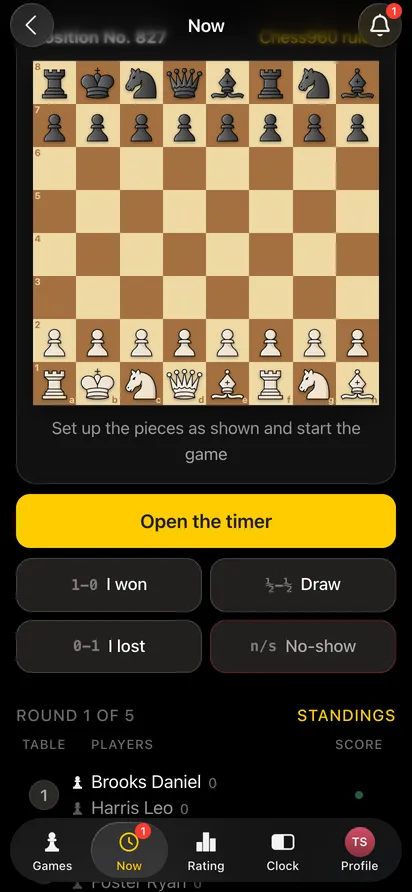
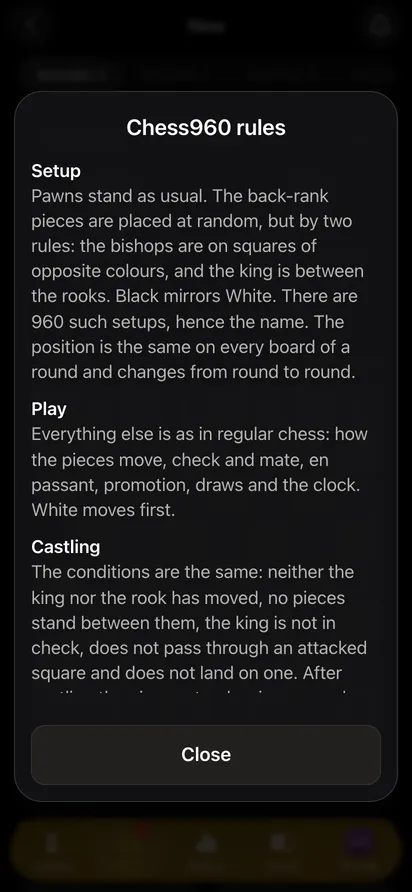
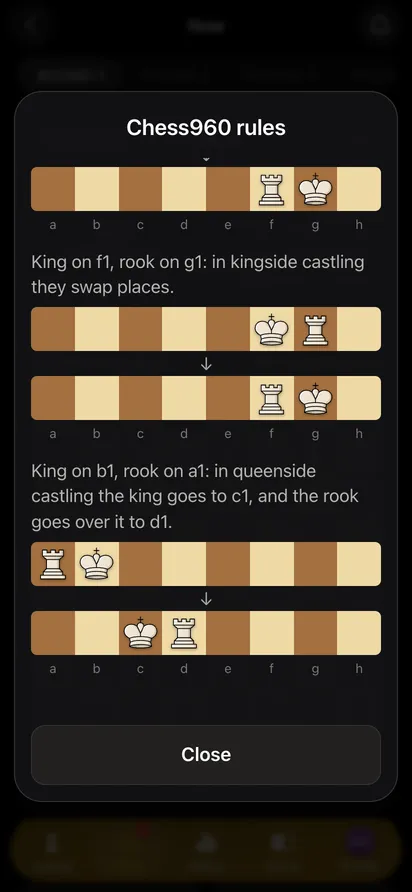
Next to the position number is a “Chess960 rules” link. It opens a window with three sections: setup, play and castling. If someone at a table is unsure, the answer is two taps away and the organiser does not have to run between boards.
Castling is the one place where Chess960 really is harder than ordinary chess. The rule: after castling, the king and rook end up on the same squares as in a normal game. Kingside - king on g1, rook on f1; queenside - king on c1, rook on d1. For Black - g8 and f8, c8 and d8. The conditions are the usual ones: neither the king nor the rook has moved, there are no pieces between them, the king is not in check, does not pass through an attacked square and does not land on one.
The tricky cases the app shows as pictures:
A tip from the rules window worth repeating to the players before the first round: so that your opponent does not take castling for an ordinary king move, say “castling” out loud, lift the king off the board, place the rook, and then the king.
Players enter the result of their game themselves: one reports it, the other confirms. If they report different results, the dispute goes to the organiser, who sets the result. Nothing has to be written down on paper.
Once every table in the round has a result, the next round starts by itself: the app pairs players by score and picks a new position - again one for all boards. The organiser does not need to press anything. Need a break? The tournament can be paused and resumed later.
The previous round’s position does not disappear: the “ROUND-1” tab shows a “Setup for this round” card with the position played in round one, plus the scores of every table. Handy when, after the evening, you want to remember which setup produced the most beautiful game.
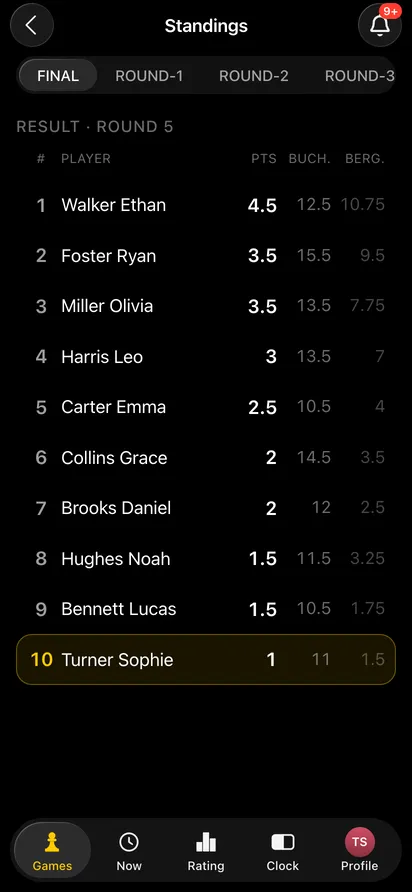
After the last round the final standings appear automatically as soon as every result is in. They show places, points, and the Buchholz and Berger scores, so equal points are separated without arguments. How to read these tiebreaks is explained in our article on the Buchholz score.
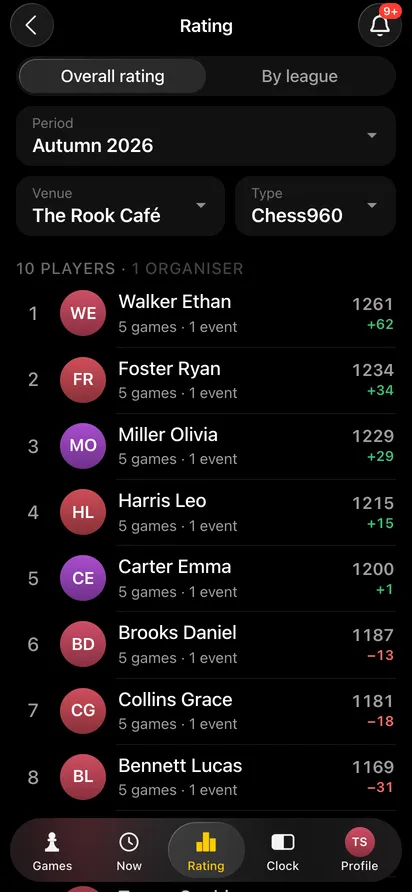
Chess960 has a rating of its own. Games from a Chess960 tournament go into a separate list where everyone starts at 1200. They do not change the usual tournament or game rating and do not count towards leagues: you can play an unusual evening without worrying about your regular number. In a Chess960 tournament the rating shown next to a name is the Chess960 one.
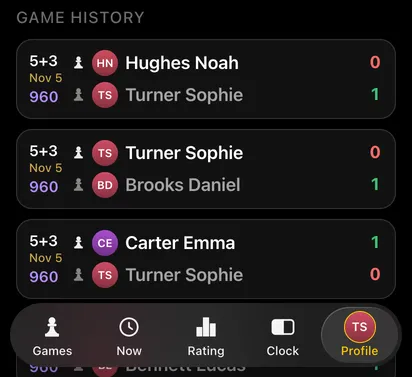
The “Rating” section gets a separate “Chess960” type, with its own places, periods and venues. And in game history every game from such a tournament carries a “960” tag so it is not confused with an ordinary one.
How many rounds. The guideline is the same as for an ordinary Swiss:
| Players | Rounds | Length of the evening at 5+3 | Good for |
|---|---|---|---|
| 8-12 | 5 | about 2 hours | a small evening in a café |
| 13-20 | 5-6 | 2-2.5 hours | a club tournament |
| 21-32 | 6 | about 2.5 hours | a big evening or a weekend event |
| 33-64 | 7 | 3 hours or more | an open tournament |
More on this in how many rounds in a Swiss system.
How an ordinary Swiss works in the app, with every screen, is in the guide how to run a tournament in the app. A Chess960 tournament runs the same way; only the position is different.
It is a Swiss-system tournament where the back-rank pieces are shuffled before every round according to Fischer’s rules. In the Vibe Chess app the position is the same for every board of a round and new each round.
Yes. The app picks one random position per round and every pair in that round plays it. The next round has a different position.
No. The position is random and is chosen when the round is created; after that it does not change. Nobody can prepare for it in advance.
No. The standard setup is position No. 518, and it is excluded from the draw.
In the app, on the “Now” tab, they see the position number and a diagram turned towards them in their colour. The bot also gives the position number in the pairing card.
The king and rook end up on the same squares as in normal castling: kingside - king on g1, rook on f1; queenside - king on c1, rook on d1. The “Chess960 rules” window in the app shows the tricky cases as pictures.
No. Chess960 has a separate rating starting at 1200. Chess960 games do not change the tournament or game rating and do not count towards leagues.
The app is free. All you need is ordinary boards and pieces, one set for every two players.
Yes, before the start. In the event settings Swiss and Chess960 convert into each other; the rounds and line-up stay.
Pairings are computed by bbpPairings, an open-source engine implementing the Dutch system by FIDE rules: score groups, floats on an odd field, colour alternation. Free to use.
The bot is constantly improved based on real tournaments. If you need a feature that isn't there yet, message the developers right inside the bot with the /support command. Many features appeared exactly because organizers asked for them, and useful ideas get added quickly.
Related: Chess960 rules and generator, how to run a tournament in the app, how many rounds in a Swiss system and the Buchholz score.

At the board since childhood: hazy about his rating, precise about every rook he has blundered. Counts an evening as a good one if the opponent stayed to talk afterwards instead of rushing off to check with an engine. Message →